

table of contents
The pattern is familiar. Your monthly charges look healthy, appointments are full, and the billing team is busy. Then cash dips, old balances climb, and the reports you get back feel like a pile of disconnected answers to questions nobody asked.
A practice manager might see one spreadsheet for charges, another for denials, a clearinghouse report for rejections, and a payer portal full of claim statuses. None of that tells the team what to fix first on Monday morning. It only confirms that money is moving too slowly.
That's where revenue cycle management analytics changes the conversation. It turns scattered billing activity into operational signals you can act on. More important, it starts earlier than most practices think. The front desk, patient access, scheduling, eligibility, and authorization workflows often determine whether the claim has a clean path to payment or a long detour into rework.
Moving Beyond Spreadsheets And Financial Uncertainty
The hardest part of revenue cycle trouble is that it rarely announces itself with one obvious failure. A practice can have solid patient volume and still struggle with cash because small errors are piling up in different places. Registration staff may be skipping an eligibility check. A provider may be using a code combination one payer doesn't like. Payment posting may be lagging, which hides the true A/R picture for days.
Spreadsheets can track pieces of that story, but they usually don't connect the cause to the result. They're static. They tell you what already happened, often after the claim has aged, the denial has landed, and the team is already behind.
A lot of administrators compensate by building side systems. They keep handwritten notes, export CSV files, or lean on reconciliation sheets to fill the gaps. If you're still cleaning up payment and deposit mismatches manually, a structured bank reconciliation Excel template can at least create order while the larger analytics process takes shape.
Why Manual Reporting Stops Short
Most spreadsheet workflows break down in three predictable ways:
- They separate front-end and back-end work. Registration issues sit in one report while denials show up somewhere else, so the practice misses the connection.
- They create lag. By the time someone compiles the numbers, the team is reacting to old problems.
- They depend on tribal knowledge. One experienced biller may know why a payer is denying claims, but that knowledge never becomes a repeatable workflow.
Practical rule: If a report shows a problem but doesn't point your team toward the next action, it's reporting, not analytics.
Revenue cycle management analytics closes that gap. It gives leaders a way to see where money is slowing down, why it's happening, and who needs to intervene. The difference is control. Instead of asking why collections feel inconsistent, you can trace the issue to a registration bottleneck, a denial pattern, a payer-specific edit, or a follow-up queue that's stalled.
That shift matters because financial uncertainty usually starts as operational uncertainty. Fix the operational blind spots, and the revenue picture gets much clearer.
What Is Revenue Cycle Management Analytics
Monday starts with a full schedule, but the first problem in the revenue cycle often shows up before the patient is roomed. An insurance ID is entered incorrectly, an authorization is missed, or a coverage change never makes it out of registration. The claim denial comes later. The revenue leakage starts at the front desk.

Revenue cycle management analytics is the practice of pulling operational and financial data from across the revenue cycle, then organizing it so teams can spot risk early, assign work faster, and collect cash with fewer rework touches. In strong programs, that includes scheduling, eligibility, registration, authorizations, coding, claim status, denials, payments, and follow-up. The point is not to produce more reports. The point is to show where revenue is likely to leak before the claim ever reaches the payer.
That distinction matters. Many practices treat analytics as a back-office denial tool. In the field, the bigger win often comes upstream. If registration error rates rise at one site, if one payer's eligibility responses are failing more often, or if prior auth turnaround is slowing for a high-value service line, finance should know before those issues turn into aged A/R.
What Analytics Changes
A standard report shows that claims denied after submission. Analytics traces the denial back to the process that created it and helps the team prevent the next one.
That usually means asking sharper questions:
- Did the issue start in scheduling, eligibility, registration, coding, or claim edits?
- Is one payer, provider, location, or specialty creating a repeat pattern?
- Which encounters have a high risk of denial before the claim is released?
- Where is staff reworking the same issue instead of fixing the source?
In practical terms, analytics works like air traffic control for the revenue cycle. It does not just record delays. It shows where the traffic is backing up, which queue needs intervention first, and whether the bottleneck started on the runway or in the control tower.
If your team needs context for how these handoffs fit together, this overview of revenue cycle management fundamentals gives the operational baseline.
From Data To Decisions
Useful analytics connects front-desk actions to downstream financial results. A patient access manager can see which registrars are missing subscriber data fields. A clinic director can see whether one location has more eligibility failures than the rest. A billing manager can prioritize claims that need same-day correction instead of waiting for denial volume to pile up.
That is where analytics earns its keep. It turns disconnected transactions into work queues, exception lists, and preventive rules. Teams that commit to converting raw claims into strategic insights can reduce avoidable denials, shorten payment cycles, and spend less time correcting errors that should have been stopped at check-in. OMOPHub's article on claims data analytics gives a useful example of how that shift happens.
Good RCM analytics treats the revenue cycle as one operating system. Front desk, clinical documentation, coding, and billing all leave data behind. When that data is connected, the practice can fix root causes earlier, protect margin upstream, and make collections more predictable.
Key Metrics That Reveal Your Financial Health
A practice doesn't need more KPIs. It needs the right ones, organized in a way that shows where revenue is leaking and whether the leak starts before or after the claim is submitted.
Many articles lean hard on denials and collections. Those matter. But too many practices wait until money is already trapped in the back end before they start measuring. That approach misses the source of a lot of avoidable loss.
As noted in PMMC's review of revenue cycle analytics, a growing share of revenue cycle improvement may come from upstream analytics on eligibility, authorization, scheduling, and patient responsibility estimation, as payment integrity problems often begin before claims submission.
The Back-End Metrics Most Teams Already Watch
These are still essential because they tell you how efficiently claims convert into cash:
- Days In A/R: This shows how long money sits outstanding. If you want a cleaner operational discussion around this measure, use a consistent accounts receivable days calculation method across sites and reporting periods.
- Denial Rate: This is often the clearest signal that preventable process breakdowns are happening somewhere upstream.
- Net Collection Rate: This tells you how effectively the practice collects the reimbursement it's entitled to receive.
- First-Pass Acceptance Or First-Pass Resolution: This reflects how often claims get through without rework.
These measures help leaders spot friction after the service is delivered. They show whether the billing engine is efficient, but they don't always explain why avoidable work keeps landing in the queue.
The Front-End Metrics Practices Underuse
Many analytics programs become more useful here.
- Eligibility Verification Rate: If coverage isn't confirmed before the visit, the practice is setting up billing staff to fix preventable errors later.
- Prior Authorization Approval Rate: Specialty and procedure-heavy groups depend on this. Missing or delayed authorization can turn a valid clinical service into a payment problem.
- Patient Responsibility Collection Rate: If copays and known balances aren't addressed early, they often become much harder to recover after the encounter.
- Registration Accuracy: Small demographic mistakes can trigger rejections, duplicate work, and delays that spread through the rest of the cycle.
- Scheduling Integrity: Incorrect visit type, insurance mismatch, or poor referral capture often creates downstream claim edits.
The front desk is not just an intake function. It's the first revenue control point.
A useful analogy comes from manufacturing and operations. Smart operators don't wait for defects to appear at the end of the line. They monitor inputs and process conditions earlier, where corrections are cheaper and easier. The same logic shows up outside healthcare in work on reducing costs with smart controllers, where better control upstream improves outcomes downstream.
What A Balanced KPI Set Looks Like
A practical analytics stack usually answers three different questions:
Are we collecting cash on time?
Look at A/R aging, collections, and payment velocity.Are claims leaving the practice clean?
Look at first-pass acceptance, rejection patterns, and denial reasons.Are we preventing leakage before billing begins?
Look at eligibility, authorization, registration quality, and upfront patient collections.
The mistake is treating these as separate workstreams. They're connected. A drop in patient responsibility collection can trace back to weak estimates. A denial spike can start with registration shortcuts. A/R growth may reflect authorization failures long before the claim reaches follow-up.
When a practice sees those links clearly, meetings get shorter and action gets sharper.
Transforming Raw Data Into Smarter Workflows
Monday morning usually exposes the underlying problem. The billing team sees a rise in denials and starts working claims one by one, but the issue often began days earlier at registration. A wrong subscriber ID, a missed authorization, or an unchecked eligibility response at the front desk can flood the back office with rework by the end of the week.

From Account Cleanup To Process Control
Raw data becomes useful when it changes how work gets assigned, timed, and prevented. In practice, that means shifting from claim-by-claim cleanup to pattern-based control.
A reactive workflow keeps staff busy. It does not protect margin.
One biller reworks a denial. Another calls for missing authorization. A supervisor reviews late charges. Each person solves the account in front of them, but nobody connects the pattern back to patient access, scheduling, or a payer rule that should have been built into the process. Many organizations miss that maturity gap.
An analytics-driven workflow groups similar failures and sends them to the right owner. If denials cluster around one location and one payer, managers can trace the problem to a registration script, an eligibility workflow, or a referral capture step. That is a far better fix than asking billing staff to keep resubmitting the same preventable claims.
Where Integrated Data Changes The Work
This approach depends on connected systems. Data from the EHR, practice management system, clearinghouse, remittance files, and payer portals has to line up well enough to show cause and effect.
When that connection is in place, teams can do more than report yesterday's denials. They can identify claims that share the same risk profile before submission, create work queues for staff who can correct the issue, and push exceptions back upstream to patient access while the encounter is still recent. That is how analytics starts reducing leakage before it reaches A/R.
Clean posting matters too. A reliable process for electronic remittance advice in medical billing helps keep adjustment, payment, and denial data consistent. If remits are posted inconsistently, the dashboard may show a denial trend that is really a posting problem.
For teams refining dashboard design, the DataTeams blog on dashboards offers useful examples of how to present trends and exceptions clearly.
What Good Workflow Design Looks Like
The strongest workflow changes are usually operational, not technical:
- Group work by pattern instead of by claim. Build queues around payer behavior, registration error type, service line, or denial category.
- Send issues back to the source. Eligibility failures, insurance discovery gaps, and authorization misses should return to patient access, not stay parked in billing.
- Add pre-submit controls. Use edits, eligibility checks, and authorization worklists before claims leave the practice.
- Assign owners for repeated variance. If one site has higher registration errors, that site leader should see it and fix it.
- Measure whether the fix held. After a change, watch the same trend for several weeks to confirm the volume drops.
A good workflow works like quality control on a production line. It catches defects near the start, where the correction is cheaper and faster.
That is the practical payoff of revenue cycle analytics. Fewer avoidable denials. Faster clean claim submission. Less staff time spent reworking errors that should never have made it past the front desk.
Anatomy Of An Effective RCM Analytics Dashboard
A strong dashboard should answer questions in layers. The first screen should tell leadership whether the practice is healthy. The next layer should show where performance is drifting. The drill-down view should identify who needs to do what.
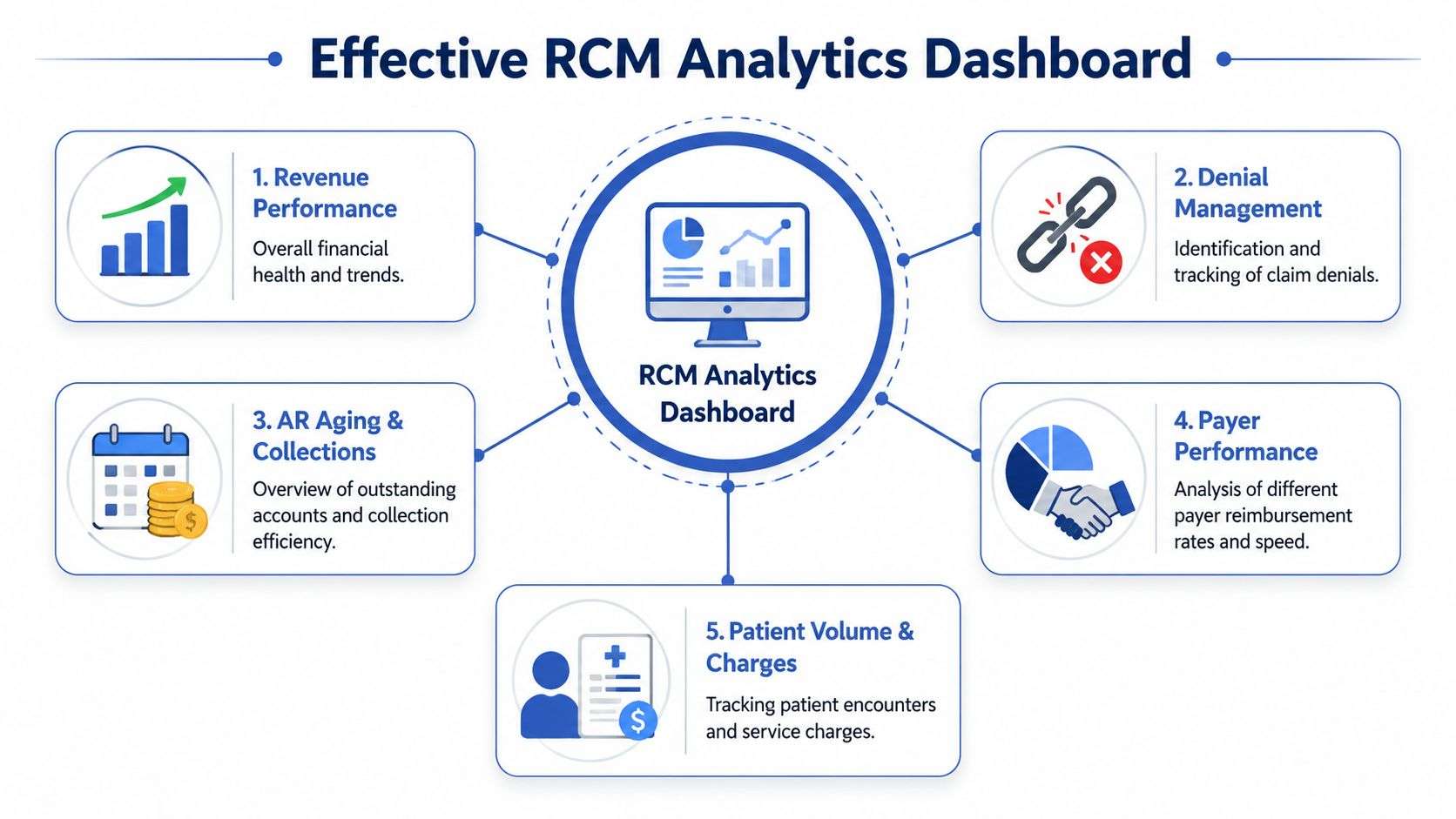
The Top Layer
This is the executive snapshot. It should be simple enough for a physician-owner, administrator, or CFO to read in a few minutes.
Include items such as:
- Overall A/R position
- Collections trend
- Denial trend
- Cash posted
- Front-end exceptions, such as eligibility or authorization misses
This layer answers one question: Are we stable, improving, or slipping?
The Trend Layer
Once a number moves the wrong way, trend visuals help explain whether the shift is temporary or structural. Line graphs and bar charts work well here because they make movement obvious without clutter.
Useful trend views include:
- A/R aging over time
- Denials by month
- Payment lag by payer
- Registration quality by site
- Authorization delays by specialty or procedure family
A good dashboard doesn't overload this page. It gives enough context to spot patterns without burying the user in filters.
The Drill-Down Layer
Reporting now functions operationally.
If the denial rate spikes, a manager should be able to click through and see denials by payer, reason code, provider, location, and service type. If patient collections fall, the dashboard should show whether estimates were inaccurate, staff didn't ask for payment, or patients were scheduled without financial clearance.
Dashboards should let a manager move from "what changed" to "who owns the fix" in one sitting.
Teams that want inspiration from outside healthcare can learn a lot from general business intelligence design. The DataTeams blog on dashboard examples is useful because it shows how strong dashboards reduce noise and sharpen decisions.
An effective RCM dashboard tells a story. It starts with financial health, traces the trend, then exposes the root cause. If users need three exports and a side spreadsheet to understand the signal, the dashboard isn't finished.
Advanced Strategies For Multi-Site And Specialty Practices
Multi-site groups don't just have more claims. They have more variation. One clinic may verify eligibility consistently while another rushes registration. One provider may document a procedure in a way that sails through. Another may trigger the same denial pattern every week. Without analytics, those differences stay anecdotal.
With analytics, leaders can benchmark performance across locations, providers, and service lines. That changes management from instinct to evidence. The question stops being “Why does this site feel harder to collect from?” and becomes “Which process differs here, and can we standardize the better version?”
Benchmarking That Actually Helps
Internal benchmarking works best when it's operational, not political. The goal isn't to rank sites for bragging rights. The goal is to identify repeatable behaviors.
Look for variation in areas such as:
- Patient access performance by location
- Denial patterns by specialty, payer, or provider
- Charge lag and submission lag
- Authorization success for high-value services
- Patient responsibility collection behavior at check-in and check-out
In specialty practices, this becomes even more important. Complex coding, payer-specific policies, and procedure-heavy workflows can make one small front-end mistake expensive. Specialty analytics should help the team track where payer rules are creating friction and whether the issue starts in documentation, authorization, coding, or claim construction.
Measuring The Analytics Program Itself
Advanced organizations don't just measure revenue outcomes. They measure whether the analytics program is being used well enough to justify its cost and effort.
Ask practical questions:
- Are managers reviewing the dashboard regularly?
- Are work queues changing because of what the data shows?
- Are process fixes documented and assigned?
- Is data quality strong enough to trust the conclusions?
This is the maturity gap many organizations miss. They buy tools, but they don't measure adoption, workflow integration, or whether insights are changing behavior.
As summarized in OmniMD's discussion of RCM analytics, high-performing organizations are moving from simple descriptive dashboards to using real-time, AI-assisted analytics with internal and external benchmarking across most of their enterprise. That's a useful model for multi-site and specialty groups because scale makes inconsistency expensive.
A mature analytics function doesn't just report problems. It helps the organization copy what works, retire what doesn't, and prove that the reporting layer is driving operational change.
Partnering For Analytics-Driven RCM Success
Monday starts with a full schedule, but cash still feels unpredictable. The usual problem is not a lack of reports. It is that eligibility, registration, authorization, claim status, and payment data sit in different places, so front-desk errors surface weeks later as denials, rework, and slower collections.
A good RCM partner closes that gap. The right team connects patient access data to back-end performance so leadership can see where revenue leakage starts, not just where it lands. That matters because many avoidable write-offs begin before the claim is ever sent.
What A Good Partner Should Handle
An outside RCM partner should do more than file claims and send aging summaries. The useful ones help a practice standardize data across systems and turn it into daily operating decisions.
That should include:
- Data normalization across systems
- Front-end workflow monitoring, including eligibility and authorization issues
- Denial trending and root-cause analysis
- Payer follow-up prioritization
- Reporting that drives action, not just monthly review meetings
Some groups build this internally. Others decide the better trade-off is to outsource execution while keeping control of targets, oversight, and accountability. If you're weighing that option, this overview of the benefits of outsourcing medical billing lays out the practical considerations.
For practices that want one partner to connect front-desk performance with downstream billing results, some vendors are built for that full-cycle view.
One option is One For All Medical Billing, which supports eligibility verification, claims management, payment posting, denial follow-up, and analytics. That model helps practices spot patterns earlier. If registration accuracy drops on Tuesday, the billing team should not be discovering the financial impact three weeks later.

The end goal is operational control. Cleaner registration. Fewer preventable denials. Faster payment. A revenue cycle that behaves more like a well-run flight schedule, where problems are caught at check-in instead of after takeoff.
If your practice is tired of finding revenue problems only after they become denials, One For All Medical Billing can help build a more proactive process. The team supports billing operations, front-end revenue cycle workflows, denial management, and analytics that show where cash is slowing down and what needs attention first.

