

table of contents
Imagine getting a detailed, digital receipt every time an insurer pays a claim. This receipt doesn't just tell you how much was paid—it automatically updates patient accounts, applies adjustments, and flags any issues for your team to review. That’s an electronic remittance advice (ERA) in a nutshell, and it’s a cornerstone of modern medical billing.

What Is Electronic Remittance Advice And Why It Matters
An electronic remittance advice, or ERA, is the digital version of a paper Explanation of Payment (EOP). It's a standardized data file that insurance payers send to healthcare providers after they’ve processed a batch of claims. The file breaks down exactly how each claim was handled—which services were paid, which were adjusted, and which were denied.
Instead of a stack of papers that someone has to manually sort through and enter into your system, an ERA is designed to be read directly by your practice management (PM) software. This automated communication is what creates an efficient and accurate revenue cycle. Without it, your staff would spend hours keying in payment data, a slow process that’s incredibly prone to costly human errors.
The Digital Shift Away From Paper
The entire financial world, including the government, is moving away from paper. The IRS, for instance, is making a major push to phase out paper checks for tax refunds, aiming for an almost entirely electronic system. This trend shows a wider recognition that digital transactions are simply faster, more secure, and far more efficient.
In healthcare, the same logic applies to claim payments. The paper EOP is quickly becoming a relic. The future of medical billing depends on the ability to receive, interpret, and act on financial data electronically. An electronic remittance advice is at the very center of this shift.
The move to digital isn’t just about convenience; it’s a strategic business decision. Practices that stick with manual, paper-based workflows will struggle to keep up with the speed and complexity of modern healthcare reimbursement, leading to slower cash flow and higher administrative costs.
How Electronic Remittance Advice Works
When a payer finalizes a set of claims, it generates an ERA file and sends it to your practice, usually through a secure portal or a medical billing clearinghouse. Your PM system then imports this file and automatically takes care of several critical jobs:
- Posts Payments: The software applies the correct payment amount to the right patient account and claim.
- Applies Adjustments: It records any contractual adjustments, write-offs, or other reductions based on your payer contracts.
- Assigns Patient Responsibility: The system automatically moves any remaining balance (like deductibles, copays, or coinsurance) to the patient’s account for billing.
- Flags Denials: Any denied claims are instantly identified and often sent to a specific work queue for your billing team to follow up on immediately.
This automated process turns what used to be days of tedious work into a task that takes just a few minutes. Once you understand how this information flows from payers to your system, it’s clear that ERAs aren’t just digital documents—they’re the engine driving a healthier financial workflow.
How To Decode The ANSI 835 Payment File
At the heart of every electronic remittance advice is a standardized data file called the ANSI X12 835. While the name sounds technical, it’s really just the universal language payers and providers use to talk about payments. Think of it as the HIPAA-mandated Rosetta Stone for medical billing—it ensures a payment file from one payer can be understood by your practice's software just as easily as one from another.
This standardization is a complete game-changer. Imagine trying to build furniture from different brands, where every screw, bolt, and instruction manual was unique. It would be total chaos. The 835 file prevents that mess by creating one consistent format for all electronic payment data, which is what allows for seamless, automated payment posting.
This shift to digital payments is happening everywhere. In the broader financial world, the global remittance market is projected to hit a staggering $270.81 billion by 2032, driven largely by the efficiency of digital channels. For your practice, this trend means faster processing, fewer manual errors, and a healthier cash flow.
The Key Components Of An 835 File
You’ll never need to read a raw 835 file—your practice management (PM) software is built to do the heavy lifting. It translates all that code into a readable report that pulls out the essential information for each claim. While the file itself is incredibly dense, your software uses it to answer a few basic questions:
- Who is getting paid? The file confirms the provider or practice name.
- Which patient is this for? It links the payment to a specific patient and their account.
- What claim is this for? It identifies the exact claim number and dates of service.
- How much was paid? It shows the total payment from the insurance company.
- Were there any adjustments? It details every single reduction, denial, write-off, or amount transferred to patient responsibility.
It’s just like a detailed receipt from the grocery store. It lists every item you bought (service codes), the original price (billed amount), any coupons or sales applied (adjustments), and the final total you paid (payer payment).
Understanding The Language Of Payers: CARCs and RARCs
Perhaps the most powerful part of an ERA is its ability to explain why a claim wasn't paid exactly as you billed it. This is done using a standardized set of codes that tell a story.
Claim Adjustment Reason Codes (CARCs) and Remittance Advice Remark Codes (RARCs) work together to give your team a complete picture of each payment decision. Learning to read these codes is the first step in turning your denial management from a reactive headache into a proactive strategy.
A CARC gives you the financial reason for the adjustment. For example, CARC 23: "The impact of prior payer(s) adjudication including payments and/or adjustments" tells you that a primary insurer already paid something on this claim.
A RARC then adds more specific, non-financial context. For instance, RARC M25: "The patient is covered by a primary insurance that must be billed first" might show up alongside CARC 23. Together, they give your billing team a crystal-clear action item: find and bill the secondary insurance.
Here are a few other common pairs you’ll see:
- CARC 16: "Claim/service lacks information or has submission/billing error(s)." This is a very generic code that always needs a RARC to be useful.
- RARC M51: "Missing/incomplete/invalid/inappropriate place of service." Paired with CARC 16, this RARC tells you precisely what to fix on the claim and resubmit.
- CARC 97: "The benefit for this service is included in the payment/allowance for another service/procedure that has already been adjudicated." This code is a clear signal that the payer has bundled the services.
- RARC N386: "This decision was based on a Local Coverage Determination (LCD)." This points you directly to the specific payer policy that triggered the denial or adjustment, so you know exactly where to look it up.
While these codes are essential for your billing team, it's important not to confuse an ERA with the document your patients receive. To learn more about the patient-facing version, check out our complete guide on how to read an Explanation of Benefits.
The Core Benefits Of Integrating ERAs Into Your Workflow
Switching to electronic remittance advice is more than just a nod to going paperless. It’s a strategic move that delivers real, measurable advantages to your practice. It’s the difference between a billing office drowning in paperwork and one where key financial tasks are handled automatically, accurately, and almost instantly.
Think about the old way of doing things. Stacks of paper Explanation of Payments (EOPs) land on someone's desk. That person then has to manually hunt for each patient account, type in the payment, post the contractual adjustment, and then shuffle the paper into a filing cabinet. It's not just slow—it's a minefield for data entry errors that can throw your accounts completely out of balance.
An electronic remittance advice does away with all of that. Instead of manual keying, your practice management system simply "reads" the ERA file and does all that work in minutes, not hours. This automation unlocks several powerful benefits that will transform your revenue cycle.
Radically Accelerated Payment Posting
With ERAs, payments get posted almost as soon as the file arrives from the payer. This massive speed boost has a direct impact on your accounts receivable (A/R) days. The faster you post payments, the sooner you can bill patients for their responsibility and, just as important, the quicker you can start working on denied claims.
It’s like the difference between a self-checkout lane at the grocery store and a single cashier with a line wrapped around the aisle. ERAs let your system process hundreds of payments at once, while manual posting forces you to handle them one by one. That efficiency means cash is applied to your books faster, giving you a much more accurate, up-to-the-minute view of your practice's financial health.
By automating payment posting, you fundamentally change the role of your billing staff. They are no longer data entry clerks but financial investigators, free to focus on high-value activities that directly boost your bottom line.
Dramatically Improved Accuracy and Reduced Errors
Every time a human hand touches a keyboard to enter data, there’s a chance for a mistake. Transposing numbers, misreading an adjustment code, or applying a payment to the wrong patient are common slip-ups that cause huge headaches down the road. Finding and fixing these errors is costly administrative detective work.
An electronic remittance advice takes human error out of the data entry equation, resulting in near-perfect accuracy. The digital 835 file guarantees that the exact data the payer sent is what gets recorded in your system. Integrating ERAs is a cornerstone of operational efficiency and is crucial for modernizing financial data exchange through effective healthcare interoperability solutions. This precision prevents those frustrating reconciliation nightmares and ensures you can trust your financial reports.
The broader financial world has embraced this shift for a reason. The digital remittances market, valued at $33.4 billion in 2026, is on track to hit $103.3 billion by 2034. In healthcare, this translates to tangible results: ERA integration can slash manual errors by up to 65%, a figure that gets even better when paired with the kind of AI-driven fraud detection now used by 98% of financial institutions. You can read the full digital remittance forecasts on marketresearch.com.
Immediate Denial and Underpayment Identification
This might just be the most powerful benefit of an electronic remittance advice: its ability to instantly red-flag problems. As soon as an ERA is processed, your system can automatically perform several critical tasks:
- Isolate Denied Claims: Any claim that comes back denied is immediately kicked over to a denials work queue for your team to address.
- Flag Underpayments: The system can compare the allowed amount on the ERA to your contracted fee schedule and instantly flag any payment that doesn’t match up.
- Trigger Secondary Billing: For claims with a remaining balance, the system can automatically create and send the bill to the secondary payer.
This immediate identification means your team can act on problems the same day they're reported, not weeks later when someone finally gets around to opening the paper EOP. This proactive workflow is absolutely essential for driving down A/R days and collecting every dollar you've earned. Exploring the benefits of outsourcing medical billing can amplify these advantages even further by combining ERA technology with expert oversight.
Your Step-By-Step Guide To ERA Implementation
Ready to make the switch to electronic remittance advice? The idea can feel a little daunting, but breaking the project down into clear, manageable phases makes it far more approachable. This guide is your roadmap to a smooth and successful transition, starting with the crucial first step of getting payers on board.
Think of it as a three-part process: first you enroll with payers, then you set up your system, and finally you test everything before going live. By tackling each step methodically, you can roll out ERAs with confidence and keep your revenue cycle running without a hitch.
Phase 1: Payer Enrollment and Setup
Before you can receive a single ERA, you have to enroll with each insurance company. This is the formal step where you tell payers you want to stop receiving paper EOPs and start getting electronic 835 files instead. Every payer has its own forms, processes, and timelines, which is why getting organized from the start is non-negotiable.
To keep from feeling overwhelmed, start by making a master checklist for your top five to ten payers by claim volume. For each one, you’ll want to track these details:
- Enrollment Form: Find and download the right ERA enrollment form from the payer’s provider portal.
- Submission Method: Take note of how the form needs to be submitted—online, via fax, or through your clearinghouse.
- Required Information: Make a list of all the data you'll need, like your practice NPI, Tax ID, and banking details if you’re also signing up for Electronic Funds Transfer (EFT).
- Status and Follow-Up Date: Log the date you submitted each form and set a calendar reminder to check on its status.
Don't assume enrollment is a one-and-done task. Payer requirements change, and keeping a detailed log of your enrollment activity will save you a ton of time and frustration when you need to update information or add new providers down the road.
Phase 2: System Configuration
With your enrollments underway, the next move is getting your practice management (PM) system ready to receive and read the ERA files. Your software needs to know where to find the incoming 835s and how to match them to the correct claims and providers. For smaller practices, choosing the right platform is a critical first step; you can learn more about the best medical billing software for small practices in our detailed guide.
This part of the process often means working with your PM software vendor or your medical billing clearinghouse. They’ll help you set up the secure connection required for the files to transfer automatically. You might also run into different data formats during this stage. As you get deeper into implementation, knowing about methods like PDF to JSON conversion for automation can be helpful for pulling ERA data from various sources into modern systems.
Phase 3: Testing And Go-Live
You should never flip the switch on full automation without a proper test run. Once your first ERA enrollment is approved, the payer will send a test file. Your goal here is simple: process that test file and confirm that your PM system posts the payments, adjustments, and denials exactly as it should.
Work closely with your software vendor to run the test. Double-check that payment amounts are accurate, contractual adjustments match your fee schedules, and any denials get routed to the right work queue. Once you've successfully processed test files from your main payers and feel confident in the results, you're officially ready to go live. This is the moment you can finally turn off paper EOPs and fully embrace the efficiency of electronic remittance advice.
Mastering Payment Posting And Reconciliation With ERAs
Once your practice starts receiving electronic remittance advice, your day-to-day revenue cycle will fundamentally change for the better. This is where an ERA stops being just a data file and becomes a powerful tool, turning hours of manual labor into an automated, precise workflow. The two areas that benefit most are payment posting and financial reconciliation.
These new workflows will transform your billing office from a reactive data-entry center into a proactive revenue-driving engine. Instead of spending hours keying in payments from paper EOBs, your team can focus on resolving issues and making sure every dollar is accounted for. This shift is essential for maintaining total financial control.
The infographic below shows the simple, three-phase process for getting electronic remittance advice set up in your practice.
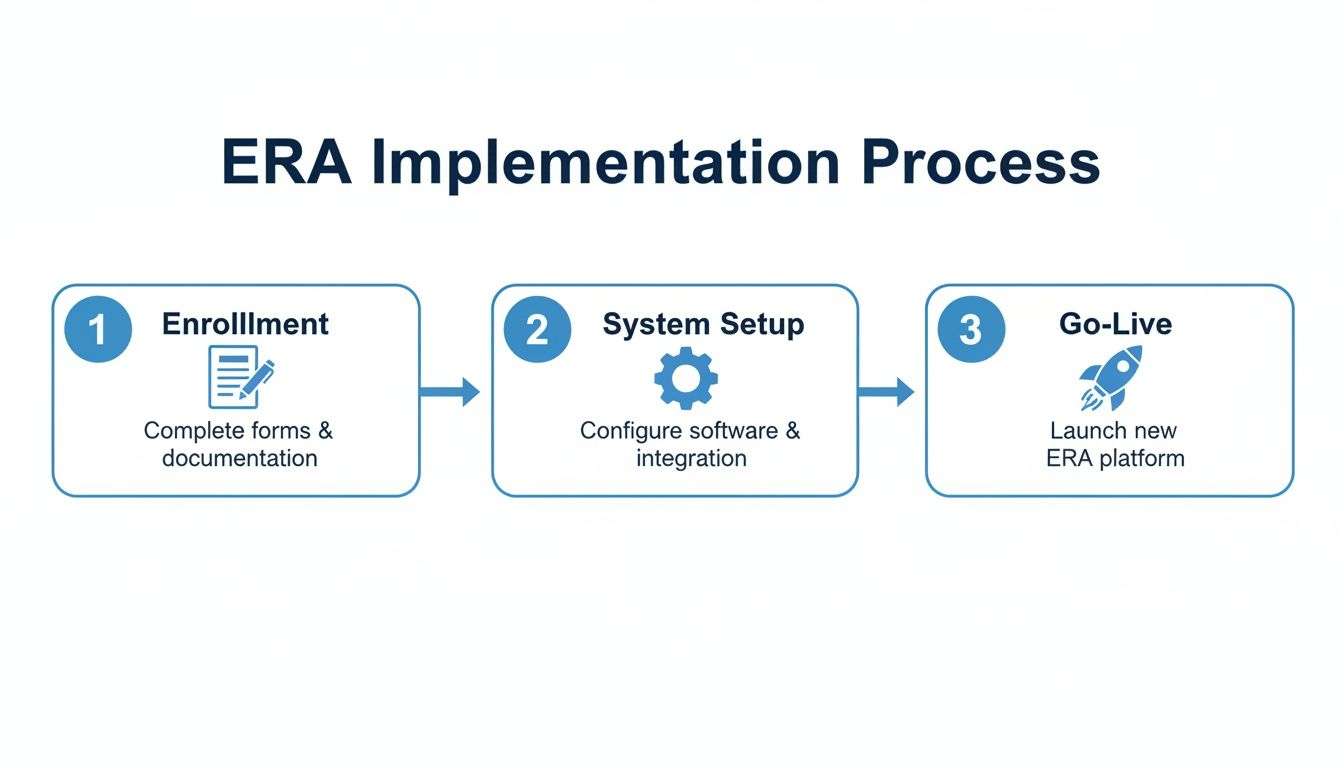
This visual breaks down ERA implementation into three manageable stages: payer enrollment, system setup, and the final go-live, showing a clear path from planning to full automation.
The Automated Payment Posting Workflow
Automated payment posting is easily the most celebrated benefit of using an electronic remittance advice. When your practice management (PM) system gets an 835 file, it automatically kicks off a series of actions that once took hours of manual work.
Imagine a single 835 file contains payment details for 100 different claims. Your system will:
- Read the file and match each payment to the correct patient and claim.
- Post the exact payment amount from the payer to the corresponding claim line.
- Apply all contractual adjustments, reducing the claim balance to the expected allowed amount.
- Automatically shift any leftover balance—like copays, deductibles, or coinsurance—to the patient's responsibility.
This entire process happens in minutes. The accuracy is nearly perfect because the system is just copying the data sent directly by the payer. This wipes out the costly human errors, like typos or transposed numbers, that so often plague manual payment posting.
Mastering The Reconciliation Process
While auto-posting is a huge win, the real power of an electronic remittance advice shines during reconciliation. This is the all-important process of balancing the payments posted in your PM system against the actual funds deposited into your practice’s bank account. Without daily reconciliation, small discrepancies can quickly snowball into major financial losses.
Reconciliation is your practice's financial health check. It confirms that the money you were told you received (on the ERA) matches the money you actually have (in the bank). Neglecting this step is like running a store without ever counting the cash in the register.
Your PM system uses the data from the ERA to generate a report of all electronic payments posted for a given day. Your job is to compare this report to your bank statement, which shows the lump-sum electronic funds transfer (EFT) you got from the payer. If the totals match, you’re balanced.
If they don’t, the ERA gives you a clear starting point for your investigation. You can quickly track down discrepancies caused by partial payments, surprise denials, or payer takebacks. This allows for quick resolution and is a core part of an effective medical billing AR follow up strategy.
Handling Common Scenarios With ERAs
A well-configured system uses ERA data to do more than just manage standard payments. It also automates how you respond to several common billing scenarios, keeping your revenue cycle moving without a hitch.
Here are a few examples:
- Triggering Secondary Billing: When an ERA from a primary insurer shows a remaining balance, the system can be set up to automatically create and send a claim to the secondary insurance on file—no manual work needed.
- Routing Denials to Work Queues: Any claim with a denial code is instantly flagged. Instead of getting lost in a pile of paperwork, it’s automatically sent to a specific denials management work queue for your billing team’s immediate attention.
- Identifying Underpayments: By comparing the allowed amount on the ERA to your contracted fee schedule, the system can automatically flag any payments that are lower than expected. This creates a task for your team to appeal the underpayment.
This level of automation ensures no claim ever falls through the cracks. It gives your staff the power to act on exceptions right away, dramatically cutting down the time it takes to fix issues and secure payment.
How We Turn Your ERAs Into A Powerful Revenue Engine
This is where the rubber meets the road. At One For All Medical Billing, we don't just process electronic remittance advice (ERAs)—we use the data inside them to find opportunities, hold payers accountable, and make a real impact on your bottom line. An ERA is more than just a digital receipt; it’s a goldmine of financial information waiting to be analyzed.
Our U.S.-based team of certified billing specialists goes far beyond basic payment posting. We dig into your 835 files to uncover the root causes of payment delays and denials. It’s this deep-dive approach that helps our partners consistently achieve a 90% clean claim rate, keeping revenue flowing smoothly into your practice.
A Proactive Stance on Revenue Cycle Management
Just getting an ERA isn't the finish line. The real value comes from how that information is used. We’ve built our entire strategy around proactive management, turning every ERA into a chance to improve your financial performance.
We concentrate on three key activities:
- In-Depth Denial Analysis: We look for the "why" behind every denial. Instead of just fixing one-off rejections, our team analyzes denial codes across all payers to spot trends. If a specific CPT code is constantly being denied by a single insurer, we get to the bottom of it and fix the issue at its source.
- Systematic Underpayment Recovery: Our system compares every single payment against your contracted rates. When a payer underpays—even by just a few dollars—it gets flagged immediately. We then actively pursue that missing revenue, making sure you collect every cent you're contractually owed.
- Payer Accountability: Armed with clear data from your ERAs, we have the evidence needed to challenge improper denials and unfair bundling decisions. This data-driven approach strengthens our appeals and creates a documented history of payment discrepancies, making it harder for payers to ignore.
This proactive approach is essential. The shift to electronic remittance is a huge factor in the booming digital remittance market, which is valued at $33.41 billion globally and projected to grow at a 15% CAGR in the U.S. through 2033. For our partners in urgent care and OB/GYN, this means faster, more accurate reconciliation and far less A/R stress. You can read more about the growing electronic remittance market on mexc.com.
Your Full-Service ERA Partner
When you partner with us, you hand over the entire ERA process from start to finish. This frees you and your team to focus on what matters most—caring for your patients.
We manage the complex payer enrollments, handle the meticulous daily payment reconciliation, and give you transparent, easy-to-read reports on your practice's financial health. You’ll always know exactly where you stand.
Our process is designed to give you peace of mind. By entrusting your revenue cycle to our specialists, you can be confident that every claim is being optimized by a team that treats your practice’s financial success as its own. We turn the dense data inside each electronic remittance advice into your most powerful financial tool.
Frequently Asked Questions About Electronic Remittance Advice
As you get ready to switch over to electronic remittance advice, it’s completely normal to have a few questions. We hear a lot of the same queries from practices making the change, so we’ve gathered the most common ones here to give you clear, straightforward answers.
Can I Receive ERAs Without Using Electronic Funds Transfer?
Yes, you absolutely can. The electronic remittance advice (ERA or 835 file) and the Electronic Funds Transfer (EFT) are two totally separate processes. In fact, payers often require you to fill out different enrollment forms for each one.
That said, we strongly recommend pairing them. When you use both, you create a seamless, automated workflow where the payment data from the ERA lines up perfectly with the funds deposited via EFT. This makes your daily reconciliation process much faster and virtually error-free.
What Are The Most Common ERA Processing Errors?
Most of the time, ERA errors boil down to simple data mismatches between what’s in your practice management system and what the payer has on file. Think of it like a single typo in a shipping address that prevents a package from arriving.
Some of the most common culprits include:
- Incorrect Patient ID Numbers: A simple data entry mistake in the patient’s account is often all it takes to prevent an ERA from posting correctly.
- Mismatched Provider NPIs: If the National Provider Identifier (NPI) on the claim doesn’t match what the payer is expecting for ERA delivery, the file will get rejected.
- Discrepancies in Billed Amounts: The amount you bill on the claim must be an exact match for what the payer has in their system.
The best way to sidestep these issues is with proactive data management. Regularly auditing your patient demographics and provider enrollment details can stop most ERA processing errors before they even start.
How Long Does ERA Enrollment Typically Take?
The timeline for ERA enrollment can vary quite a bit from one payer to the next. Some of the big national insurance companies can turn around an approval in just a few business days.
On the other hand, smaller or regional payers might take several weeks to process all the paperwork. It’s a good idea to plan for an average of 30-45 days from submission to final approval. To make the process feel less overwhelming, start by enrolling with your top five highest-volume payers first. This ensures you’ll see the biggest impact on your workflow right away.
Managing the entire electronic remittance advice lifecycle—from payer enrollment to daily reconciliation—is what we do best. At One For All Medical Billing, our U.S.-based experts turn your ERA data into a powerful tool for financial growth, helping you achieve higher clean claim rates and lower A/R days. Discover how our team can optimize your revenue cycle by visiting us at https://oneforallmed.com.

