

table of contents
Picking the right medical billing software for your small practice isn't just about automating a few tasks—it's about installing a financial command center. The right platform can mean the difference between a healthy revenue stream and constant administrative headaches.
Why Finding The Right Medical Billing Software Is Crucial

For a small medical practice, billing isn't just back-office paperwork; it's the engine that keeps the lights on. Every rejected claim, coding mistake, or late payment directly impacts your ability to focus on what matters most—your patients.
When you're bogged down with manual processes, it’s easy to create a bottleneck. Before you know it, your accounts receivable is climbing, and revenue starts to leak.
Think of your billing process as the central nervous system for your practice's financial well-being. If it's slow, error-prone, or disorganized, the whole operation feels the strain. That’s why choosing software isn't just an IT decision. It's a strategic move that will shape your practice's stability for years to come.
The Financial Impact Of Inefficient Billing
It’s easy to underestimate the damage a clunky billing system can do. We're not just talking about a handful of denied claims here and there. Over time, those little inefficiencies snowball into systemic problems that are a nightmare to fix.
This is where dedicated software steps in and becomes a game-changer. The right platform helps your practice:
- Slash claim denials by catching coding and formatting mistakes before they get sent to payers.
- Speed up payment cycles with electronic claim submissions and real-time tracking.
- Free up your team to focus on patients instead of mind-numbing data entry.
- Get a clear financial picture with easy-to-read reports on the metrics that actually matter.
By organizing and automating your billing workflow, you shift from constantly putting out fires to proactively managing your revenue. That change in mindset is everything for a small practice looking to grow.
A Growing Market Driven By Need
This push for efficiency is fueling a major industry shift. The medical billing software market, valued at USD 17.92 billion in 2024, is expected to hit USD 32.18 billion by 2030.
Small practices are a huge part of that growth. They're looking for an escape from industry-wide denial rates that hover around a painful 15-20%, often caused by simple, preventable mistakes.
Getting a handle on this complex process is fundamental to a healthy bottom line. You can learn more about building a stronger financial strategy in our guide on how to improve revenue cycle management.
The Essential Features Your Small Practice Software Needs
When you're shopping for medical billing software, it’s easy to get distracted by a sleek interface or a long list of bells and whistles. But the real value isn’t in the flashy stuff—it’s in the core features that solve the biggest financial headaches your practice faces every single day.
These aren't just "nice-to-haves." They are the non-negotiable tools that turn billing from a reactive, time-consuming chore into a proactive part of your revenue strategy. Think of them as direct solutions to problems like claim denials, slow payments, and administrative burnout.
Seamless EHR And PM Integration
Your Electronic Health Record (EHR) and Practice Management (PM) systems are the heart and soul of your practice. The best billing software doesn't stand alone in a silo; it plugs directly into these systems, acting like the central nervous system for all your patient and financial data.
When these systems can't talk to each other, your team gets stuck in a frustrating loop of double data entry. This isn't just a waste of time—it's an open invitation for human error. A single typo in a patient's ID number or a wrong date of service can trigger an immediate claim denial.
True integration means clinical notes and patient demographics flow effortlessly into the billing workflow, creating one single source of truth. It’s the fastest way to minimize errors and speed up the entire claim creation process.
Robust Claims Management And Scrubbing
Let's be blunt: the most important job of any billing software is to get you paid correctly the first time. This is where a powerful claims management toolkit becomes absolutely essential.
Think of a built-in claim scrubber as a meticulous proofreader for your finances. Before any claim leaves your office, the software automatically scans it for common, costly mistakes, such as:
- Incorrect patient demographic information
- Invalid or out-of-date insurance policy numbers
- Mismatched diagnosis and procedure codes (ICD-10 and CPT)
- Missing modifiers or place of service codes
Catching these issues upfront is the secret to a high first-pass acceptance rate (FPAR)—the percentage of claims that get approved without needing a single correction. A high FPAR means cash comes in the door faster, and your staff spends less time on the phone chasing down denials.
Your goal should be to submit "clean claims" every single time. The right software makes this possible by flagging potential problems before they cost you time and money, effectively acting as your first line of defense against revenue loss.
Comprehensive Reporting And Analytics
You can't fix what you can't see. The best medical billing platforms give you clear, easy-to-read reports that act like a real-time EKG for your practice's financial health.
Forget about generic data dumps. What you need are actionable insights that help you make smarter business decisions. Your software should be able to instantly pull up reports on key performance indicators (KPIs) like:
- Accounts Receivable (A/R) Aging: Who owes you money, and how long have they owed it?
- Denial Rate Analysis: What are the top reasons your claims are being denied, and which payers are the biggest offenders?
- Payer Mix and Reimbursement Rates: Which of your insurance contracts are actually profitable?
- Collection Rates: How good are you at collecting what you're owed from both patients and insurance companies?
This kind of visibility lets you spot problems early before they spiral out of control. Armed with the right data, you can fine-tune your entire billing operation. You can learn more about the power of these tools by reading our article on the benefits of automating your medical billing workflow.
Ironclad Security And HIPAA Compliance
In healthcare, data security isn't just a feature—it's a legal and ethical requirement. Any software you’re considering must be fully HIPAA compliant, with baked-in protections like data encryption, role-based access controls, and secure data centers.
For a small practice, a data breach can be catastrophic, leading to huge fines, irreparable damage to your reputation, and a complete loss of patient trust. Make sure any software provider can clearly explain their security protocols and prove their commitment to protecting sensitive patient data.
This marriage of security and efficiency is fueling huge growth in the market. The global medical billing sector is on track to hit USD 41.32 billion by 2032. In the U.S. alone, the market is projected to jump from USD 4.69 billion in 2023 to USD 12.47 billion. It's no wonder why—practices using modern software with AI-powered analytics are seeing claim denials drop by as much as 40%.
To help you keep track, we've put together a quick checklist of the must-have features.
Core Software Feature Checklist For Small Practices
This list breaks down the essential features and connects them to the real-world problems they solve for your practice. Use it as a guide when comparing different software options.
- EHR/PM Integration: This eliminates manual data entry, which reduces errors and saves your staff countless hours. Look for bidirectional sync, automated charge capture from clinical notes, and unified patient demographics.
- Claim Scrubbing: This catches costly errors before you submit claims, dramatically increasing your first-pass payments. Look for real-time code validation (CPT, ICD-10, modifiers), payer-specific rule checks, and missing information alerts.
- Denial Management: This turns a reactive, chaotic process into a streamlined workflow for recovering lost revenue. Look for denial reason dashboards, automated worklists for follow-up, and easy tools for appeals and corrected claims.
- Reporting & Analytics: This provides a clear view of your financial health, helping you spot trends and make better decisions. Look for customizable dashboards, A/R aging reports, denial trend analysis, and payer performance reports.
- HIPAA Compliance & Security: This protects your patients and your practice from devastating data breaches, fines, and legal trouble. Look for end-to-end data encryption, role-based user access, audit logs, and secure cloud hosting.
- Specialty-Specific Tools: This ensures the software understands the unique coding and billing rules of your medical field. Look for pre-built templates for your specialty, common procedure code bundles, and specialty-specific billing rule alerts.
When you focus on these core functions, you move beyond just buying software and start investing in a system that actively protects and grows your practice's revenue.
Decoding Software Pricing: What To Expect
Trying to figure out medical billing software pricing can feel like a puzzle. Vendors package their costs in all sorts of ways, and if you don't know what you're looking at, it's easy to misjudge the true cost to your small practice. The goal is simple: find a plan that fits your revenue, patient volume, and future goals, ensuring your choice is a sustainable one.
Let's break down the common pricing models you'll run into. Most software falls into one of three buckets, each with its own pros and cons depending on your clinic's needs.
Subscription-Based Models
This is the most common structure you'll see. With a subscription model, you pay a flat, recurring fee, usually on a monthly basis. This fee is often calculated per provider, per month, which makes it a predictable expense you can easily build into your budget.
For a new solo practitioner or a small, stable practice, this model is a breath of fresh air. You know exactly what your software will cost every month—no surprises. That consistency is gold for financial planning.
Percentage-Based Fees
Another popular approach is the percentage-based model, where the vendor takes a small slice of your practice's monthly collections. This fee typically lands somewhere between 4% to 8% of the revenue brought in through their system.
This model is interesting because it ties the software's cost directly to your financial performance. If you have a slow month, your software bill is smaller. As your practice grows and collections increase, so does the fee. It’s a compelling option for practices with fluctuating income or for those who want a partner that’s genuinely invested in their ability to get paid.
With percentage-based fees, you’re in a shared-success partnership. The software company only makes more money when you do, which gives them a powerful incentive to provide tools that boost your reimbursement rates.
One-Time Licensing Costs
While less common in today's cloud-first world, some vendors still offer a one-time licensing fee. Here, you buy the software outright and own the license forever. The large upfront cost can be a tough pill to swallow for a small practice, but it does mean you won't have another recurring monthly payment.
But don't stop at the initial price tag. This model almost always comes with separate—and mandatory—annual fees for support, maintenance, and critical updates. If you skip those, your software will quickly become obsolete and fall out of compliance. This route puts more of the long-term management burden squarely on your shoulders. If you want to see how these costs stack up, you can explore detailed guides on medical billing services pricing.
Calculating The True Total Cost
No matter the model, the sticker price is almost never the final number. The total cost of ownership (TCO) is what really matters, and it includes several other expenses you need to factor in to get an accurate budget.
Make sure you ask every potential vendor about these potential add-ons:
- Implementation and Setup Fees: Is there a one-time charge to get the system installed and configured for your practice?
- Training Costs: Is initial team training included, or will you pay extra per session or per person?
- Ongoing Support Packages: Is customer support part of the deal, or do you need a premium plan to get help when you need it?
- Clearinghouse Fees: Are electronic claim submission costs bundled in, or is that a separate bill?
Asking these direct questions helps you uncover any hidden fees and build a realistic financial picture. That way, your chosen software will be a powerful tool, not a financial drain.
Choosing Your Path: In-House Software vs. Outsourcing
You’ve explored the features, you’ve crunched the numbers on pricing, and now you’ve arrived at the big question: Do you manage billing yourself with in-house software, or do you hand the reins to a team of dedicated experts?
This isn't just about picking a tool; it's a fundamental decision about how you'll invest your practice's most precious resources—your time, your money, and your focus.
Think of it like this: you could buy professional-grade kitchen equipment and teach yourself to be a five-star chef, or you could hire one to run the kitchen for you. The first path gives you total control, but it also demands constant learning and makes you responsible for every single outcome. The second frees you from the kitchen's complexities, guaranteeing a top-tier result while you focus on taking care of your guests. That's the heart of the in-house versus outsourcing debate.
The In-House Approach: Direct Control And Its Demands
Managing billing with your own software puts you squarely in the driver's seat. You have direct line-of-sight into every claim, payment, and follow-up. For practice owners who want a firm grip on every operational detail, this hands-on control can feel empowering. It allows for immediate tweaks and a deep, personal familiarity with your financial data.
But that control comes with a heavy price tag—and I don't just mean the software subscription. The "total cost" of going it alone extends far beyond the initial purchase. You're also signing up for:
- Endless Staff Training: Your team must become experts not just in using the software, but in the constantly shifting world of medical coding and payer rules.
- IT Headaches and Maintenance: Who’s going to handle software updates, troubleshoot glitches, and manage data security? This usually falls on an already overworked office manager or means hiring an IT consultant.
- The Compliance Treadmill: Payer regulations, coding guidelines, and government mandates change all the time. If you fall behind, you can expect a flood of claim denials and serious compliance risks.
This path requires a massive, ongoing investment of both time and specialized knowledge. For most small practices, these administrative burdens become a major distraction from the real mission: delivering excellent patient care.
The Outsourcing Alternative: A Strategic Partnership
Outsourcing your medical billing isn't just about offloading a task list; it's about gaining a strategic partner. When you team up with a specialized billing service, you’re hiring an entire department of certified coders, billing specialists, and denial management pros for a fraction of what it would cost to build that team yourself.
This approach instantly lifts the administrative weight off your staff. Instead of wrestling with software and chasing down unpaid claims, your team can focus entirely on scheduling, patient communication, and creating a positive experience from the moment someone walks through your door.
Choosing to outsource is a decision to protect your core mission. It lets your practice focus exclusively on patient care while entrusting the complexities of your revenue cycle to specialists who live and breathe medical billing every single day.
The benefits are hard to argue with. The global medical billing market is on track to hit USD 37.68 billion by 2033, which shows just how many practices are turning to experts to navigate this complex field. Small practices often lose 10-15% of their revenue to simple billing errors. A top-tier outsourcing partner can practically eliminate that leakage, ensuring 98% claim accuracy and shrinking accounts receivable days by 25%.
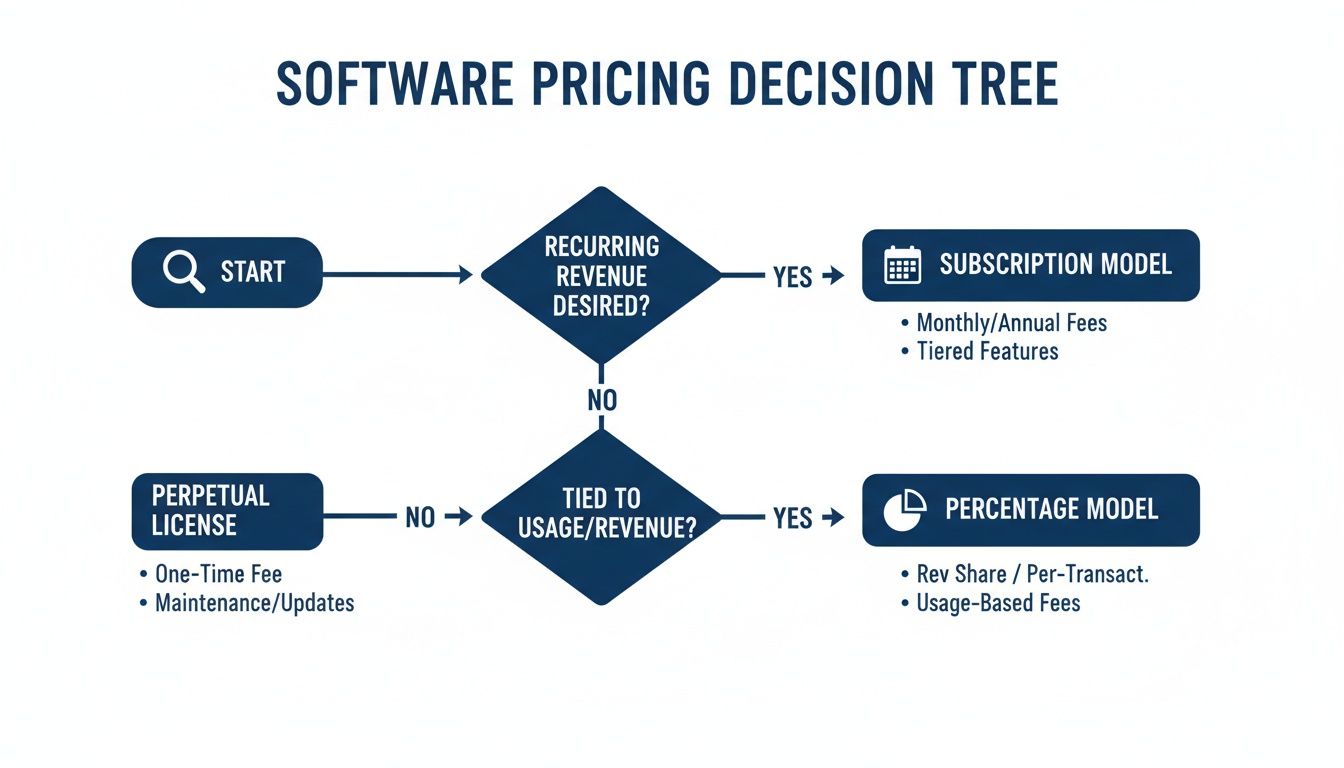
This decision tree helps visualize how practices weigh predictable subscription costs against performance-based percentage models—a choice that outsourcing often simplifies.
Before making a final call, it’s helpful to see a direct comparison of what each path truly entails.
In-House Software vs. Outsourced Billing: A Head-To-Head Comparison
In-House Software
- Primary Responsibility: Your staff handles all coding, submission, and follow-up.
- Upfront Costs: Software licenses, implementation fees, and hardware upgrades.
- Ongoing Costs: Staff salaries, benefits, continuous training, software maintenance.
- Expertise Required: You must hire, train, and retain certified billing specialists.
- Technology Management: Your practice is responsible for all IT, updates, and security.
- Focus & Resources: Diverts staff time and focus away from patient-facing tasks.
Outsourced Billing Partner
- Primary Responsibility: A dedicated team of experts manages the entire billing cycle for you.
- Upfront Costs: Minimal to no upfront costs; typically a percentage of collections.
- Ongoing Costs: A predictable fee based on revenue, aligning their success with yours.
- Expertise Required: You gain immediate access to a full team of certified professionals.
- Technology Management: The partner manages all technology, security, and compliance.
- Focus & Resources: Frees your staff to concentrate entirely on patient care and operations.
This comparison makes the trade-offs clear. While in-house software offers control, outsourcing delivers expertise, efficiency, and peace of mind, allowing you to focus on what you do best.
A Clearer View On The Best Path For Your Practice
So, which path is right for you? It really boils down to your practice's unique resources, goals, and biggest headaches. If you have a dedicated, highly trained billing staff and the IT infrastructure to back them up, the in-house model might give you the control you're looking for.
However, for the vast majority of small practices, the strategic advantages of outsourcing are undeniable. You get access to a level of expertise and efficiency that's nearly impossible to replicate in-house without a huge investment.
To see a deeper breakdown, you can explore our detailed guide on how outsourcing medical billing can save your practice time and money. By partnering with experts, you can transform your billing from a costly, time-sucking chore into a streamlined asset that fuels your practice's stability and growth.
Your Checklist For Making The Final Decision
You’ve done the research on features, pricing, and whether to keep things in-house or outsource. Now it’s time to take all that information and turn it into a confident final choice. This checklist is your last mile—a clear roadmap to help you vet your options and pick the right partner for your practice’s future.
Think of this as your final due diligence. Each step is designed to cut through the sales pitches and get to the reality of how a system or service will perform for you. A methodical approach here prevents major headaches down the road.
Step 1: Schedule The Demos
Reading about software is one thing, but seeing it in action is everything. Line up live demos with your top contenders. This is your chance to watch the platform handle the exact day-to-day tasks your team performs.
Don’t let them run a generic presentation. Ask the sales rep to walk you through a specific, common workflow from your own practice. For example, have them show you exactly how a claim is created, scrubbed for errors, submitted, and then tracked. Pay close attention to how clunky or intuitive the interface feels. Does the process make sense?
Step 2: Ask The Right Questions
A demo is still a sales presentation, so it’s on you to dig deeper with the right questions. Your goal is to get past the marketing fluff and into the practical details that will impact your practice every single day.
Come prepared with a list. Here are a few must-asks:
- Support: What are your customer support hours? If we submit a ticket, what’s the average response time? Is your support team based in the U.S.?
- Training: What does onboarding look like for my staff? Is that included, or is it an extra fee? Do you offer ongoing training as you roll out new features?
- Integration: Can you show me exactly how your software connects with my specific EHR/PM system? Which data fields sync automatically?
- Clearinghouse: Do you have a preferred clearinghouse, or can we use our own? Are those fees baked into your pricing? To get a better handle on this critical piece, check out our guide on what a clearinghouse is in medical billing.
Step 3: Check References From Practices Like Yours
Never, ever skip this step. Ask every vendor for references from at least two or three practices that are similar to yours in size and specialty. A solo family practice has completely different needs than a multi-provider surgical center, so make sure you’re talking to your peers.
When you call these references, ask about their real-world experience. How was the implementation process? How responsive is customer support when something goes wrong? Most importantly, what impact has the software had on their key metrics, like their denial rate or days in A/R?
A truly confident provider will have no problem connecting you with happy clients. Hesitation to provide relevant references is a significant red flag that should not be ignored.
By following this checklist, you can move forward knowing you’ve made a strategic choice. Whether you land on an in-house software solution or decide the expert support of an outsourced partner like One For All Medical Billing is a better fit, this process ensures your decision will strengthen your practice’s financial foundation for years to come.
Your Top Questions, Answered
Choosing new software always brings up a ton of questions. Let’s tackle some of the most common ones we hear from small practice owners when they’re trying to make this big decision.
How Long Does This Whole Implementation Thing Take?
Honestly, it depends. The timeline really hinges on a few things: the size of your practice, how much patient data you need to move over, and how quickly your team can get through training. For most small practices, you're looking at anywhere from a few weeks to a couple of months.
The secret to a smooth transition? Have one person from your practice be the dedicated point person. When they work directly with the software company’s team, it keeps the whole process—setup, configuration, and training—from getting bogged down.
What Kind Of Support Should I Actually Expect?
This is a huge one. Don't even think about signing a contract until you have a crystal-clear answer here. At the bare minimum, you need access to a support team that knows their stuff and can help you with both technical glitches and tricky billing questions. Look for companies that give you options—phone, email, and a support ticket system are a good start.
A lot of software providers have different tiers of support. You need to ask if U.S.-based, comprehensive support is included in the price or if it's a premium add-on. The last thing you want is to be hit with surprise fees when you're in a jam.
Also, nail down their hours and average response times. You don't want to be left hanging with a critical claim issue on a Friday afternoon, unable to get help until Monday morning.
How Does The Software Keep Up With All The Coding And Payer Rule Changes?
The best medical billing software handles this for you, automatically. The world of billing never sits still—new CPT codes and ICD-10 updates drop every year, and insurance companies are constantly tweaking their submission rules.
A solid platform will have all these updates built right in, usually managed in the cloud without you ever having to lift a finger. This is a massive advantage because it stops your practice from accidentally sending out claims with old codes, which is one of the fastest ways to get a denial. Think of it as a compliance engine running quietly in the background, keeping your claims clean.
Can This Software Actually Help Me With Patient Collections?
Yes, absolutely—and it can make a huge difference. Modern billing software isn’t just for submitting claims to payers; it has tools designed to make the patient collections process way less painful for everyone involved. These features can directly impact your cash flow by making it simpler for patients to see what they owe and pay it.
Here’s what you should look for:
- Integrated Patient Portals: This is a game-changer. It gives patients a place to log in 24/7 to see their statements, check their payment history, and pay their bills online securely.
- Automated Statement Delivery: You can set the system to automatically send out statements, whether by email or mail. It takes a ton of administrative work off your team’s plate.
- Payment Plan Management: For patients with larger balances, the software can help you set up, track, and manage payment plans to ensure you’re collecting that money consistently.
By making payments more convenient and transparent, these tools don’t just speed up collections. They also improve the patient experience by cutting down on confusion and follow-up calls, which helps you maintain a good relationship while still getting paid for your work.
Ready to stop worrying about billing and start focusing on your patients? The team at One For All Medical Billing combines deep expertise with dedicated support to help practices like yours achieve a 90% clean claim rate and stronger financial performance. Schedule your free consultation today to see how our partnership can transform your revenue cycle.

