

table of contents
If you're managing a practice right now, the billing office probably feels like a relay race with no finish line. Staff re-enter demographics, check eligibility on payer portals, chase claim statuses, rework denials, post payments, and then circle back to aging accounts that should have been touched days earlier. None of that is unusual. What's changed is that manual effort no longer scales well enough to protect cash flow.
That pressure is why revenue cycle management automation has moved from a nice-to-have to an operating decision. One market analysis estimated the global RCM market at about $102.16 billion in 2024 and projected it to reach nearly $291 billion by 2033, with about 22% of administrative spending still tied to workflows that could be fully automated using existing standards, according to this revenue cycle management market summary. The takeaway for a practice manager is simple. Too much money is still trapped in repetitive work.
The End Of Manual Medical Billing Overload
Manual billing doesn't usually fail all at once. It erodes performance in small, expensive ways. A registration error slips through. An eligibility check happens too early and isn't reverified. A claim goes out with a missing modifier. Payment posting falls behind, so underpayments sit unnoticed. By the time leadership sees the impact, the issue shows up as slower collections, more denials, and a team that's stuck in constant catch-up mode.
Staffing makes this harder. Most practices don't have extra people waiting to absorb rework. When experienced billers spend their day on claim status checks and repetitive follow-up, they aren't working the exceptions that demand judgment. That's when a practice starts feeling busy without feeling in control.
Why Manual Work Breaks First
The first cracks usually appear in places that seem routine:
- Front-end intake: Incomplete demographics and insurance details create problems that won't show up until the claim is already delayed.
- Status chasing: Staff spend hours touching accounts just to learn whether a payer has responded.
- Denial rework: The team fixes errors after submission, when the cost of delay is already real.
- Aging AR cleanup: Old balances become a second job because no one had time to intervene earlier.
A lot of practice managers already know these pain points by memory. What changes with automation is not just speed. It's consistency. Systems can handle repeatable tasks the same way every time, which reduces the number of preventable exceptions staff have to fix later.
Manual billing creates hidden queues. Automation removes the queues that shouldn't exist in the first place.
That doesn't mean every step should be automated blindly. It means practices need to identify where repeatable work is clogging the cycle and then redesign it. If your team is dealing with recurring intake errors, missing documentation, and follow-up delays, this overview of revenue cycle management challenges is a useful reference point for spotting where the overload begins.
What Is Revenue Cycle Management Automation
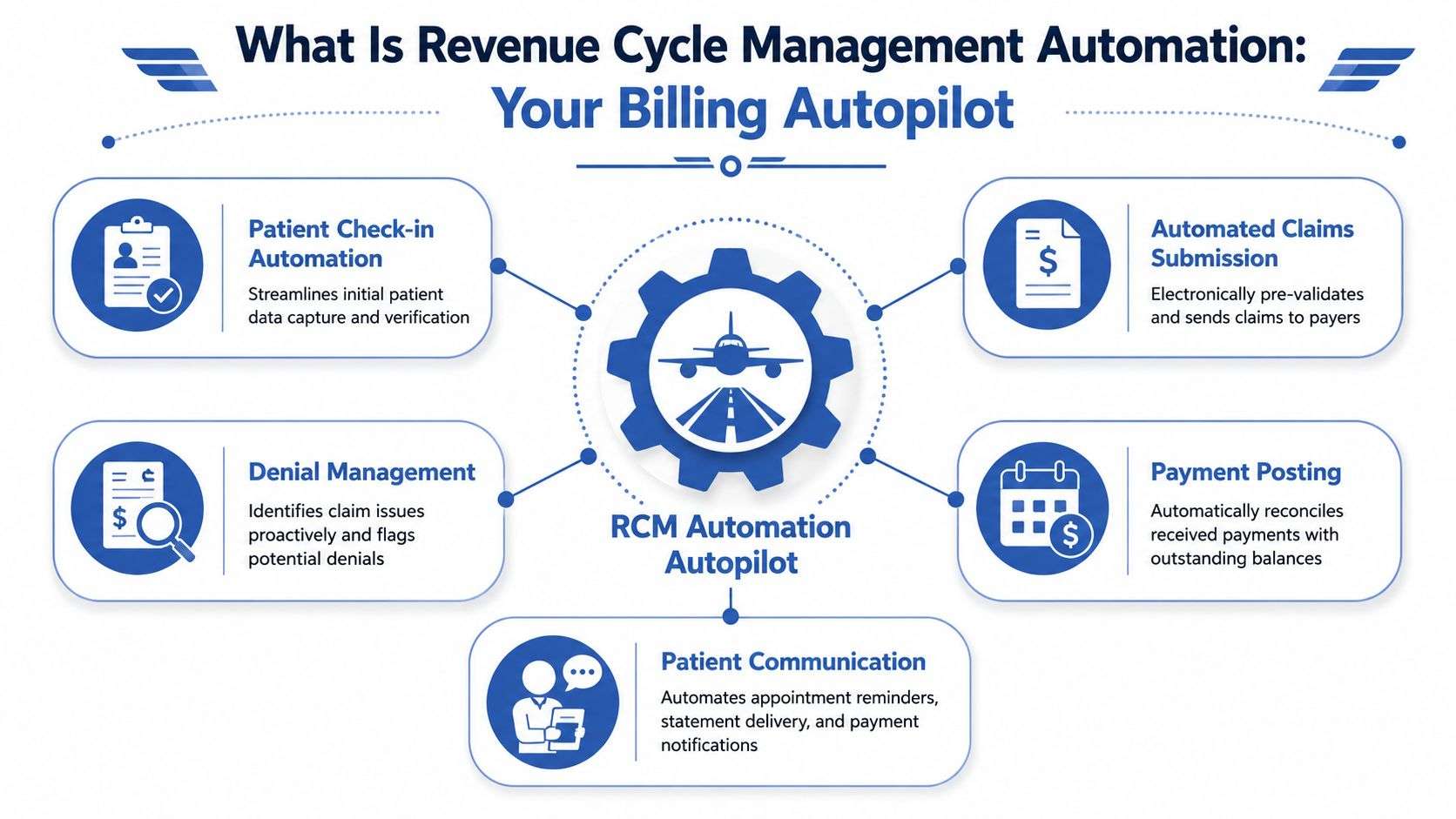
Revenue cycle management automation is the use of software, rules, integrations, and AI-assisted workflows to handle repetitive billing tasks with less manual intervention. The easiest way to think about it is as an autopilot for the billing office. It doesn't replace the pilot. It handles stable, repeatable actions so trained staff can focus on exceptions, judgment calls, and payer-specific problem solving.
What It Actually Does
In practice, automation usually covers tasks like:
- Eligibility verification: checking active coverage and benefits before the visit or before claim submission
- Claim scrubbing: validating required fields, code combinations, and payer edits before a claim leaves your system
- Status updates: retrieving claim status without someone logging into multiple portals all day
- Payment posting support: matching remittance data to open claims and flagging exceptions
- Work queue routing: sending low-risk claims straight through while escalating higher-risk claims for human review
The core tools vary. Some organizations use basic rule-based automation. Others layer in robotic process automation for portal tasks, machine-learning risk scoring for denials, or workflow engines that assign work based on payer, specialty, or aging rules. The technology matters, but the operational design matters more.
What It Is Not
Automation isn't a magic button, and it isn't the same as buying one piece of software. It also shouldn't be framed as a way to remove experienced billing staff from the process.
What doesn't work:
- Automating bad workflows: If registration errors and coding handoff problems already exist, faster processing can spread bad data faster.
- Treating automation as an IT project only: Revenue cycle leaders, billers, coders, and front-desk teams need to shape the workflow.
- Assuming every task should be hands-off: Some claims need judgment, payer interpretation, or documentation review that software alone shouldn't own.
Practical Rule: Automate the repetitive steps, standardize the handoffs, and keep humans on the exceptions.
A good automation setup gives your staff fewer screens to manage, fewer duplicate touches, and a clearer view of what needs attention now. This is its core advantage. It turns billing from a reactive cleanup function into a controlled operating process.
Where Automation Transforms The Revenue Cycle
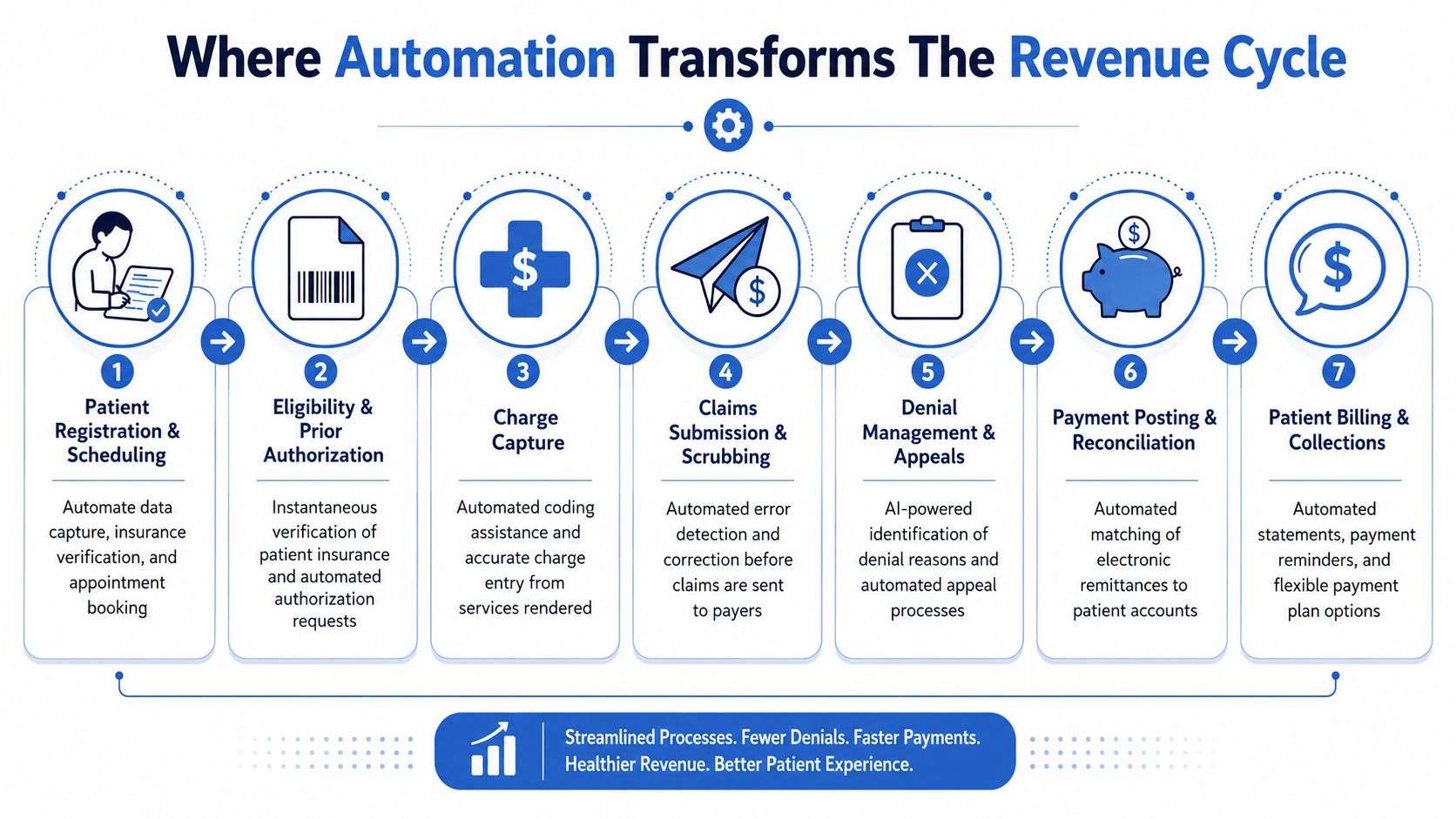
The best automation projects don't start everywhere. They start where denial risk, staff time, and payment delay intersect. In most practices, that's not one step. It's a chain of connected steps that break down when one handoff is late or incomplete.
High-performing providers commonly aim for a clean claim rate of 98%, while one industry summary reported initial claim denial rates around 11.8% and noted that AI-driven tools can reduce denials by 30% to 40% in digitally mature settings by catching errors before submission, according to these RCM benchmark metrics. That gap explains where automation earns its keep.
Six Places Where It Changes Daily Operations
Patient registration and scheduling
Before automation, staff retype demographics, manually verify fields, and correct missing information later. After automation, intake workflows can validate required fields up front and reduce the chance that bad data moves downstream.Eligibility and benefits verification
This is one of the clearest wins. Automated checks can run before the visit and again closer to billing, reducing the chance that the team discovers inactive coverage only after services are rendered.Prior authorization and documentation readiness
Authorization work is highly repetitive but detail-sensitive. A focused tool such as RiverAxe healthcare workflow automation is useful when a practice wants to streamline authorization-related workflow steps that often create downstream claim delays.Charge capture and coding support
Automation can flag missing elements, inconsistent documentation, or coding combinations that are likely to trigger edits. It won't replace experienced coders, but it can reduce avoidable misses and route questionable encounters for review.Claims scrubbing and submission
This is where rule-based validation matters most. Claims can be checked for payer-specific edits, formatting issues, and missing attachments before they leave the system. Catching those errors before submission is cheaper than fighting a denial later.Payment posting, denial management, and AR follow-up
Posting and reconciliation can be partially automated so exceptions surface faster. Denial workflows can also sort by denial reason, payer, balance, or appeal priority, which helps staff spend time on accounts that are most likely to move.
Where Human Review Still Matters
Some practices hear "AI" and assume the smartest move is end-to-end automation. It usually isn't. The better model is selective automation with human control over exceptions, payer nuance, and difficult appeals.
For a more technical look at that operating model, this guide to RCM AI workflows shows how automation can support the cycle without turning judgment-heavy tasks into black-box decisions.
The strongest revenue cycle teams don't remove humans from the process. They remove humans from repetitive clicks so they can focus on revenue-critical decisions.
The Financial Case For RCM Automation
Most automation conversations stall because they stay too abstract. Practice leaders don't need another promise about efficiency. They need to know where money is currently leaking and whether automation will help collect it faster and more reliably.
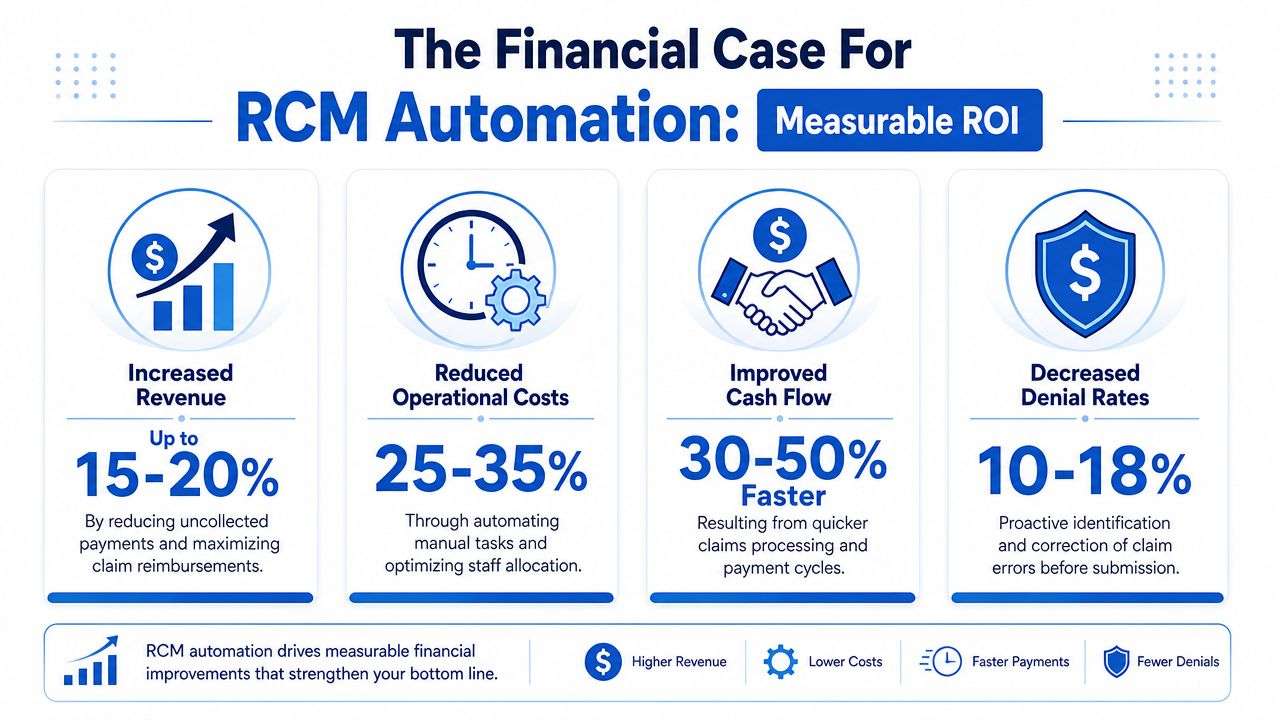
The cleanest business case usually comes from three areas: fewer preventable denials, faster payment posting and reconciliation, and better follow-up on work that staff often postpone because it doesn't seem worth the time.
The Revenue Hiding In Small Claims
Low-dollar claims are where many teams experience unnoticed financial losses. Staff naturally prioritize large balances, complex denials, and urgent payer issues. Smaller claims drift because touching each one manually takes time, and the return on that time can feel low. Across a large volume of encounters, that logic creates avoidable write-offs and aging.
One practical shift is using AI agents to work through thousands of low-dollar claims 24/7, checking statuses, identifying denials, and taking predefined corrective actions, as described in this overview of AI agents for low-dollar, high-volume claims. That's a meaningful ROI driver because these are exactly the accounts human teams often deprioritize.
How To Judge Whether The Investment Is Working
Don't judge automation by how impressive the demo looks. Judge it by whether it improves operational and financial control.
A practical scorecard includes:
- Days in AR: If claims move faster and exceptions surface sooner, AR should become easier to manage.
- Denial pattern visibility: You want fewer repeat errors and clearer insight into which payer edits are driving rework.
- Touch reduction: Staff should spend less time on status checks, duplicate data entry, and manual reconciliation.
- Recovery of neglected accounts: Backlogs and small-balance claims should stop aging in place.
If you want to evaluate those signals in a structured way, a reporting framework for revenue cycle management analytics can help connect workflow changes to cash performance instead of treating automation as a standalone tech purchase.
When automation works, finance sees it in cash timing, operations sees it in fewer backlogs, and staff feels it in fewer repetitive touches.
Your Roadmap To Implementing Automation
Automation projects succeed when they start as workflow redesign, not software rollout. The practices that struggle usually buy tools first and ask process questions later. That order creates friction, because the system ends up layered on top of inconsistent intake, unclear ownership, and denial patterns nobody has fully mapped.
A better rollout is phased, measured, and tied to a narrow set of operational goals.
Start With Workflow Diagnosis
Map the current process from scheduling to zero balance. Not the ideal version, but the actual one. Look for places where work stops, waits, or gets repeated. Those are your automation targets.
Focus especially on:
- Repeated handoffs: front desk to billing, coding to claims, remittance to posting
- Manual portal work: eligibility checks, claim status checks, authorization follow-up
- Known denial triggers: missing data, documentation mismatches, payer-specific edits
- Backlog patterns: claim queues or AR buckets that stay old because the team can't reach everything
This is also the stage to review the operational steps inside your claims management process, because automation won't rescue a workflow that lacks clear ownership or escalation rules.
Set Goals That Operations Can Actually Use
One published case study reported a 99% clean-claim rate after data-driven workflow refinement, and industry guidance emphasizes using core KPIs such as Days in AR and denial rates to measure success, as outlined in this guide to RCM automation KPIs and workflow measurement. The right lesson isn't to chase a vanity number. It's to define a small set of metrics your team can monitor consistently.
Examples of useful goals include:
- Reduce preventable denials tied to front-end data and claim edits.
- Shorten lag times between encounter completion, claim submission, and payment posting.
- Increase automation coverage for repetitive tasks that don't need judgment.
- Create faster exception routing so difficult claims reach experienced staff immediately.
Build The Operating Model, Not Just The Stack
Once the targets are clear, decide who owns what. Someone should own rule updates. Someone should review exception queues. Someone should monitor whether payer changes are causing new edits. Training matters here, but governance matters more.
What works well is a simple cycle:
- implement in one workflow
- watch the queue behavior closely
- fix edge cases
- expand only after the first workflow is stable
That approach is slower at the beginning and far faster by the time the practice scales it.
Choosing Your Path Automation Software Vs A Billing Partner
This is the decision that matters most. Do you buy automation software and run it internally, or do you work with a billing partner that already has the people, workflow discipline, and oversight to use automation well?
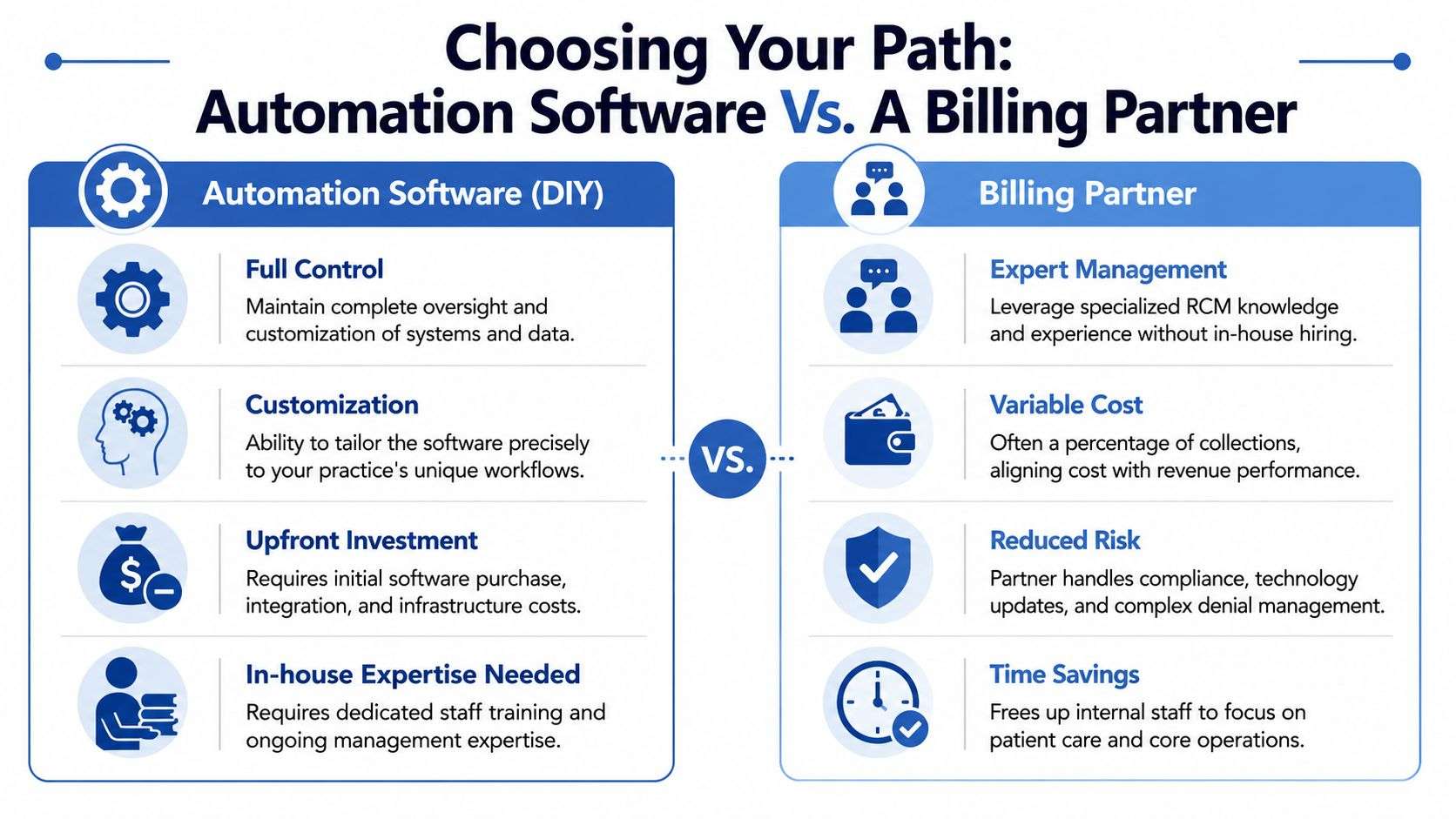
The answer depends less on enthusiasm for technology and more on operational capacity. The software path can work. It just asks more from your internal team than many practices expect.
When The DIY Path Makes Sense
Buying software directly may fit if your organization already has strong internal billing leadership, clear workflows, disciplined reporting, and the bandwidth to manage setup, exceptions, and optimization.
The upside:
- Control over configuration and workflow design
- Closer internal ownership of daily operations
- Potential alignment with existing systems and internal IT priorities
The downside is just as real:
- You still need experts to build rules, monitor payer change, and manage exceptions
- Staff adoption can stall if the workflow changes aren't well governed
- Bad process design gets automated instead of fixed
When A Billing Partner Is The Better Fit
A partner model makes sense when the practice wants automation but doesn't want to build an internal automation program from scratch. That's especially true for multi-site operations, specialty groups, and teams that already know their bottlenecks but don't have spare capacity to redesign them.
Industry guidance from the AHA notes that about 46% of hospitals and health systems use AI in RCM, while also cautioning against a broad "automate everything" approach because repetitive work is the safer target and more advanced functions still need human review, according to the AHA's review of AI use in revenue cycle management. That caution is exactly why partnership matters. The tool is only as good as the team governing it.
One option practices evaluate is One For All Medical Billing, which provides billing, denial management, coding, posting, and broader RCM support for healthcare providers. The practical question isn't whether a vendor mentions automation. It's whether the team can combine automation with specialty-specific billing judgment.
Software can execute tasks. A capable partner decides which tasks should be automated, which should be reviewed, and which should be escalated immediately.
A Short Evaluation Checklist
If you're comparing partners, ask direct questions:
- Who manages exceptions: not just the software, but the claims that fall outside the rules?
- How transparent is reporting: can you see denials, aging, and work queue performance clearly?
- How is compliance handled: who stays on top of coding and payer rule changes?
- What specialty experience exists: general billing knowledge isn't always enough for specialty-specific workflows.
- What happens after go-live: who tunes the process when payer behavior changes?
That last point is where many DIY plans struggle. Automation isn't set-and-forget. It needs oversight.
Get Paid Faster With An Expert Automation Partner
Revenue cycle management automation works best when practices stop treating it like a software purchase and start treating it like an operating capability. The goal isn't to automate everything. The goal is to remove repetitive work, catch errors earlier, route exceptions faster, and give staff enough room to focus on claims that need judgment.
For many practices, the hard part isn't finding technology. It's building the discipline to use it well. That includes workflow design, denial prevention, payment reconciliation, reporting, and ongoing adjustment when payer rules shift. An experienced outsourcing model for healthcare revenue cycle support can solve that gap when internal teams are already stretched.
If your billing team is buried in status checks, preventable denials, and aging follow-up, automation should help. But it should help inside a managed process, not sit on top of chaos.
If you want a clearer view of where automation would improve your billing operation, contact One For All Medical Billing for a free consultation. A good review should show where manual work is slowing collections, which tasks are safe to automate now, and where expert oversight will protect revenue better than software alone.

