
table of contents
By the time many practice managers start asking what practice management software is, they're already feeling the problem it solves.
The front desk is working out of one screen for appointments, another for eligibility, a clearinghouse portal for claim status, and a spreadsheet for balances that still need follow-up. Staff are answering phones while trying to fix registration errors from yesterday. Billing can't tell whether a charge problem started at check-in, in documentation, or after claim submission. Nothing is fully broken, but nothing moves cleanly either.
That's where practice management software stops being “software” and starts being operational infrastructure. In a healthy setup, it becomes the system that coordinates scheduling, registration, insurance, billing, payments, reporting, and the handoff between clinical work and reimbursement. If your current workflow depends on memory, workarounds, and manual reconciliation, the problem usually isn't effort. It's fragmentation.
The Command Center Of A Modern Medical Practice
A lot of practices still run on a patchwork that grew over time. One tool handled scheduling first. Then billing moved somewhere else. Then patient reminders were added through a separate app. Then reporting got pushed into spreadsheets because no one trusted the built-in dashboard.
That setup works until volume grows, a second location opens, or payer complexity increases. Then every disconnected step turns into delay. A missing insurance update at registration becomes a rejected claim. A scheduling change doesn't make it to billing. A payment posts, but no one reconciles it quickly enough to catch the underpayment.
Where The Friction Actually Shows Up
The daily strain usually shows up in places that feel small until they stack up:
- Check-in bottlenecks: Staff re-enter demographics, chase cards, and verify coverage too late.
- Charge lag: Encounters happen, but billable activity doesn't move cleanly into the revenue cycle.
- Claim follow-up confusion: Teams can see denials, but not always the upstream cause.
- Reporting blind spots: Managers know collections feel off, but they can't isolate whether the issue is scheduling, registration, coding, claims, or follow-up.
A strong PMS pulls those operational threads into one workflow. It doesn't just store data. It gives the practice a shared operating layer so front desk, billing, and leadership are working from the same record of what happened and what needs attention.
Practical rule: If your staff has to compare multiple systems just to answer one revenue question, your workflow isn't integrated enough.
That's also why PMS decisions sit close to broader medical practice revenue cycle management strategy. The software affects far more than appointment booking. It shapes how quickly information moves from patient intake to clean reimbursement, and how much manual effort your team spends fixing preventable mistakes.
Defining Practice Management Software Beyond The Calendar
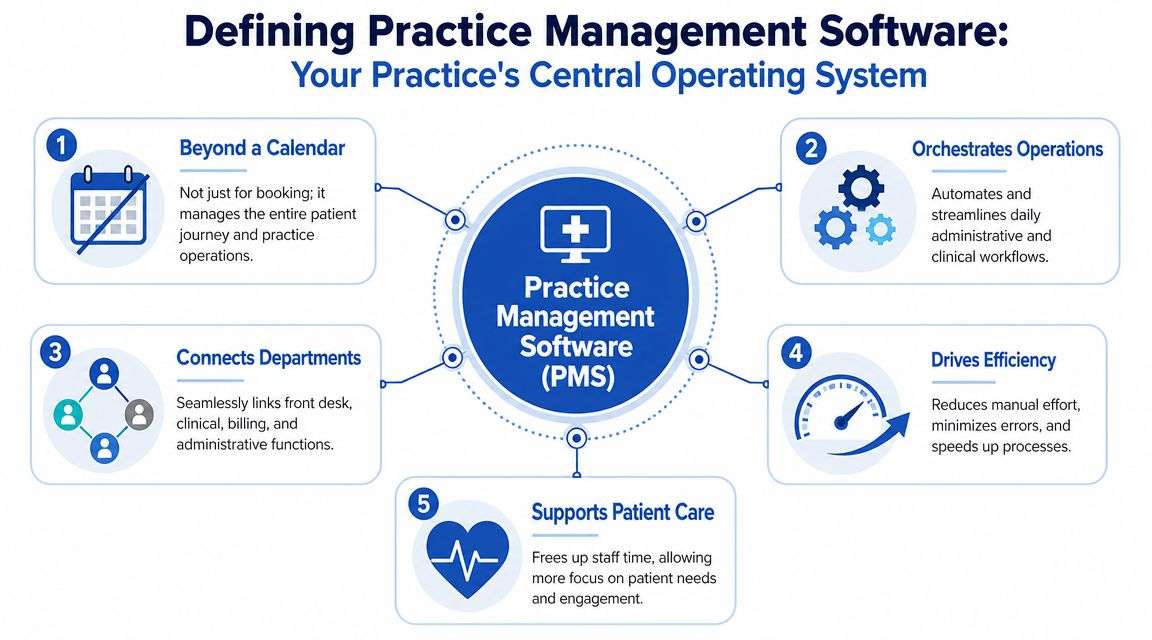
If you want the simplest useful answer to what is practice management software, it's this: the business operating system of a medical practice.
A lot of buyers start with the calendar because scheduling is the most visible feature. But a PMS isn't just a digital appointment book. It's closer to air traffic control. It directs who is coming in, confirms whether the visit is financially ready to happen, pushes information where it needs to go, and helps the practice track what was billed, what was paid, and what still needs action.
What It Covers Operationally
In practice, PMS handles the non-clinical side of care delivery. That includes scheduling, patient registration, billing workflows, claim handling, payment posting support, reporting, and patient communications tied to appointments and balances.
That role is why the category is so large. Grand View Research says the global practice management system market was valued at USD 14.45 billion in 2024 and is projected to reach USD 25.54 billion by 2030, growing at a CAGR of 10.19% from 2025 to 2030. That scale matters because it confirms PMS is no side utility. It's a core infrastructure layer for modern practices.
How PMS Differs From EHR
Many teams find this distinction challenging. A PMS and an EHR aren't the same thing, even when one vendor sells both.
- PMS manages operational and financial flow. It supports scheduling, eligibility, claims, invoicing, payments, and management reporting.
- EHR manages clinical documentation. It houses visit notes, diagnoses, orders, treatment history, and other clinical records.
- The handoff between them is where value is won or lost. If demographics, insurance, and encounter information don't move cleanly, staff end up correcting errors downstream.
A practice can survive with separate systems if they integrate well. It struggles when they don't. That's why buyers comparing platforms should spend less time admiring feature checklists and more time understanding how data moves into billing. If you're evaluating operational tools for a smaller organization, this guide to medical billing software for small practices helps frame the financial side of that decision.
A weak PMS creates extra work in places your staff can't always see immediately. A good PMS removes work before it reaches billing.
The Core Features That Power A Modern Practice
The best way to judge a PMS is to ask a simple question of each feature: What problem does this remove from the daily workflow? A long feature list doesn't matter if it doesn't reduce handoffs, errors, or payment delays.
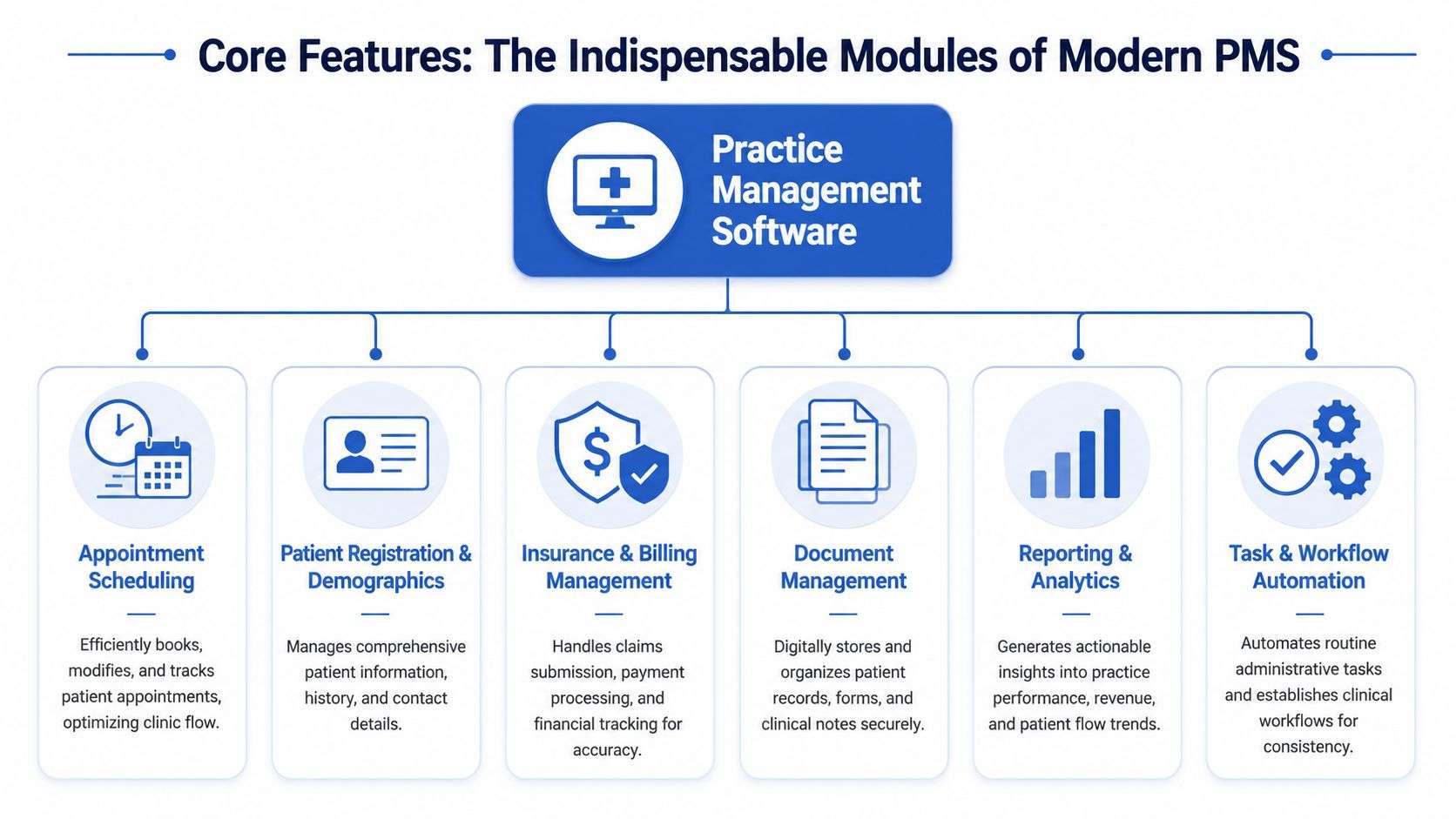
A research summary highlighted by SoftwarePath found that 80% of practice management software products include appointment reminders, claims management, and EHR integrations as key features, while 60% also offer billing management and digital intake forms. That tells you where the category has centered itself for years. Front-office efficiency and revenue capture.
Scheduling And Registration
Scheduling is the front door. In a mature workflow, it's not just about finding an open slot. It's about assigning the right provider, location, visit type, and timing in a way that sets up the claim correctly later.
Registration matters just as much. If patient demographics, subscriber details, or guarantor information are wrong at intake, the rest of the revenue cycle inherits that error. A PMS should make updates easy, visible, and consistent across the encounter lifecycle.
What works:
- Structured appointment types: These reduce vague scheduling that causes downstream confusion.
- Integrated reminders: They help staff avoid manual outreach and support attendance workflows.
- Digital intake tied to the chart and account: This cuts duplicate entry.
What doesn't work:
- Free-text scheduling habits.
- Manual demographic updates that live only in one screen.
- Reminder tools that don't sync back to the patient's operational record.
Eligibility And Financial Readiness
Eligibility verification is one of the highest-value front-end functions in the whole system. Not because it looks impressive, but because it prevents avoidable work.
A strong PMS lets staff confirm active coverage, identify problems before the visit, and surface the details needed to collect appropriately. If that step happens too late, staff either scramble at check-in or billing cleans up the mess after the claim fails.
Field observation: Most preventable claim trouble starts before the patient is roomed, not after the claim is denied.
Billing, Claims, And Patient Balances
The PMS becomes more than a front-desk tool. Charges need to move into billing cleanly, patient responsibility has to be visible, and claims should be generated with enough structure that teams can manage exceptions instead of rebuilding work from scratch.
Look for systems that support:
- Claim workflow visibility: Staff should be able to see claim status, not guess it.
- Patient statement generation: Balances need a repeatable process, not ad hoc follow-up.
- Adjustment and refund handling: Financial controls matter as much as claim submission.
- Payment posting support: Reconciliation should be traceable and timely.
Reporting That Managers Can Actually Use
A PMS should tell you what happened operationally and financially without forcing you to export everything into a spreadsheet. Useful reporting doesn't just display totals. It helps managers spot patterns such as registration issues, denial clusters, aging bottlenecks, or location-specific slowdowns.
If a report can't help your team act, it's decoration.
How PMS Integrates With EHR And RCM Workflows
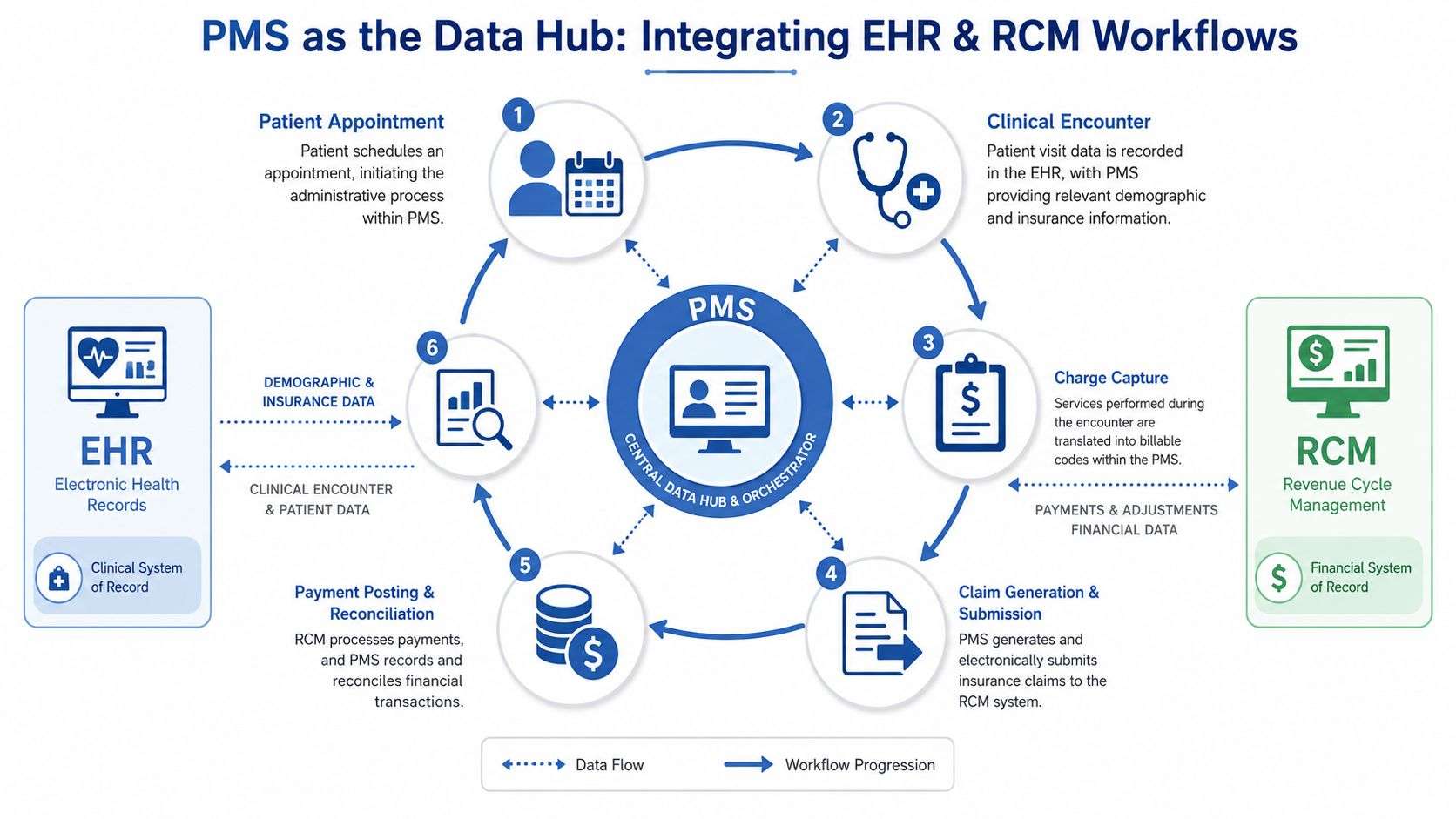
A PMS creates the most value when it sits at the center of a connected workflow. On one side is the clinical record. On the other is the revenue cycle. If those sides don't exchange data cleanly, staff compensate with manual fixes, duplicate entry, and delayed follow-up.
How The Data Should Move
The operational sequence is usually straightforward when the setup is healthy:
- Appointment gets scheduled in the PMS. The patient's demographic and insurance data enter the workflow first.
- Eligibility and registration details are confirmed. Front-end accuracy reduces downstream correction work.
- The visit happens and documentation is completed in the EHR. Clinical information belongs there.
- Charges and related billing data flow back into PMS-linked revenue workflows.
- Claims are generated, submitted, tracked, and reconciled.
- Payments, denials, balances, and follow-up activity feed reporting.
That handoff is where many implementations fall short. Teams assume that because the PMS and EHR “interface,” data quality is solved. It isn't. An interface can pass bad data just as efficiently as good data.
Why The Hub Model Matters
A public requirements document from Maryland outlines mature PMS capabilities such as appointment scheduling by provider or procedure room, electronic batch claim payment and remittance advice, EFT/ERA management, patient statement generation, refund and adjustment processing, and real-time or near-real-time dashboards. In that framework, the PMS becomes a single source of operational truth across scheduling, billing, and financial reporting.
That phrase matters. A practice doesn't need five systems arguing about whether a patient showed, whether a charge dropped, or whether a payer remitted correctly. It needs one operational record that billing, management, and finance can trust.
If your organization is also evaluating how clinical systems exchange regulated data, understanding EHR meaningful use requirements and workflows helps clarify what belongs on the clinical side versus the business side.
Where An RCM Partner Fits
An internal billing team or outsourced RCM partner relies on the PMS to do revenue work well. The cleaner the data coming in, the less time gets wasted fixing patient demographics, chasing missing coverage details, or reconciling disconnected balances.
A capable RCM workflow uses PMS data to:
- Monitor claim status without waiting for surprises
- Work denials with visibility into the original scheduling and registration record
- Post and reconcile payments against expected activity
- Track balances and aging by payer, provider, location, or workflow issue
- Support management reporting that ties operations to collections
Integration doesn't mean two systems can exchange data. It means your staff no longer has to act as the interface.
The Tangible Benefits Of Improved Collections And Compliance
The strongest case for PMS isn't convenience. It's control.
When administrative and financial steps happen in a connected system, the practice has a better chance of catching errors before they turn into write-offs, appeals, or staff overtime. That's what makes a PMS a business decision rather than an IT purchase.
Fewer Rework Loops
Advanced PMS platforms can include coding validation, payer edits, and claim scrubbing before submission. According to Mindbowser's overview of practice management software features, those capabilities lead to fewer claims requiring manual rework, which shortens days in accounts receivable and reduces administrative labor.
That cause-and-effect relationship is one of the clearest in the whole PMS category. Clean the claim upstream, and your team spends less time reopening accounts later.
Faster Collections And Better Visibility
Better collections usually come from a chain of smaller improvements:
- Cleaner front-end data: Eligibility and registration problems get caught earlier.
- More reliable claims workflow: Submission and status tracking are easier to manage.
- Stronger payment reconciliation: Teams can see whether money posted correctly.
- Actionable reporting: Managers can spot lag before it becomes a cash-flow problem.
This is also why payment workflows matter. The software should support a process that makes it easier for staff and patients to resolve balances with less friction. Practices reviewing that side of operations often benefit from a closer look at healthcare payment solutions as part of the broader PMS conversation.
Compliance Gets Easier When Work Is Standardized
No PMS makes a practice compliant by itself. Policies, training, user permissions, and oversight still matter. But standardized workflows help.
A good system supports cleaner audit trails, more consistent financial handling, more controlled access to patient and billing data, and less dependence on informal workarounds. In real operations, compliance problems often start when staff leave the system to finish the job elsewhere.
The safest workflow is usually the one staff can complete inside the system without inventing a workaround.
Selecting And Implementing The Right PMS For Your Practice
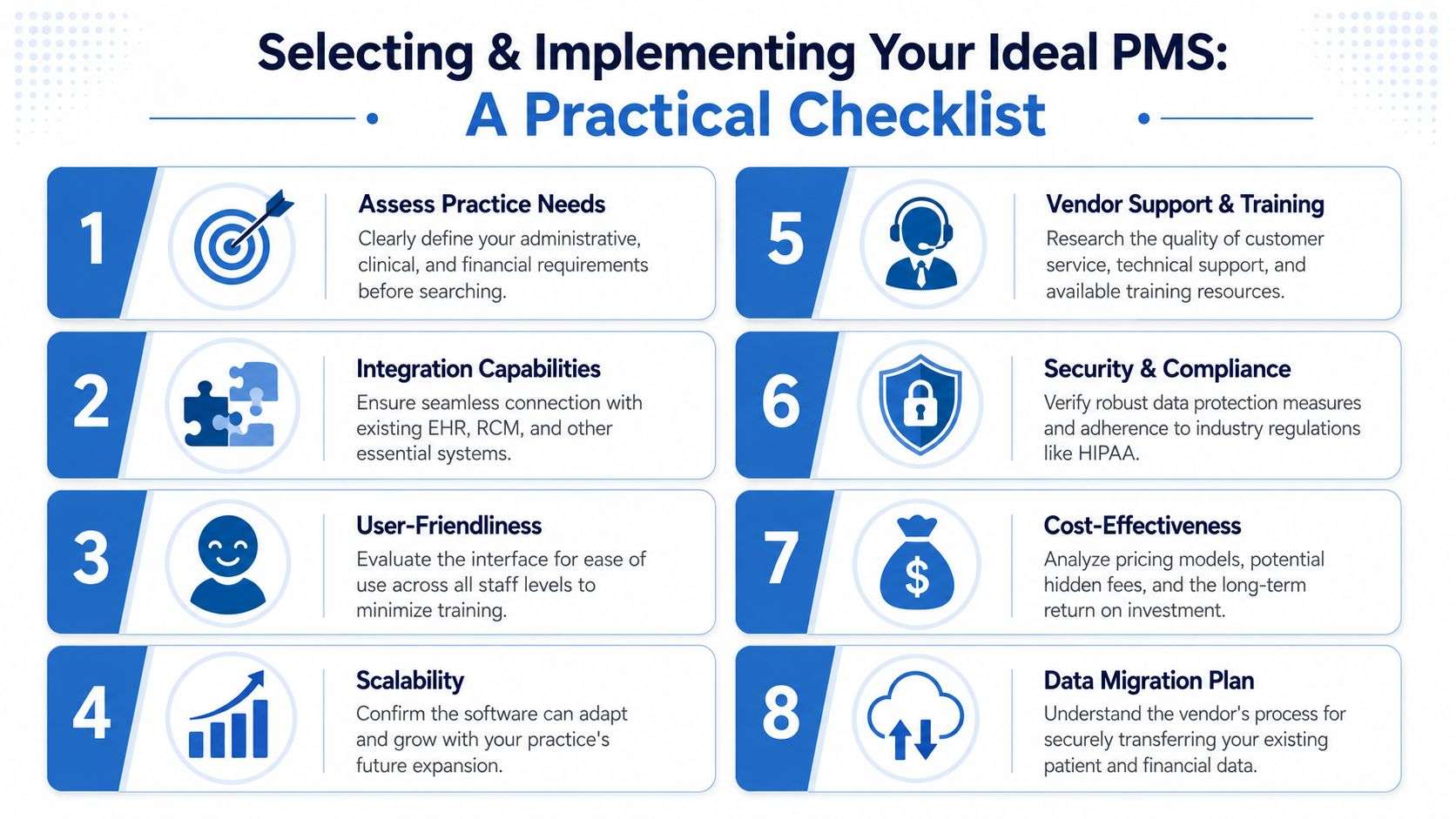
A PMS selection goes wrong when leadership shops for screens instead of workflows. Demos tend to highlight polished scheduling views and easy clicks. The harder questions show up later. Can the system handle specialty billing nuances? Can it support multiple locations without fragmenting reporting? Can staff learn it fast enough to keep operations stable during rollout?
That pressure is real. Salesforce reports that 87% of healthcare professionals work late every week because administrative tasks are so demanding. In that environment, choosing a PMS isn't a routine software purchase. It's a decision about whether your operation gets simpler or more burdened.
What To Evaluate Before You Sign
Start with operational fit.
- Integration depth: Ask exactly how the PMS connects with your EHR, clearinghouse, and billing workflows.
- Scalability: A system that works for one office may break down across several sites or service lines.
- Specialty alignment: Scheduling logic, charge capture patterns, and payer rules vary by specialty.
- Financial controls: ERA handling, statement workflows, adjustments, refunds, and reporting shouldn't be afterthoughts.
Then look at implementation risk, not just licensing cost.
What Usually Makes Or Breaks Adoption
Most failed rollouts don't fail because the software had no features. They fail because the practice underestimated data cleanup, training, role design, and workflow discipline.
Use this checklist during vendor review and go-live planning:
- Map current-state problems first: If you can't name the bottlenecks, the vendor will fill the gap with generic promises.
- Test real scenarios: Run specialty-specific appointments, registration edge cases, claim corrections, and payment posting examples.
- Define ownership clearly: Decide who owns templates, edits, user permissions, and reporting after launch.
- Plan migration carefully: Bad demographic and financial data can contaminate the new system fast.
- Train by role: Front desk, billers, managers, and providers don't need the same workflow education.
For practices that depend heavily on outside billing support, it also helps to evaluate how the software will work with claims management companies or internal claim teams before making a final decision.
A PMS implementation succeeds when the workflow is simpler on an ordinary Tuesday, not when the demo looked impressive on Thursday.
Frequently Asked Questions About Practice Management Software
Is Practice Management Software Only Useful For Large Groups
No. Large groups feel the pain sooner because they have more providers, more staff, and more locations. But small practices benefit too when the system reduces manual scheduling work, keeps registration cleaner, and creates a more reliable billing process.
The main question isn't size. It's operational complexity. A solo practice with fragmented tools can suffer just as much as a larger group.
How Does PMS Help Multi-Site Practices
Multi-site groups need consistency. If each location schedules differently, collects differently, or works denials differently, leadership loses visibility fast.
Industry commentary notes that for multi-site or specialty groups, an integrated PMS is essential because it ties scheduled sessions directly to documentation and billing so claims can be generated automatically, reducing missed charges and improving financial visibility across locations. That's described in this overview of practice management software for preventing revenue leakage.
Is PMS The Same As Billing Software
Not exactly. Billing is part of PMS, but PMS is broader. It covers the operational steps that happen before, during, and after billing, including scheduling, registration, eligibility, communications, and reporting.
A billing tool can process claims. A PMS helps the practice create the conditions for cleaner claims in the first place.
Are Free Systems Good Enough
Sometimes for very simple workflows, but there's usually a trade-off. Free or very low-cost systems often leave gaps in support, reporting, integration, workflow control, or financial functionality.
For a medical practice, the true cost isn't just subscription price. It's the labor you create when staff have to compensate for system limitations every day.
If your practice needs help turning PMS data into faster payments, fewer denials, and cleaner workflow execution, One For All Medical Billing supports providers nationwide with billing, claims management, payment posting, denial follow-up, and revenue cycle guidance that works across existing EHR and practice management systems.

