

table of contents
Monday starts with a stack of encounter forms on one desk, rejected claims in a work queue, and a front office team saying the insurance on file “looked active” when the patient checked in. By Wednesday, payments are slower than expected, providers want to know why charges haven't gone out, and your billing staff is spending more time fixing preventable mistakes than moving money in the door.
That's the moment when electronic claims submission stops being an IT project and becomes an operations issue. Practices rarely struggle because claims are hard to send. They struggle because the workflow around the claim is inconsistent, the data feeding it is incomplete, and no one owns the path from patient intake to adjudication.
A well-run electronic process fixes more than postage and paper. It tightens charge capture, shortens the time between visit and submission, and gives your team a cleaner way to spot breakdowns before they become denials. If you're trying to stabilize collections, reduce avoidable rework, and give staff a process they can follow, this is one of the most practical places to start.
Moving Your Practice Beyond Paper And Piles Of Denials
A familiar pattern shows up in practices that still rely on manual billing habits. A patient is seen, charges are entered later, someone rekeys insurance data from a scanned card, and the claim goes out only after a few rounds of internal chasing. Nothing in that chain feels catastrophic on its own. Together, it creates delays, missed details, and denial volume that feels bigger every month.
The operational cost is what usually gets overlooked. Staff members stop working the revenue cycle strategically and start working it reactively. They spend mornings correcting subscriber IDs, afternoons searching for authorization notes, and the end of the week trying to understand why a payer rejected something that “went through fine last month.”
What Changes When Submission Becomes Electronic
Electronic claims submission gives the practice a repeatable route instead of a patchwork of handoffs. Data flows from the registration and clinical side into the billing side with fewer manual touchpoints. Claims can be scrubbed before they leave the system. Rejections come back faster, which means your team can correct them while the visit is still fresh.
That's why many managers pair electronic submission with broader efforts to optimize revenue cycle management. The claim itself matters, but the business result comes from tightening the full workflow around it, from eligibility through payment posting.
Practices also get more visibility when they connect billing workflows to tools designed for revenue cycle management automation. That visibility matters. If a payer rejection hits the same day instead of weeks later, the fix is usually simpler, and the cash flow damage is smaller.
Paper slows down more than delivery. It hides where the process broke.
What Managers Should Expect
Electronic submission won't rescue a bad front desk process or unsupported coding. It will expose both. That's a good thing if you're ready to treat denials as workflow signals rather than random bad luck.
The practices that get the most from electronic claims submission usually do three things well:
- They standardize intake: Demographics, insurance details, and ordering information are collected the same way every time.
- They define ownership: Someone owns payer enrollment, someone owns rejection review, and someone owns follow-up.
- They monitor exceptions daily: Rejections, held claims, and missing documentation are worked before they age.
The Core Components Of Electronic Claims Submission
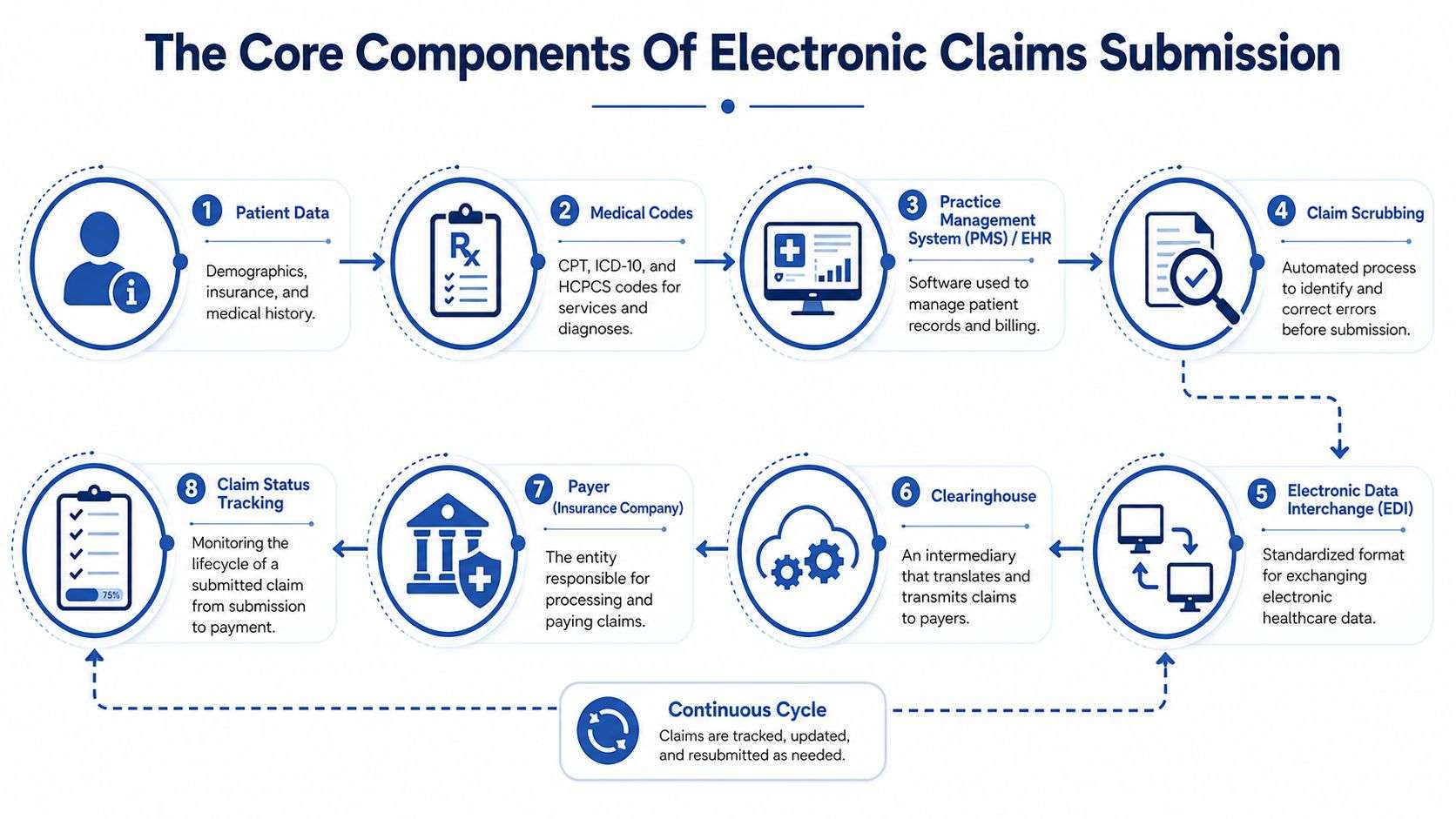
Electronic claims submission works best when the team understands the chain, not just the button that says submit. A clean electronic claim moves through several systems, and each one has a specific job. If one part is weak, the whole process slows down.
Here's the visual map most managers need on hand:
The Systems And Players In The Chain
Start with the EHR or practice management system. The system integrates patient demographics, insurance details, provider information, charges, and diagnosis codes. If the registration data is wrong here, the claim will carry that error downstream.
Next comes the clearinghouse. Think of it as the traffic controller between your practice and the payer. It receives the claim file, checks it for structural issues, applies edits, and routes it to the correct insurance company. If you need a plain-language breakdown of that middle layer, this guide on what a clearinghouse does in medical billing is useful for managers training staff.
Then there's the payer. Once the payer receives the claim, it moves into adjudication. At that point, the insurer decides whether the claim is accepted for processing, pended for more information, reduced, or denied based on coverage rules, authorization status, coding support, and contract terms.
The Rules That Govern The Process
Electronic claims don't move as free-form documents. They move in a standardized structure. The most important one for professional and institutional claims is the ANSI X12 837 format. In practice, that means the claim has to be packaged in a consistent digital language so systems can read it correctly.
Managers don't need to memorize loops and segments to lead this well. They do need to understand the implication. If your staff enters data inconsistently, or your software mappings are off, the payer won't “figure out what you meant.” The claim may reject before it ever gets processed.
HIPAA matters here too, not just as a compliance box. It affects how protected health information is stored, transmitted, accessed, and shared. Secure transmission, role-based access, audit trails, and vendor controls all matter when claims contain patient and financial data. If your team is reviewing vendors or remote workflows, this practical resource on how to prevent HIPAA violations in your business can help frame the operational side of compliance.
Operational view: HIPAA protects data. The 837 format protects claim readability. You need both.
What Actually Happens After You Hit Submit
A manager should expect the process to follow a sequence like this:
- Patient and visit data are captured in the EHR or billing platform.
- Codes and charges are attached to the encounter.
- Claim scrubbing checks for errors such as missing fields, invalid combinations, or payer-specific issues.
- The clearinghouse validates structure and routes the file.
- The payer acknowledges receipt or returns a rejection.
- The billing team tracks status through acceptance, pend, denial, or payment.
- ERA and payment posting close the loop so underpayments and balance transfers can be worked.
Where Practices Usually Get Confused
Many teams use “rejection” and “denial” like they mean the same thing. They don't. A rejection usually means the claim failed before adjudication because something was missing or formatted incorrectly. A denial usually means the payer reviewed the claim and refused payment for a reason tied to coverage, coding, authorization, or policy.
That distinction changes workflow. Rejections should be corrected and resubmitted quickly. Denials usually need investigation, supporting documentation, and sometimes an appeal.
Your Implementation Roadmap From Start To Finish
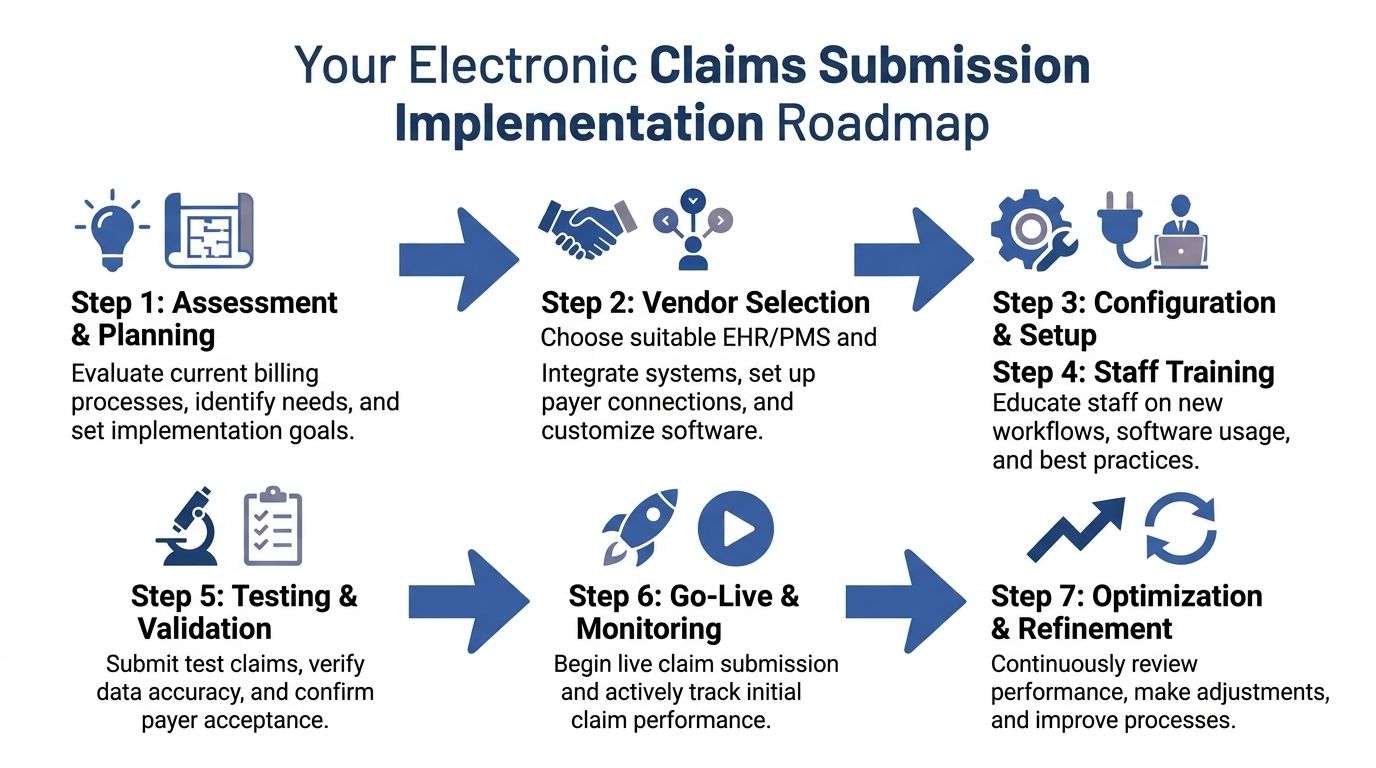
Rolling out electronic claims submission is less about software installation and more about workflow design. Practices get into trouble when they buy a tool, assign training to one billing lead, and assume the rest will sort itself out. It won't. You need a controlled rollout with clear ownership.
Use this roadmap as the working model:
Start With Workflow Mapping
Before you evaluate vendors, map how a claim is created today. Follow one encounter from scheduling to payment posting. Write down where staff enters data, where documents are scanned, where authorizations are stored, and where claims sit waiting.
This exercise usually reveals the actual blockers. Sometimes the issue isn't the billing platform at all. It's delayed coding, inconsistent eligibility checks, or provider signatures that arrive late.
A strong first pass includes these questions:
- Where does patient data originate: Front desk, call center, portal, or all three?
- Who reviews claim edits: Billers, coders, or a mix?
- How are payer enrollments tracked: Spreadsheet, credentialing team, or vendor portal?
- What happens to rejected claims: Immediate correction, end-of-week batch, or manual chasing?
Choose The Right Setup, Not The Flashiest One
The right configuration depends on your specialty, volume, payer mix, and internal staffing. Some practices work well with an integrated EHR and PM suite. Others need a separate clearinghouse with more edit control or stronger payer routing support. If your team is still sorting out software roles, this overview of practice management software is a good baseline.
When you compare options, focus on operating realities:
- Edit logic: Does the system catch payer-specific issues before submission?
- Integration quality: Will demographics, charges, rendering provider data, and authorizations flow cleanly?
- Work queues: Can your staff separate rejections, denials, and pending claims without building manual reports?
- Support model: Who helps with payer setup, file mapping, and early production issues?
If you use an outside billing partner, ask how they handle enrollment, claim edits, rejection worklists, and reporting. For example, One For All Medical Billing provides claim submission as part of a broader billing workflow, which may fit practices that want outside support for execution rather than just access to software.
The wrong implementation choice usually shows up as hidden manual work, not a dramatic failure.
Don't Underestimate EDI Enrollment
This is one of the biggest go-live delays. Your software can be ready while your payer connections are not. EDI enrollment establishes that your practice is authorized to submit claims electronically, and often to receive remittance files electronically as well.
Managers should assign one person to track enrollment status by payer and by provider group. Don't assume a previous setup carries over after ownership changes, tax ID changes, or software migrations. Those are common points of failure.
Configure Before You Train
Training staff before the system is configured wastes time. Set up provider records, payer IDs, taxonomy details, NPI records, location mappings, and charge workflows first. Then train staff in the operational environment they'll use.
A practical training plan should separate roles:
- Front desk staff learn registration standards, insurance verification, and card capture.
- Clinical staff learn documentation habits that support coding and authorizations.
- Billing staff learn edit queues, rejection correction, and submission monitoring.
- Managers learn reporting views, exception tracking, and escalation paths.
Test Like You Expect Something To Break
Testing should include more than “we sent a claim and it went through.” Submit test claims that reflect your actual business. Include common visits, specialty procedures, modifiers, multiple payers, secondary coverage, and authorization-dependent services.
Look for practical problems:
- Missing rendering provider data
- Invalid payer routing
- Authorization fields not carrying over
- Diagnosis pointer mismatches
- Location or billing provider setup errors
Run a short pilot before full go-live. A controlled launch with a limited provider group or payer subset gives your team room to catch avoidable issues without freezing the entire revenue cycle.
Go Live With Daily Oversight
The first weeks matter. Review claim acceptance reports, clearinghouse rejections, payer acknowledgments, and held claims every day. Waiting until month-end is how manageable setup issues turn into aging A/R.
Use a temporary command-center mindset. Assign one owner for front-end corrections, one for billing edits, and one for payer follow-up. Keep a running issue log so recurring problems become workflow fixes, not recurring staff frustrations.
Best Practices For A High Clean Claim Rate
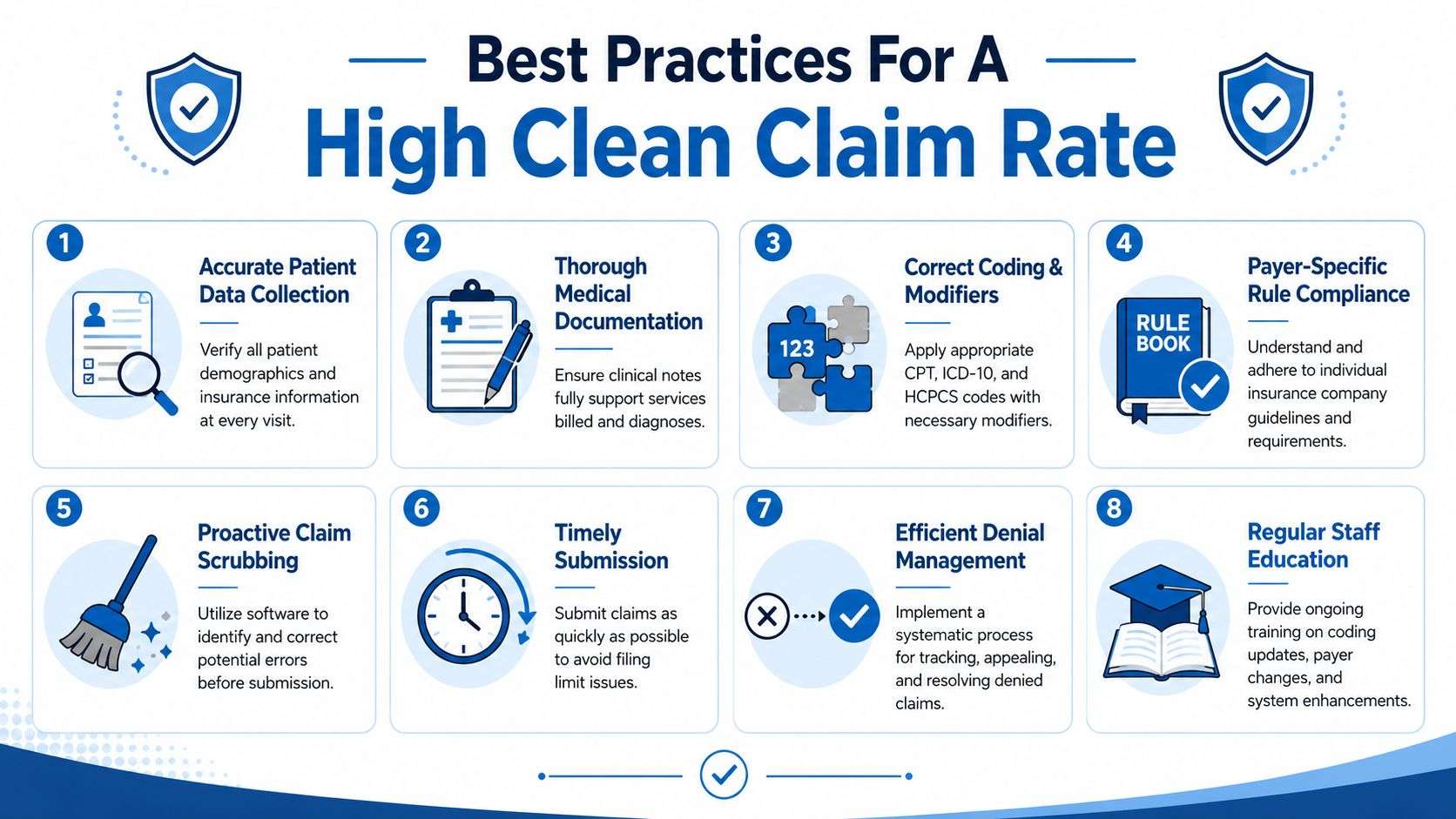
A high clean claim rate doesn't come from working harder after submission. It comes from controlling what happens before the claim leaves your system. Practices that send cleaner claims don't have perfect patients, perfect staff, or perfect payers. They have disciplined front-end habits.
The most valuable change is cultural. Staff have to stop treating registration, coding, and documentation as separate tasks. They're connected steps in a single payment process.
Front Desk Accuracy Drives Billing Performance
Most preventable claim issues begin before the patient is roomed. Subscriber name mismatches, outdated member IDs, missing referral details, and unchecked coordination of benefits all create downstream cleanup that billing can't solve efficiently after the fact.
The front desk should verify more than whether insurance “is on file.” A reliable process confirms active coverage, payer order, referral requirements, plan-specific restrictions, and whether the card image matches what's entered in the system.
Practical rule: If the patient data is weak at check-in, the claim is weak at submission.
Documentation And Coding Have To Match
Billers can't code around vague documentation for long. If the note doesn't support the level of service, diagnosis specificity, or modifier usage, the claim becomes fragile even if it gets accepted initially.
That's why regular communication between providers, coders, and billers matters. Short feedback loops work better than quarterly surprises. When one payer starts rejecting a pattern, the coding and documentation teams should hear about it quickly.
A few habits consistently improve claim quality:
- Verify demographics every visit: Returning patients often assume nothing changed. Plans, addresses, and subscriber relationships do change.
- Tie notes to billed services: The chart should support what was done, why it was medically necessary, and who performed it.
- Use payer-aware coding review: A valid code set isn't enough if the payer has its own edit logic.
- Submit promptly: Old claims are harder to fix because staff memory and supporting detail fade.
For practices tightening edits before transmission, this guide to claim scrubbing is worth sharing internally with both billers and managers.
Scrub For Known Errors, Audit For Unknown Ones
Claim scrubbing tools are excellent at finding missing data, invalid code combinations, and formatting issues. They are not a substitute for process review. They only catch what the rules are built to catch.
That's why mini-audits still matter. Pull a sample of paid claims, denied claims, and corrected claims. Look for recurring staff behaviors, not just isolated mistakes. Maybe one location skips subscriber suffixes. Maybe one provider's notes consistently miss laterality. Those are training issues, not software issues.
A scrubber catches what your rule set knows. An audit catches what your team keeps repeating.
Monitoring Performance And Troubleshooting Common Issues
Once electronic claims submission is live, managers need a disciplined review rhythm. Without it, the process turns into a black box. Claims go out, money comes back eventually, and no one can tell whether delays are caused by front-end registration, coding quality, payer edits, or follow-up failures.
The most useful reporting setup gives you a line of sight from submission to payment. If your platform supports operational dashboards, use them. If not, build a simple recurring review process around exports and exception worklists. This overview of reporting and analytics is a good reference point for deciding what your team should monitor regularly.
The KPIs That Actually Help You Manage
Start with clean claim rate or first-pass resolution rate. This tells you how often claims get through without avoidable correction work. If it drops, don't just ask billing to “be more careful.” Break it down by location, payer, provider, and denial category.
Then watch denial rate. Denials reveal where your process is leaking money and time. A denial pattern tied to authorizations points to front-end workflow. A pattern tied to coding support points to provider documentation and coding review. A pattern tied to eligibility often means registration standards aren't being followed consistently.
Also monitor days in A/R, but use it carefully. It's a lagging indicator. It tells you cash is moving too slowly, but not always why. Pair it with aging by payer and aging by denial category so you can see whether the problem is submission quality, slow follow-up, or a payer-specific issue.
What Each Metric Should Trigger
Don't stop at reporting. Pair each KPI with an action rule.
- If clean claims drop: Review the edit queue, recent staff changes, and top rejection reasons.
- If denials rise in one category: Audit the exact workflow tied to that category, not the entire billing department.
- If A/R ages unevenly by payer: Check payer enrollment status, remittance setup, and unresolved documentation requests.
- If claims are accepted but underpaid: Compare payment posting patterns against contracts and review EOB workflows.
Metrics should change staff behavior. If a report doesn't trigger an action, it's just decoration.
A Manager's Troubleshooting Checklist
When rejections or denials start stacking up, work the basics in order. Most recurring problems come from a short list of causes.
- Invalid Patient ID: Compare the insurance card, subscriber record, and payer-specific formatting in the system.
- Missing Or Incorrect NPI: Confirm rendering, billing, and referring provider records are active and mapped correctly.
- Authorization Missing: Check whether the service required prior approval and whether the authorization was attached to the correct encounter or date span.
- Payer Rejection For Demographics: Verify name spelling, date of birth, gender marker, address, and subscriber relationship.
- Service Not Covered Or Not Authorized: Review plan rules and referral requirements before resubmitting.
- Claim Stuck In Clearinghouse: Look for structural edits, payer ID mapping issues, or enrollment status problems.
- Repeated Coding Denials: Pull the provider note and compare it directly to the code set and modifier usage.
A practical troubleshooting habit is to separate one-off errors from pattern errors. One bad member ID is staff correction. Ten of them from one location is a training and process problem.
The Practice Manager's Electronic Submission Checklist
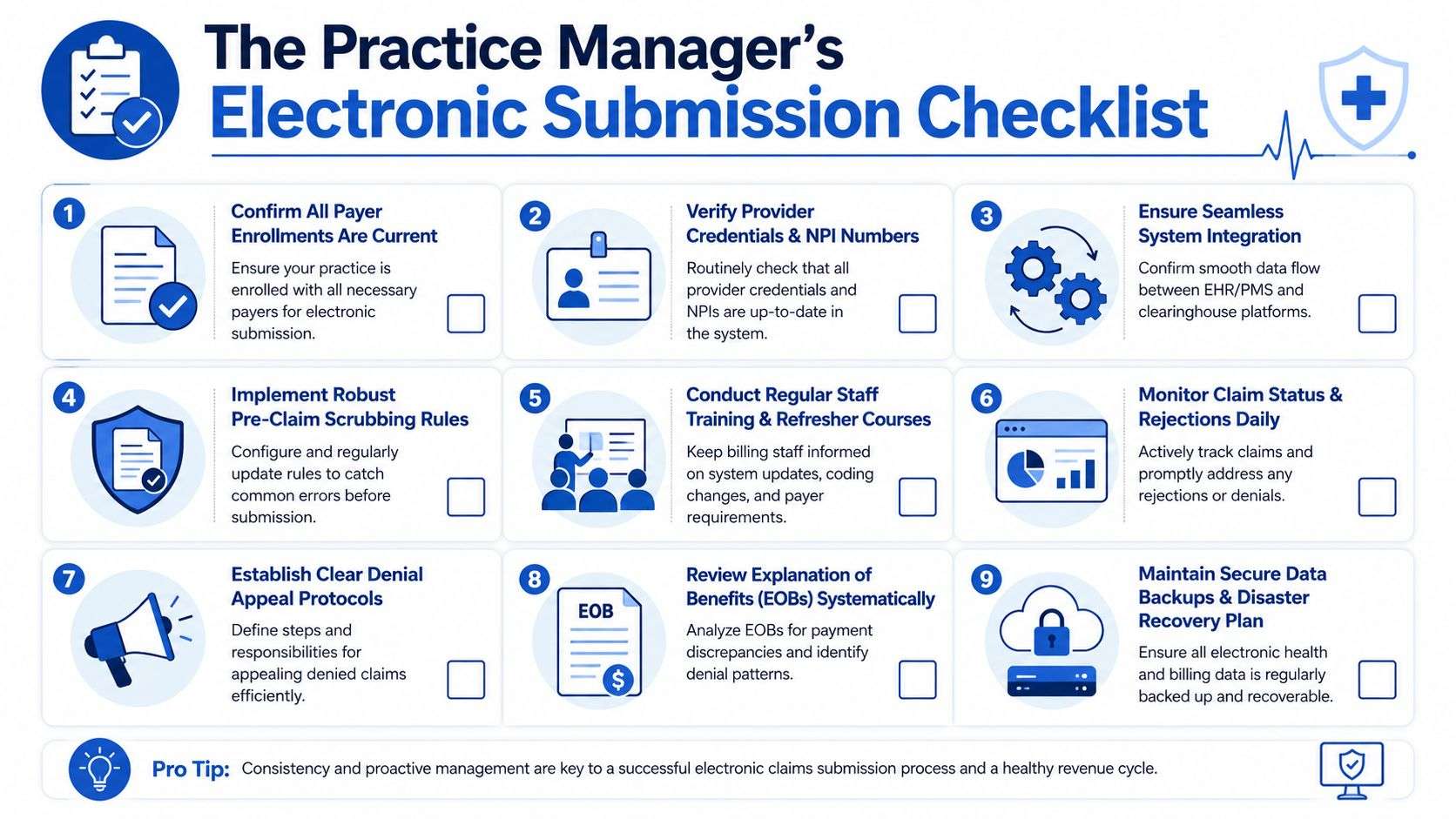
Managers don't need another abstract framework. They need a checklist that can be assigned, reviewed, and reused. The most effective version is divided by phase so the team knows what belongs before launch, what belongs during onboarding, and what has to keep happening after go-live.
Keep this visible in your billing meetings and implementation notes:
Pre Implementation Planning
- Map the current workflow: Identify where registration, coding, charge entry, and submission break down.
- List every payer and connection type: Don't rely on memory. Build a current payer roster with submission and remittance status.
- Define ownership clearly: Assign who handles enrollment, setup validation, rejection review, and escalation.
- Review insurance verification procedures: If your intake process is weak, fix that before you automate anything. This primer on how to verify insurance coverage is a useful starting point for front-office consistency.
Onboarding And Go Live
A smooth launch depends on sequence. Finish enrollments. Validate provider files. Test real claim scenarios. Then train staff in the configured workflow, not in a generic demo environment.
Use this short go-live list:
- Confirm payer enrollments are active
- Validate NPIs, taxonomy, and provider credentials in every location
- Test common claim types, not just simple office visits
- Run a pilot group before broad rollout
- Review rejections and acknowledgments daily during launch
Ongoing Optimization
After go-live, the main risk is drift. Staff shortcuts return. Payer rules change. New providers join. Old edits stop catching current problems.
That's why ongoing management should be scheduled, not improvised:
- Review rejection and denial trends on a routine cadence
- Run mini-audits on registration, coding, and documentation alignment
- Update scrubbing rules when payer behavior changes
- Train staff after workflow changes, not months later
- Review EOBs and posting patterns for underpayments and anomalies
- Maintain backups, access controls, and recovery procedures for billing data
The healthiest billing teams don't wait for A/R pain before they tighten process.
If your practice wants help building a more reliable electronic claims submission workflow, One For All Medical Billing supports providers with eligibility verification, coding, claims submission, denial follow-up, reporting, and revenue cycle oversight that fits both independent practices and multi-site groups.

