

table of contents
Monday starts with a full schedule, but the cash picture still looks shaky. Claims are sitting in limbo, front-desk staff are rechecking insurance after the visit instead of before it, and your billers are spending too much time fixing avoidable errors. By the time denials come back, the original problem is already buried under new work.
That's the pattern many practices call “billing trouble,” but it's usually bigger than billing. It's a workflow problem, a visibility problem, and often a staffing problem. When patient access, coding, charge entry, claim edits, payment posting, and follow-up all run in separate lanes, the practice leaks revenue in small amounts all day long.
That's why healthcare RCM solutions matter. They don't just push claims out the door. The right setup coordinates the entire path from scheduling through final payment, so fewer mistakes happen upstream and fewer fires need to be put out downstream.
The shift is happening at scale. The global revenue cycle management market is projected to grow from USD 180.91 billion in 2026 to USD 472.42 billion by 2034, a 12.70% CAGR, according to Fortune Business Insights' revenue cycle management market analysis. That growth reflects a simple reality. Providers are moving toward technology-enabled workflows because reimbursement pressure and billing complexity keep rising.
For practices that need flexible support without adding another in-house hire, services like Cool Blue VA's virtual medical billing are part of that broader move toward remote, process-driven billing operations.
Moving Beyond Billing Chaos With RCM Solutions
A strong RCM solution acts like traffic control for your financial operations. It keeps the right information moving to the right place at the right time. When it works, claims go out cleaner, payments post faster, and staff spend less time digging through payer portals or correcting the same errors every week.
Most administrators don't need another vendor promise. They need fewer bottlenecks.
What Billing Chaos Usually Looks Like
The warning signs are easy to recognize:
- Front-End Errors: Insurance wasn't verified correctly, or the registration data was incomplete.
- Coding Delays: Providers close charts late, or documentation doesn't support the codes billed.
- Submission Rework: Claims fail edits and bounce back for missing modifiers, invalid policy details, or authorization issues.
- Back-End Drag: Staff post payments in batches, chase aging claims manually, and appeal denials without clear prioritization.
Each issue seems small on its own. Together, they slow cash flow and create constant administrative noise.
Clean revenue cycles are usually built at the front desk, not rescued in accounts receivable.
What Modern Solutions Actually Change
The best healthcare RCM solutions reduce handoffs. They connect scheduling, eligibility, coding, claim scrubbing, remittance posting, and follow-up into one operating rhythm. That matters because a denial rarely starts when the payer rejects the claim. It usually starts much earlier, when the wrong detail enters the system and no one catches it.
If you're evaluating options, think less about “billing software” and more about financial workflow design. That's the core buying decision. The software, service model, and staffing structure should support how your practice gets paid without creating new workarounds.
What Is Healthcare Revenue Cycle Management
Healthcare revenue cycle management is the financial circulatory system of a practice. Money doesn't show up because care was delivered. It shows up because every step that turns care into a payable claim was handled correctly.
If one part of that system breaks, the whole practice feels it. A missed eligibility check at scheduling can create a denial weeks later. Weak documentation during the visit can lead to coding problems. Slow payment posting can hide underpayments and distort your real cash position.
This visual captures the full loop.
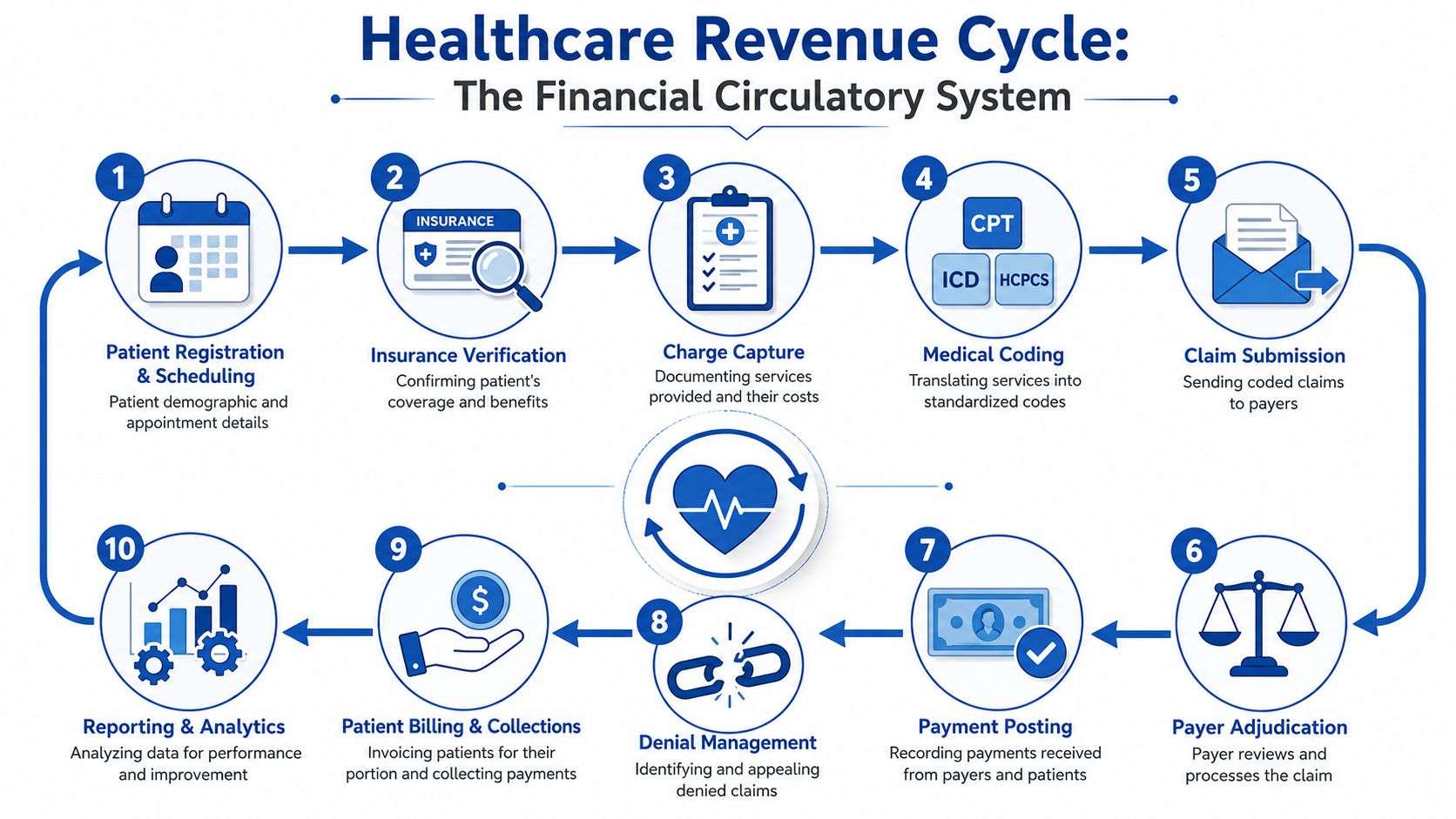
A high-performing process spans preregistration, eligibility verification, charge capture, claim submission, remittance posting, insurance follow-up, and patient collections. Front-end eligibility checks and automated claim scrubbing are especially important for reducing preventable denials, as described in this overview of the healthcare revenue cycle process. If you want a broader background before comparing tools, this tag page on what revenue cycle management means in practice is a useful companion.
The Revenue Cycle In Plain English
Think of the cycle as a relay race. Each handoff has to be clean. If registration hands off bad data, coding starts behind. If coding hands off an incomplete claim, billing has to stop and fix it. If billing sends a claim with preventable errors, accounts receivable inherits the mess.
That's why mature RCM teams stop treating departments as separate silos. They manage one connected workflow.
The Core Stages That Matter Most
Pre-Registration And Eligibility Verification
This starts before the patient arrives. Staff confirm demographics, insurance coverage, referral status, and any authorization requirements. When this step is sloppy, the practice often learns about the mistake only after the claim is rejected.Patient Encounter And Charge Capture
The visit happens, services are documented, and billable activity needs to be captured completely. Missed charges don't generate denials. They never become revenue, which makes them harder to detect.Medical Coding And Claim Creation
Clinical documentation is translated into standardized codes. Specificity is critical. If the note is vague, coders either have to query the provider or submit with weaker support than they'd like.
Practical Rule: If providers document for clinical care only and not for billing support, the billing team ends up guessing. Guessing is expensive.
Claim Submission And Scrubbing
Before a claim goes to the payer, edits should catch missing data, invalid combinations, formatting issues, and known payer rules. Good claim scrubbing prevents avoidable rework.Payer Adjudication
The payer reviews the claim and decides what to pay, deny, pend, or reduce. During this review, contracts, medical necessity rules, and documentation quality all start affecting reimbursement.Payment Posting And Reconciliation
Payments and adjustments must be posted correctly. If this step is weak, you can't see whether the claim was underpaid, partially denied, or still needs action.Denial Management And Patient Collections
Denials need root-cause analysis, not just correction. Patient balances also need clear statements, timely follow-up, and workflows that don't confuse patients or stall payment.
Why The Whole System Has To Work Together
Practices often focus on the noisiest problem. Usually that's denials or aging A/R. But those are often symptoms, not root causes. A better approach is to trace every downstream issue back to the first avoidable breakdown.
That's what separates a real RCM solution from a patchwork of tools and manual fixes.
The Measurable Benefits Of Modern RCM Solutions
The biggest value of modern healthcare RCM solutions is not “efficiency” in the abstract. It's operational calm. Your team stops spending the day on preventable rework and starts spending time on exceptions that need judgment.
That shift improves the financial side fast. Cleaner front-end work usually means fewer claim defects. Better claim edits mean fewer avoidable denials. More disciplined posting and follow-up mean cash doesn't sit untouched in aging buckets longer than it should.
Where Practices Usually Feel The Difference
Some benefits show up almost immediately in day-to-day operations:
- Fewer Preventable Denials: Eligibility checks and claim edits catch common issues before submission.
- Faster Cash Movement: Claims go out sooner, and staff spend less time fixing returned work.
- Better Use Of Staff Time: Experienced billers can focus on payer issues, appeals, and underpayments instead of repetitive corrections.
- Stronger Visibility: Reporting shows where claims stall, which payers create friction, and which workflows need repair.
For administrators comparing options, this overview of the benefits of revenue cycle management is useful because it frames the gains in operational terms, not just software features.
What Good RCM Feels Like Inside A Practice
A healthy revenue cycle doesn't mean there are no problems. It means the problems are visible early, routed to the right person, and resolved before they become expensive.
That matters for staff morale too. People burn out when the same errors keep recycling through the office. They do better when the system catches routine mistakes and leaves humans to handle the edge cases.
The right RCM setup doesn't remove work. It removes the wrong work.
Key Performance Indicators To Track RCM Health
If you can't see where revenue gets stuck, you can't fix it. Practices need a small set of KPIs that tells the truth about claim quality, collection speed, and follow-up discipline. Too many dashboards create noise. Too few metrics hide risk.
This is the scorecard worth watching.
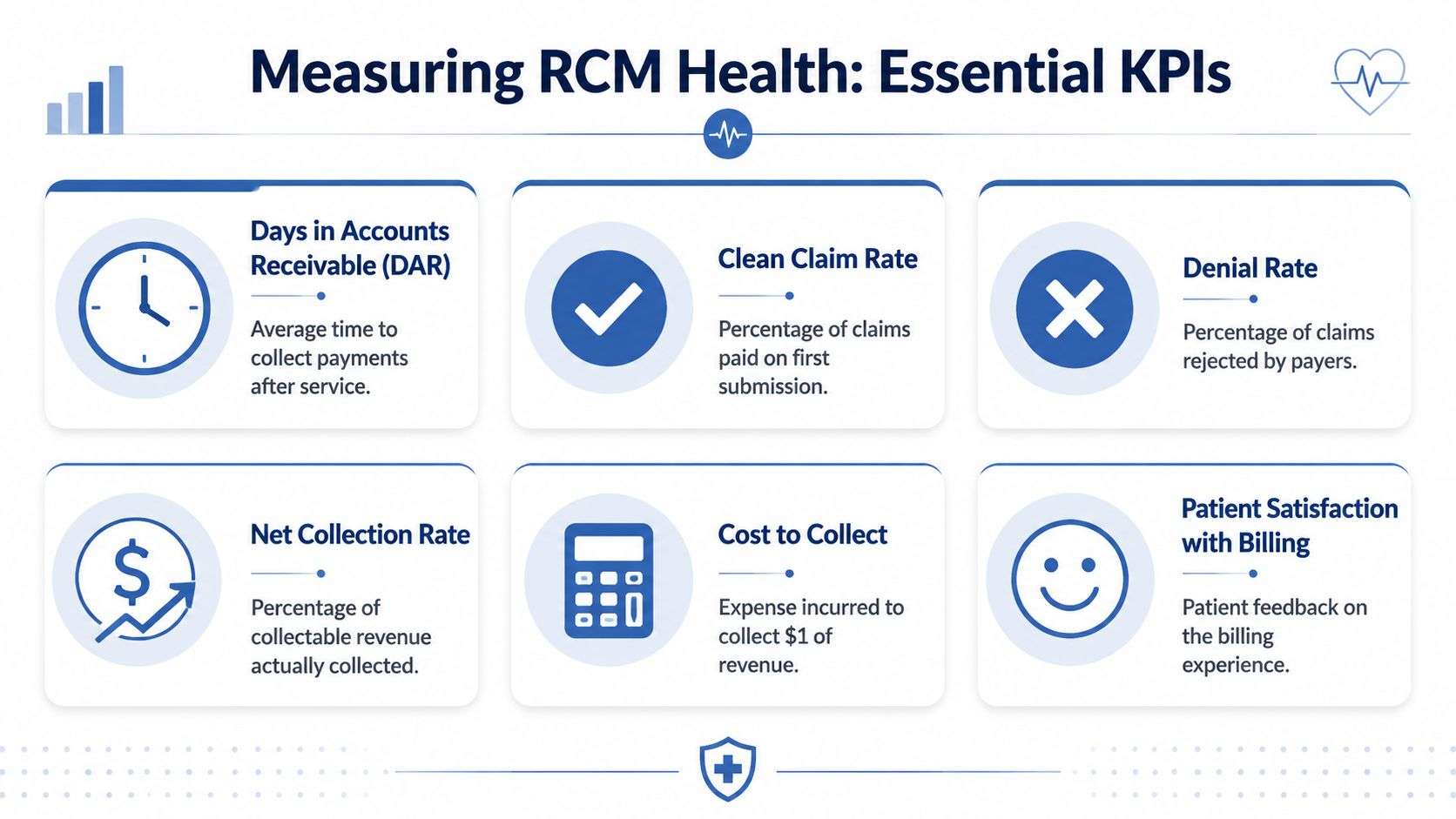
Industry guidance commonly cites a clean claim benchmark of 98% and above, and in the U.S. the revenue cycle management market was estimated at USD 172.24 billion in 2024, underscoring how much operational weight sits on these metrics, according to Grand View Research's U.S. RCM market analysis. For teams building internal scorecards, this resource on benchmarking in healthcare operations can help frame what to monitor consistently.
Four KPIs That Deserve Weekly Attention
Clean Claim Rate
This measures how many claims pass through on the first submission without needing correction. It's one of the clearest indicators of front-end and mid-cycle discipline. If this slips, don't only look at billers. Look upstream at registration quality, authorization checks, coding patterns, and claim edits.
Denial Rate
Denial rate tells you how much submitted work came back unpaid for a reason that needs action. On its own, the rate isn't enough. You also need to know why claims are denied. Eligibility errors, authorization problems, coding mismatches, and filing issues each point to different fixes.
Days In Accounts Receivable
This reflects how long revenue sits uncollected after service. Rising A/R days usually signal one of three problems. Claims are going out late, follow-up is inconsistent, or payments are being posted too slowly to expose what still needs action.
Net Collection Rate
This shows how much collectible reimbursement the practice receives. It helps answer a tough question: are you leaving earned revenue behind through write-offs, missed follow-up, underpayments, or unresolved denials?
How To Use KPIs Without Creating More Meetings
The best KPI review is short and specific. Ask:
- Where Did Performance Slip: Which metric changed and when?
- What Is The Root Cause: Front desk, coding, submission, payer behavior, or follow-up?
- Who Owns The Fix: Assign a person, not a department.
- When Will You Recheck It: Trends matter more than one bad week.
A dashboard should trigger action. It shouldn't become a monthly ritual where everyone agrees there's a problem and nothing changes.
Your Vendor Selection And Partnership Checklist
Monday starts with three payer calls, two missing remits, and a front-desk lead asking why claims are stuck again. That is usually the moment a practice realizes it is not shopping for billing help. It is choosing who will protect cash flow, surface problems early, and keep staff from spending their day on avoidable rework.
Start with the operating model. Vendor selection comes after that. Practices that skip this step often buy a service that looks strong in a demo but does not match how work moves through the office.
A practical shortlist should compare three models side by side. If you need help structuring that review, this roundup of revenue cycle management companies and evaluation topics is a useful starting point.
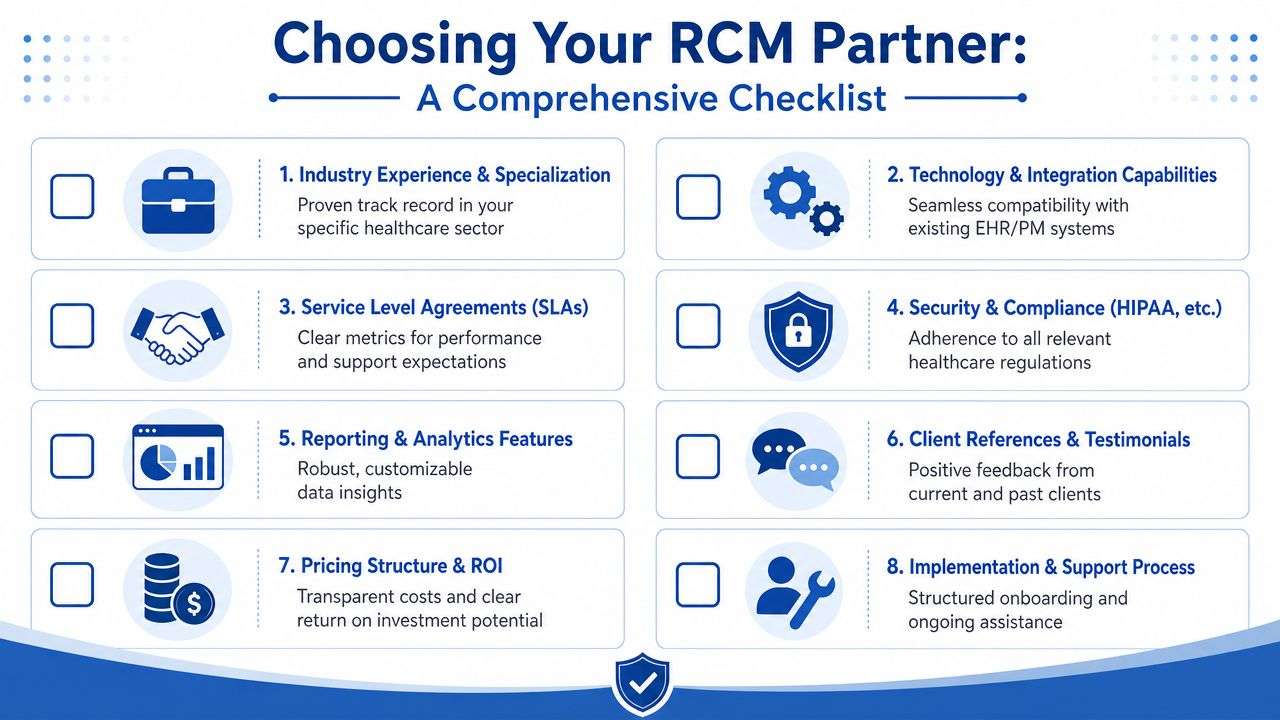
Pick The Right Model Before The Right Vendor
RCM works like a relay race. If the baton gets dropped at registration, coding and collections have to waste time recovering ground. Your operating model determines where control stays in-house and where a partner takes over.
- In-House RCM: Fits practices with experienced staff, stable workflows, and leadership that can manage hiring, training, compliance updates, and payer rule changes. The trade-off is exposure to turnover, uneven specialist knowledge, and limited capacity when volume spikes.
- Fully Outsourced RCM: Fits groups that need scale, tighter accountability, or relief from staffing gaps. The trade-off is distance. If communication is weak, the practice can lose visibility into denials, write-offs, and patient balance issues until they become larger problems.
- Hybrid RCM: Fits growing practices that want control over patient-facing and provider-facing tasks while assigning claim production, coding support, denial follow-up, or reporting to a partner. This model often works well because it keeps local knowledge close to the practice and moves repeatable back-end work to specialists.
The right answer depends on where your bottleneck sits. A practice with strong front-desk discipline but poor denial recovery needs a different model than a practice with constant eligibility and authorization errors.
The Questions That Expose Fit Quickly
Good vendor interviews should feel less like a sales call and more like an operations review. Ask for process details, examples, and ownership.
How Do You Integrate With Our EHR And PM System
Ask whether charges, payments, claim status, and edits pass cleanly between systems. If staff has to key data twice, errors rise and collections slow down.What Experience Do You Have In Our Specialty
Specialty matters. Orthopedics, behavioral health, cardiology, urgent care, and infusion each bring different coding patterns, modifier use, authorization rules, and payer behavior.How Do You Handle Denials And Underpayments
Look for a defined workflow. Strong partners can explain how they sort denial reasons, assign follow-up, appeal when appropriate, and feed recurring errors back to registration, coding, or providers.What Reporting Will We Receive
Ask for sample reports before signing. You want claim aging, denial categories, payer trends, work queue status, and collection performance in a format your team can use without waiting for a monthly summary call.Who Owns Communication And Escalations
Require named contacts, response times, and an escalation path. A partnership fails quickly when everyone is copied on an issue and nobody is accountable for fixing it.What Happens In The First 90 Days
This answer tells you how the vendor operates under pressure. Look for a plan covering data migration, claim inventory review, old A/R ownership, staff training, and weekly issue tracking.
What A Good Partner Relationship Looks Like
A strong RCM partner should operate like a visible extension of your business office. You should be able to see the workflow, understand the exceptions, and know who is responsible when performance slips. If the vendor cannot explain its process in plain language, the practice will end up managing confusion instead of results.
Ask vendors to show you how they handle a real claim from intake through payment. That simple exercise reveals more than a polished slide deck. It shows whether their team understands handoffs, payer edits, denial prevention, and follow-up discipline.
One option practices may review during vendor selection is One For All Medical Billing, which provides full-cycle billing support including eligibility verification, coding, claims submission, payment posting, denial follow-up, reporting, credentialing assistance, and compliance consulting.
Choose the partner whose process you can inspect, measure, and hold accountable. That is what reduces billing headaches and protects revenue.
A Roadmap For Successful Implementation And Onboarding
A lot of practices delay switching RCM systems or partners because they expect disruption. That concern is valid. A rushed transition can scramble claims, confuse staff, and cloud reporting for weeks. A structured rollout avoids most of that.
The safest implementations follow a phased approach instead of a hard cutover with unanswered questions.
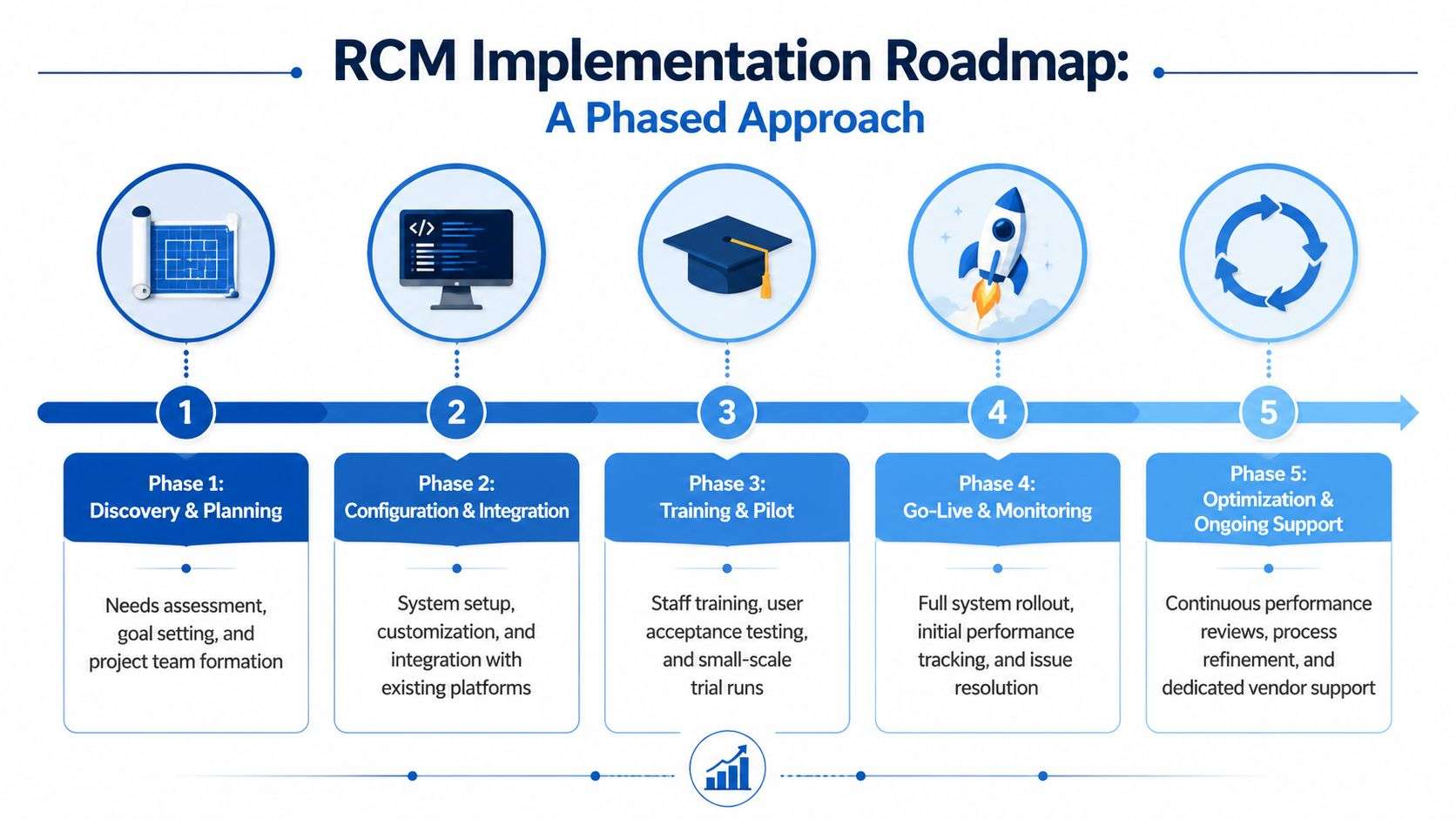
For teams preparing staff before go-live, practical guidance on revenue cycle management training can help shape role-specific onboarding and expectations.
Phase One Through Phase Three
The first half of implementation is about accuracy and alignment.
- Discovery And Planning: Map your current workflow. Identify where claims break, where handoffs fail, and which reports matter most. If a practice skips this step, it often recreates old problems in a new system.
- Configuration And Integration: Connect the RCM platform to the EHR and practice management environment. Set payer rules, user roles, work queues, and claim edits carefully. Small setup errors made here can lead to large billing problems later.
- Training And Pilot: Train front-desk staff, coders, billers, and managers differently. They don't use the system the same way, so they shouldn't get the same training. A pilot period helps catch real-world issues before full volume hits.
Phase Four And Beyond
Go-live isn't the finish line. It's the start of disciplined monitoring.
- Go-Live And Monitoring: Watch eligibility workflows, submission timing, rejection patterns, remittance flow, and staff response times closely during the first weeks.
- Optimization And Ongoing Support: Once the system is stable, review bottlenecks, payer edits, denial trends, and staffing handoffs. The goal is not just continuity. It's improvement.
A practical onboarding plan usually includes these checkpoints:
- Clear Ownership: Every task needs a named owner.
- Data Validation: Test patient demographics, payer mappings, fee schedules, and remittance posting logic.
- Contingency Plans: Decide how urgent claims, held claims, and unresolved payer issues will be handled during transition.
- Short Review Cycles: Meet often early on, then reduce frequency once workflows stabilize.
A smooth implementation depends less on software features and more on disciplined decisions made before the first claim goes out.
Common Pitfalls In RCM And How To Avoid Them
Monday starts with a full schedule, but by Friday the problems show up in the bank account. Claims are held for missing authorizations, coders are chasing thin documentation, and old denials sit in aging because no one is sure who owns the follow-up. That pattern is common in practices with decent people and busy schedules. It usually comes from a few repeatable breakdowns in the workflow.
The first pitfall is treating the front end like clerical work instead of revenue protection. A bad registration or missed eligibility check is like loading the wrong address into every package before it leaves the building. The claim may still go out, but the chances of delay, rework, or nonpayment go up fast. Standardized intake scripts, real-time verification, and routine spot checks prevent a large share of avoidable denials.
The second pitfall is weak provider documentation. If the note does not clearly support medical necessity, code level, or diagnosis linkage, the billing team has to guess, undercode, or send queries that slow everything down. Generic reminders rarely fix this. Specialty-specific feedback does. Show providers a short list of rejected claims, explain what was missing, and connect documentation habits to dollars tied up in A/R.
The third pitfall is passive reporting. Practices buy software or hire a billing partner and assume the reporting dashboard will keep performance on track. It will not. Reports only help when someone reviews them on a set cadence, decides what needs to change, and follows through. Denial categories, first-pass resolution, clean claim rate, and aging by payer should all have a named owner.
A fourth mistake is choosing an RCM solution on price alone. Low fees can hide expensive trade-offs, such as weak follow-up, poor payer escalation, limited reporting, or extra staff time spent fixing interface issues. Buyers should compare total operating impact. That means asking how much work stays in-house, how exceptions are handled, and what visibility the practice keeps after go-live. This is also where the in-house, outsourced, and hybrid decision matters. A low-cost outsourced model can create blind spots, while a fully in-house model can strain staffing and training. Hybrid setups often work well, but only if handoffs are defined with precision.
The fifth pitfall is vague accountability between the practice and the RCM partner. Shared workflows fail when everyone touches the process and no one owns the result. Eligibility, coding edits, claim submission, denial follow-up, appeals, patient statements, and credit balances all need clear ownership. If that ownership is not written down, delays become routine and finger-pointing follows.
Use this checklist to catch problems before they hit cash flow:
- Audit front-end accuracy: Find bad demographics, coverage errors, and missing authorizations before claims are created.
- Tighten documentation feedback: Give providers short, claim-based feedback tied to specialties and payer behavior.
- Review KPIs on a schedule: Weekly reviews catch slippage while it is still fixable.
- Test vendor communication: Measure response times and issue handling during the buying process.
- Define handoffs in writing: Spell out who does what, by when, and what happens when a task stalls.
The best safeguard is simple. Run your revenue cycle like a relay race, not a group project. Each handoff needs a clear runner, a clean exchange, and a visible finish line. Practices that do this well do not just reduce denials. They make collections more predictable, staff workloads easier to manage, and vendor relationships far less painful.
If your practice needs a clearer path to fewer denials, cleaner workflows, and more predictable collections, One For All Medical Billing is one option to consider. The company supports the full billing lifecycle, from eligibility verification and coding through claims management, payment posting, denial follow-up, reporting, and compliance support, which can help administrators reduce operational friction while keeping visibility into financial performance.

