

table of contents
If you're running a practice or managing billing across multiple locations, you probably know the feeling. Month-end arrives, cash looks tighter than expected, denials seem to be climbing, and someone asks a simple question like, “Is this a payer issue or an internal workflow issue?” The answer is usually buried in spreadsheets, payer portals, EHR reports, and a billing team's inbox.
That setup creates delay. Delay in seeing problems, delay in assigning ownership, and delay in fixing revenue leakage while it's still recoverable. A practice can stay busy clinically and still struggle financially because nobody has one clean view of what is happening across registration, claim submission, posting, denials, and collections.
A Revenue Cycle Management dashboard changes that. It gives practice leaders one operating view of financial performance, not just a pile of reports. If your current reporting depends on someone exporting data, cleaning it up manually, and explaining what happened after the fact, you're already behind.
Moving Beyond Spreadsheets To Financial Clarity
Spreadsheets aren't the problem by themselves. Most practices start there because it's familiar, flexible, and quick. The problem is what spreadsheets become over time: multiple versions, inconsistent formulas, stale data, and no clear owner of the truth.
A billing manager may track denials in one file, finance may monitor collections in another, and operations may look at site performance in a separate report altogether. That structure makes it hard to answer practical questions:
- Cash Flow Questions: Are payments slowing down because claims are aging, because denials are rising, or because payment posting is delayed?
- Operational Questions: Is one location struggling with registration accuracy while another is having coding issues?
- Management Questions: Which metric needs attention this week, and which one can wait until the monthly review?
That last point matters more than is often acknowledged. Good revenue cycle management isn't just about visibility. It's about timing. If you identify a problem only at month-end, your team spends the next month reacting instead of preventing the next dip.
A proper dashboard becomes the financial command center for the practice. It connects the front desk, coding, billing, payer response, and collections into one operating picture. That's the difference between reporting and control.
Practical rule: If a manager can't tell within a few minutes where money is getting stuck, the practice doesn't have visibility. It has documentation.
The dashboard also works better when it's tied to the systems your staff already use. If you're evaluating your broader operating stack, it helps to understand how billing and scheduling data fit inside practice management software for medical offices. The dashboard sits on top of that workflow and turns activity into decisions.
What Is A Revenue Cycle Management Dashboard
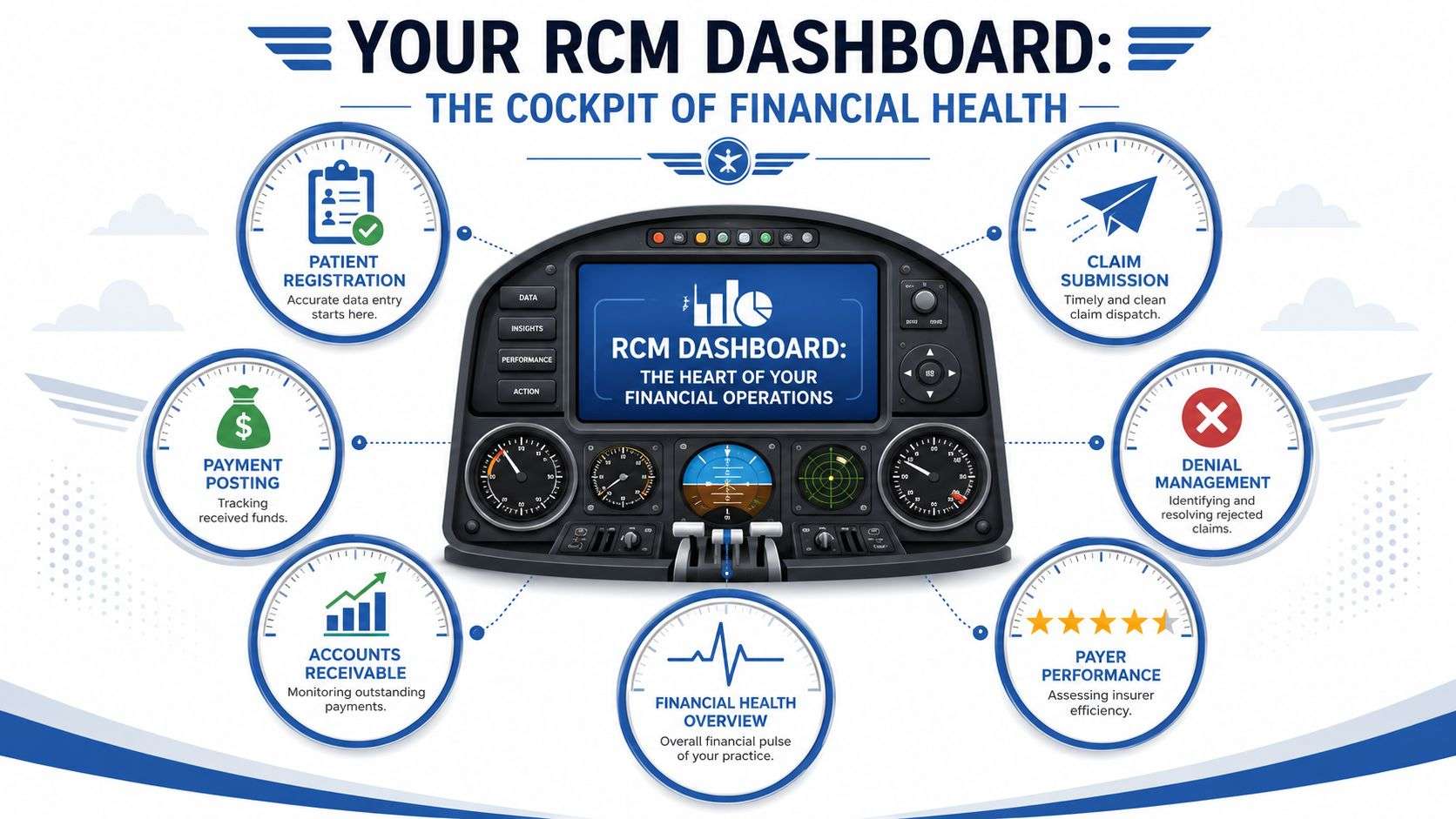
Think of a revenue cycle management dashboard like a cockpit. A pilot doesn't fly by reading a stack of reports after landing. The pilot needs instruments that show what is happening now, which direction things are moving, and which control needs adjustment before a small issue becomes a dangerous one.
A practice needs the same thing financially.
It Is A Control Tool, Not Just A Report
A true dashboard pulls from billing, coding, collections, cash posting, and related RCM workflows into one view. It doesn't just display output. It organizes financial signals so leadership can monitor performance, assign follow-up, and spot exceptions early.
That distinction matters. A static monthly report tells you what happened. A dashboard helps you decide what to do next.
In practical terms, a useful dashboard should let you answer questions like:
- Claims Quality: Are claims going out clean, or is rework increasing?
- Payer Friction: Are denials concentrated with one payer, one site, or one workflow?
- Cash Conversion: Is outstanding A/R growing because follow-up is weak or because posting is delayed?
- Patient Collections: Are balances moving through the patient responsibility process or stalling?
Why Dashboards Became Essential
Denials are one of the clearest reasons practices moved away from fragmented reporting. Independent healthcare sources estimate that claim denials can cost organizations about 5% of net revenue, which is why modern dashboards emphasize denial trends and clean-claim performance as early warning indicators (Whitespace Health on denial-related revenue loss).
That isn't just a finance concern. It changes how teams work every day. If denials rise and nobody sees the trend quickly, days in A/R usually follow. If cash posting lags, leaders may misread the issue and focus on collections when the underlying problem is upstream.
The best dashboard doesn't answer every question at once. It shows where to look first.
What It Should Show In One Screen
At a minimum, the dashboard should bring together the major parts of the revenue cycle into one operating view:
- Front-End Activity: Registration accuracy, eligibility-related issues, and claim readiness
- Mid-Cycle Performance: Submission flow, lag, and rejection or denial trends
- Back-End Results: A/R aging, cash posting, collection measures, and payer behavior
- Management Views: Executive summaries, team work queues, and site-specific comparisons
If a dashboard can't connect those layers, it's still just reporting with better graphics.
The Must-Track KPIs For Your RCM Dashboard
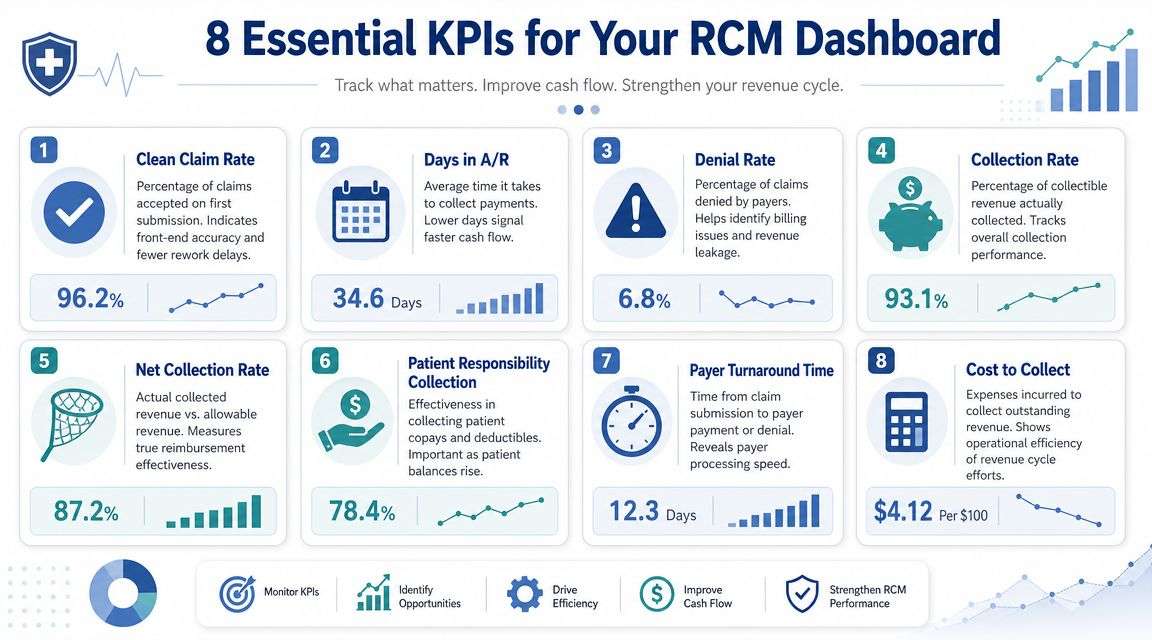
A useful RCM dashboard does more than display numbers. It gives a practice manager a fast read on three questions: are claims leaving clean, is cash arriving on time, and where is work getting stuck? The right KPI set should answer those questions without forcing the team to click through six reports.
Benchmarks help, but they are not the main point. A multispecialty group, a small primary care office, and an ASC will not all perform the same way. What matters is whether the dashboard highlights trend changes early enough for managers to act before revenue slips.
The Core Metrics That Deserve Dashboard Space
These are the KPIs I would put on the first screen for most practices.
Clean Claim Rate: This shows the percentage of claims accepted on first pass without edits or rework. It is one of the fastest ways to spot front-end registration issues, authorization misses, coding handoff problems, or payer rule changes.
Days In Accounts Receivable: This measures how long billed charges take to turn into cash. It is a broad indicator, so it should always be paired with aging and payer drilldowns. For teams that want a practical refresher on the formula and how managers use it, this guide on A/R days calculation in medical billing is a useful operational reference.
Denial Rate: This tracks how much claim volume is being denied after submission. By itself, it signals friction. Broken out by payer, denial category, provider, or location, it points to the exact process that needs attention.
Net Collection Rate: This measures how much of the allowed reimbursement the practice collects after contractual adjustments. If this number softens while volume stays stable, the problem often sits in underpayments, write-off controls, follow-up discipline, or unresolved denials.
The Supporting Metrics That Explain The Story
Headline KPIs show that performance changed. Supporting metrics explain why.
A/R Aging: Aging buckets show whether receivables are staying current or drifting into older balances. A practice can post an acceptable total A/R number and still have a growing 90+ day problem that will be harder to collect.
Claim Lag: This tracks the time between date of service and claim submission. Long lag delays cash at the start of the cycle and often points to charge entry backlogs, coding delays, or provider documentation gaps.
Patient Balance: Patient responsibility deserves its own place on the dashboard. If insurance payments are steady but patient A/R keeps climbing, review point-of-service collections, statement timing, estimate accuracy, and payment plan follow-through.
Payer Mix: This adds context to every other KPI. A denial spike tied to a payer that represents a large share of revenue demands a different response than the same issue tied to a low-volume plan.
Use KPI Combinations, Not Single Metrics
Single metrics create false confidence. KPI combinations show operating reality.
If clean claim rate drops and claim lag rises together, start upstream. Check registration quality, documentation turnaround, and coding queue volume. If days in A/R rises while denial rate stays flat, the root cause is often back-end follow-up, posting delays, or payer response timing rather than claim quality. If patient balances increase after a payer mix shift, the practice may need to tighten upfront estimates and front-desk collection scripts because more of the revenue now depends on patient payment behavior.
That is why the best dashboards are built for interpretation, not just display. Managers should be able to see the trend, identify the likely cause, and assign a next step on the same screen.
For teams that want a second finance lens on receivables performance, Resolut average collection period gives a useful comparison alongside A/R days and aging.
A dashboard should show which KPI moved first, which process it affected next, and what the team needs to fix now.
From Data To Decisions Interpreting Dashboard Trends
A dashboard earns its keep when it changes behavior. If the team checks it, nods, and goes back to work exactly as before, the dashboard is decorative. What matters is the connection between a trend and an action.
Experian's healthcare guidance makes this point well. Effective RCM dashboards reveal both upstream and downstream signals of failure. A rising denial rate may trace back to front-end eligibility errors, while slow payment posting worsens aged A/R and hides where cash flow is slowing (Experian on choosing revenue cycle dashboard KPIs).
If You See This, Do This
The easiest way to train managers on dashboard interpretation is to connect each signal to a response.
Days In A/R Creeps Up: Start with aging buckets and payer drilldown. If older balances are concentrated with one payer, review follow-up timeliness, payer response patterns, and unresolved denials. If the increase is spread everywhere, look internally at posting delays or claim lag.
Clean Claim Rate Starts Falling: Don't tell the billing team to “be more careful.” Audit the front-end inputs first. Check registration data quality, authorization capture, eligibility verification, and coding handoff. A clean-claim problem usually begins before submission.
Denial Rate Spikes For One Payer: Pull the denial reasons immediately. If the reasons cluster around authorization, medical necessity, or eligibility, route the issue to the department that owns that workflow. If all sites are affected, the payer may have changed edit behavior or policy interpretation.
How Mature Teams Investigate Trends
The dashboard should help your staff move from symptom to source.
For example, if aged A/R rises, don't stop at “collections are slow.” Ask:
- Which age bucket is expanding
- Which payer or site is driving it
- Whether the balance is denied, pending, or untouched
- Whether posting delays are distorting the picture
That kind of structured review is where revenue cycle management analytics for medical practices becomes useful. Analytics should support drilldown, not just summary reporting.
When one metric moves, look for the adjacent process owner. Revenue cycle problems rarely belong to finance alone.
Trend Interpretation By Workflow
Some dashboard patterns are especially actionable.
- Rising Denials Plus Stable Claim Lag: Claims are going out on time, but not going out correctly. Focus on eligibility, authorization, coding edits, or payer-specific rules.
- Stable Denials Plus Slower Cash: The issue may be payment posting, payer turnaround, or unresolved underpayments rather than first-pass quality.
- Growing Patient Balances: Review point-of-service collection habits, estimate accuracy, statement cadence, and how quickly unresolved balances are contacted.
- Site-Level Variation: If one location consistently underperforms on the same KPI definitions, compare workflow steps before blaming volume or specialty complexity.
What Not To Do
Three habits make dashboards less valuable than they should be.
- Chasing Every Daily Blip: Not every movement is meaningful. Watch for trends, not isolated noise.
- Reviewing Summary Metrics Without Drilldown: A total denial number doesn't tell the team what to fix.
- Treating Metrics As Billing-Only Problems: Many dashboard failures start at scheduling, registration, or clinical documentation.
A dashboard is a diagnostic tool. Teams get value from it when they use it to assign ownership fast and close the loop on corrective action.
A Practical Guide To Implementing Your RCM Dashboard
Monday starts with a familiar problem. The administrator sees cash is light, the billing manager says denials are rising, and the front desk insists registration is current. Everyone has a report. No one trusts the numbers enough to act. Dashboard projects usually break down at that point, not because the charts are weak, but because the underlying definitions, refresh timing, and ownership were never settled.
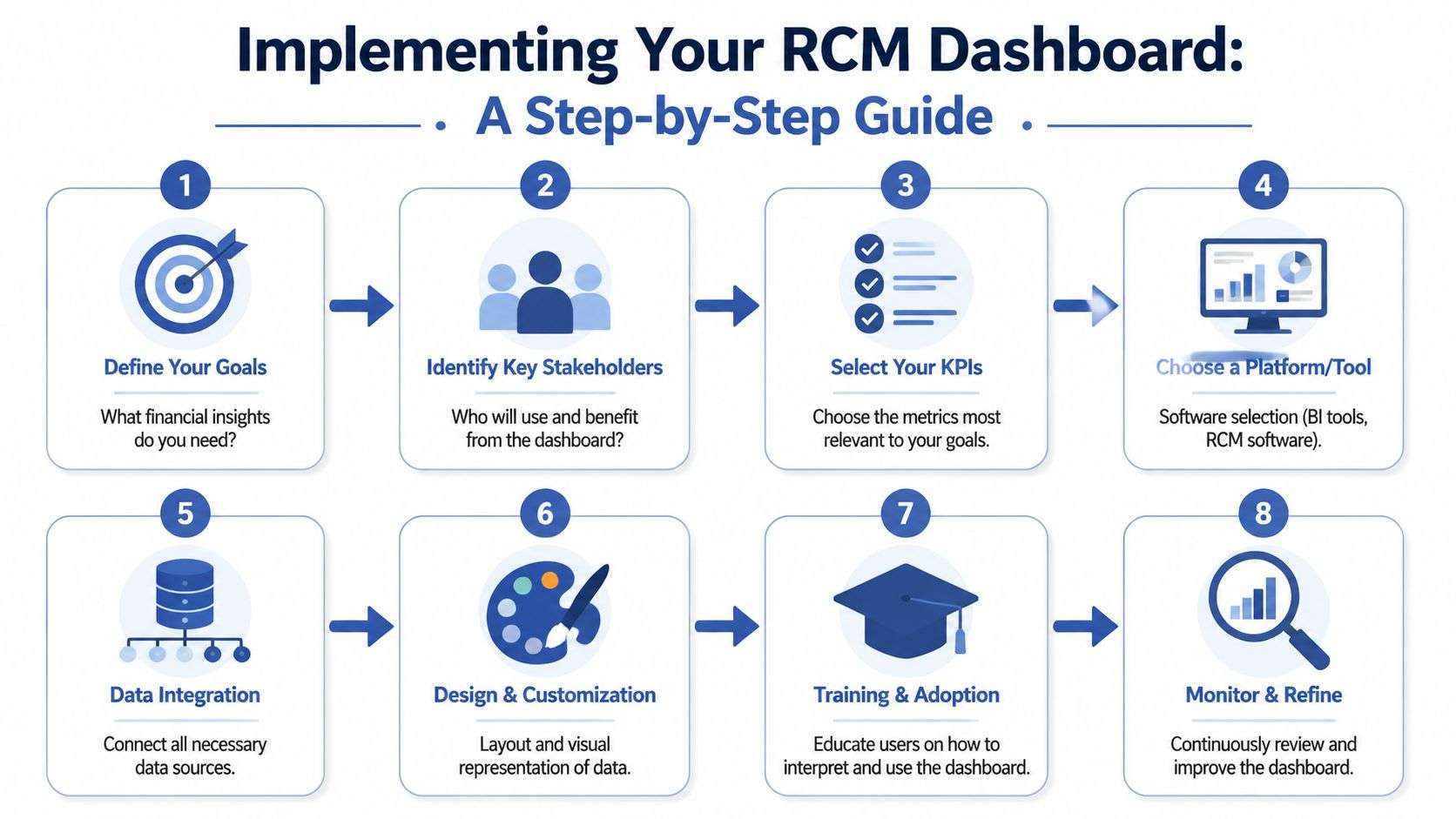
A useful implementation starts with operating questions. Which issues need same-day visibility. Which trends belong in a weekly management review. Which financial signals should trigger a monthly correction plan. If the dashboard cannot answer those questions clearly, it becomes another reporting layer instead of a management tool.
Start With Data Flow, Not Screen Design
The first working session should map systems, fields, and timing. In most practices, dashboard data comes from the EHR, practice management system, billing platform, clearinghouse activity, and payment posting. If claim status updates every few hours but payment data refreshes once a day, staff will compare mismatched numbers and lose confidence fast.
Cadence Collaborative emphasizes role-based dashboard reporting tied directly to billing, coding, and collections workflows so teams can support both day-to-day prioritization and higher-level planning (Cadence Collaborative on role-based RCM dashboard reporting).
Set these rules before anyone debates chart layout:
- Define the source of truth for each metric: claim status, payments, adjustments, denials, and write-offs should each have one system owner
- Standardize filters: payer, provider, site, service date, and posting date need consistent logic across every view
- Document refresh timing: users should know whether a number is current to the hour, the day, or the close of business
- Resolve naming conflicts early: "denial rate" and "net collections" often mean different things to finance, operations, and outsourced billing teams
That groundwork prevents a common implementation failure. Teams spend weeks building screens, then discover the definitions do not reconcile with month-end reports.
Build Around Decisions And Owners
Role-based views matter, but the stronger design principle is accountability. Every metric on the screen should lead to a named owner and a likely action.
An executive team usually needs trend direction, exception reporting, and site comparison. A billing supervisor needs queue visibility and payer-level drilldown. A practice manager needs enough detail to tell whether the problem starts in scheduling, registration, coding, or follow-up. The same raw data can serve all three, but only if each screen is tied to a decision the user can make.
A practical rollout usually follows this order:
- List the operational decisions first: for example, whether to reassign staff, escalate a payer issue, retrain registration, or audit coding
- Choose a limited KPI set for phase one: a smaller set gets adopted faster and exposes definition problems early
- Assign ownership by workflow: registration leaders should own front-end errors, billing leaders should own claim and denial follow-up, and finance should own reconciliation and cash reporting
- Design drilldown before design polish: users need to move from total A/R to payer, site, provider, and denial category without rebuilding reports
- Pilot with one team or one location: this makes it easier to catch mapping errors and workflow gaps before broad rollout
I usually advise practices to resist the urge to launch every feature at once. A dashboard that supports five repeated management decisions is more useful than a large dashboard no one uses consistently.
Set Review Cadence And Control The Workflow
Implementation is not finished when the dashboard goes live. It is finished when meetings, follow-up, and access rules are working.
Operational teams should review short-cycle metrics often enough to catch backlog before it affects cash. Leadership should review financial trends on a slower cadence, with enough context to judge whether the issue is temporary noise or a true process failure. As noted earlier, many organizations use weekly operational reviews, monthly financial reviews, and quarterly benchmark or strategic reviews. The exact schedule matters less than consistency and clear escalation rules.
Access controls matter for the same reason. Summary performance can be shared broadly. Account-level detail should follow role permissions and privacy requirements. Teams also need written KPI definitions, because adoption drops quickly when two departments bring different formulas to the same meeting.
Training should focus on response, not software clicks. Staff need to know what to do when denial rate rises, when charge lag stretches, or when one payer's aging starts to drift. That is what turns a dashboard into a management tool.
Some practices build this internally. Others pair BI reporting with revenue cycle management automation services to standardize repetitive work in claims, posting, and follow-up while the dashboard stays focused on oversight, exceptions, and accountability.
Sample RCM Dashboard Templates For Your Practice
Most practices don't need one dashboard. They need a dashboard family built from the same data. The trick is keeping the KPI definitions consistent while changing the layout based on who uses it.
Executive Financial Overview
This view should be restrained. Senior leaders don't need a cluttered screen full of queue details. They need trend lines and exceptions.
A strong executive layout usually includes line charts for collection performance and days in A/R, a high-level aging summary, and a payer comparison view that highlights where reimbursement friction is building. If the organization has multiple sites, this view should also rank locations by the same core KPIs so underperformance is visible quickly.
Keep the executive screen focused on direction, not detail. If everything is highlighted, nothing is.
Billing Operations Daily View
This is the dashboard billing managers and team leads use to run the day. It should prioritize action over presentation.
The most useful format usually includes:
- Bar Charts For A/R Aging: These make backlog concentration easy to spot.
- Work Queues For New Denials: Reason-based sorting helps assign follow-up.
- Claim Lag Monitoring: A simple trend or queue view helps catch slowdown before cash is affected.
- Payer Filters: Managers should be able to isolate one payer without rebuilding the report.
Site-Level Performance Template
A site manager needs context and comparison. Pie charts or stacked visuals can work for payer mix because they show exposure quickly. Registration-related trends, patient balance movement, and denial patterns by location often work better as side-by-side comparisons rather than long trend tables.
This view is especially useful for multi-site groups because it helps distinguish a local workflow issue from a systemwide process problem. When one site's numbers drift while the others remain stable, the dashboard should make that visible in seconds.
Checklist For Choosing The Right RCM Partner
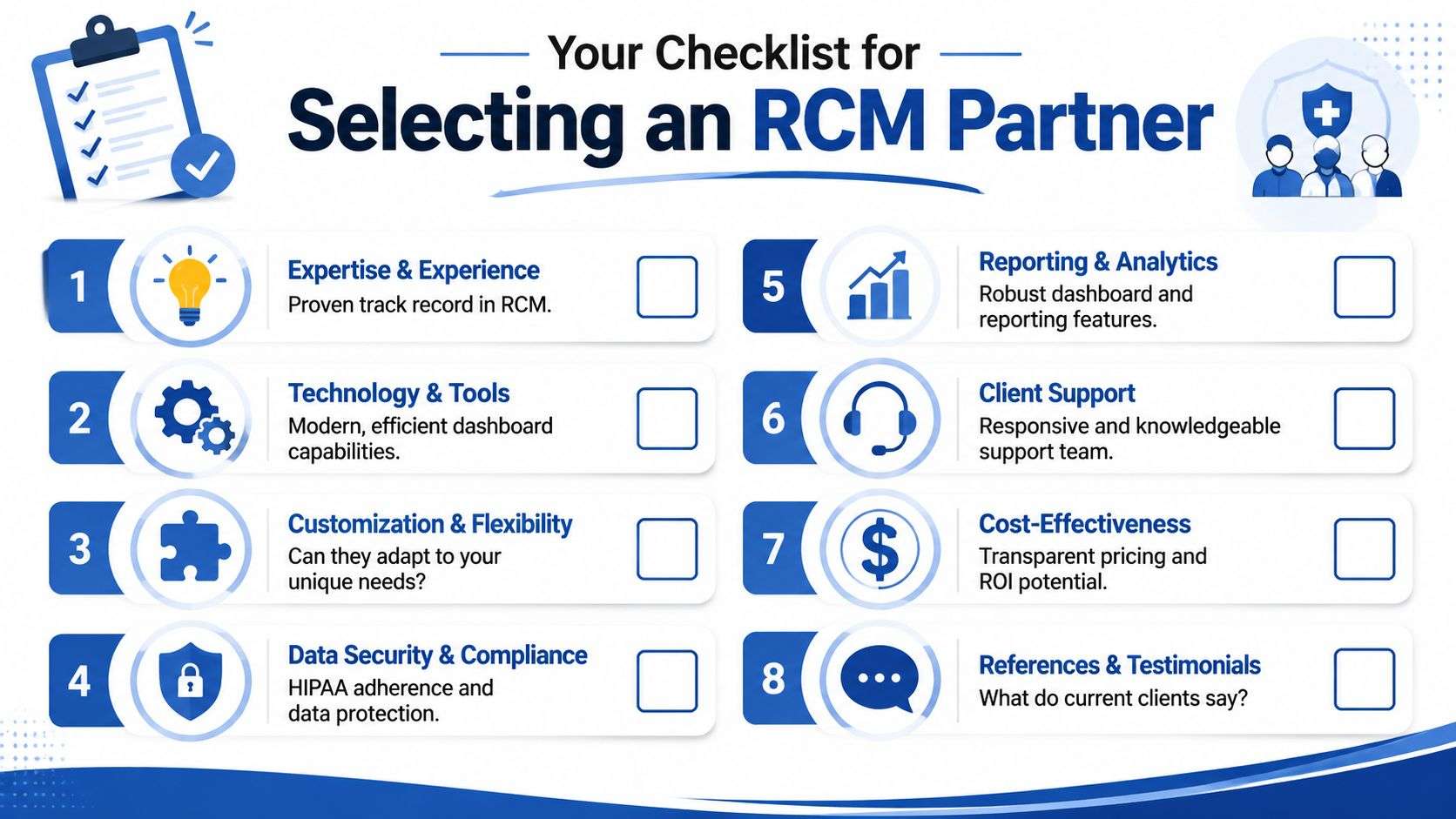
If you're selecting an RCM partner to provide or support dashboard reporting, ask questions that reveal how they operate under pressure, not just how polished the demo looks. A good vendor should be able to explain metric definitions, drilldown capability, data refresh timing, and who acts on the insight once the dashboard surfaces a problem.
Questions Worth Asking Before You Sign
- Can They Support Your Specialty And Site Structure: Multi-site urgent care and a single-specialty clinic won't need the same dashboard logic.
- Do They Define KPIs Clearly: If they can't explain how they calculate core metrics, reporting quality will become a problem later.
- Can Users Drill Down By Payer, Site, Provider, And Age Bucket: Summary numbers without root-cause visibility won't help your team manage performance.
- How Do They Handle Security And Role-Based Access: Dashboard access should align with workflow and HIPAA requirements.
- What Happens After A Problem Appears On The Dashboard: Insight without accountability doesn't improve collections.
- How Often Does Data Refresh: If the dashboard updates too slowly, managers will stop trusting it.
- Can They Work With Your Existing Systems: Integration discipline matters more than flashy visuals.
- Will They Show Transparent Reporting Examples: You want to see real operational reporting, not just sample screenshots.
One practical comparison point is whether the partner combines dashboarding with actual billing execution. For example, directories of revenue cycle management companies for medical practices can help you evaluate whether a vendor mainly reports on problems or also helps resolve them.
A serious RCM dashboard isn't a cosmetic add-on. It's an operating system for revenue decisions. The right partner should treat it that way.
If your practice needs clearer visibility into denials, A/R, claim quality, and site-level performance, One For All Medical Billing is one option to evaluate. The company provides medical billing and revenue cycle support, including reporting and analytics, for practices that want a more structured view of financial performance without relying on disconnected spreadsheets.

